
1. Introduction
This manual provides detailed instructions for the installation, operation, and maintenance of your PolarLander DME-4019 1-DIN 4.1-inch Touch Screen Car MP5 Player. Please read this manual thoroughly before using the product to ensure proper functionality and safety.

Image 1.1: Front view of the PolarLander DME-4019 Car MP5 Player with included rearview camera.
2. Setup and Installation
2.1 Wiring Diagram
Proper wiring is essential for the safe and correct operation of your car MP5 player. Refer to the diagram below for connection details. If you are unsure about any connections, consult a professional installer.

Image 2.1: Detailed wiring diagram for the PolarLander DME-4019. This diagram illustrates connections for power, speakers, video input/output, and optional accessories like a DVR and parking sensors.
- ISO Connector: Standard connection for power and speakers.
- Reversing Video Signal Input: Connects to the rearview camera.
- Audio Output: RCA jacks for external amplifier connection.
- Video Signal Output: RCA jack for external display.
- Antenna Input Interface: Connects to your car's radio antenna.
- Ground Wire: Connect to the vehicle's chassis ground.
- +12V Accessory/Switch: Connect to a switched 12V power source (ACC).
- Power Antenna/Amplifier Turn On: Provides a 12V output to turn on a power antenna or external amplifier.
- +12V Constant Power Supply: Connect to a constant 12V power source.
- Parking Sensor Control Wires: For integration with parking sensors (if applicable).
2.2 Initial Power On
After completing all wiring connections, turn on your vehicle's ignition. The unit should power on automatically. Follow any on-screen prompts for initial setup.
2.3 USB, TF Card, and AUX Connections
The unit supports media playback from USB drives, TF cards, and external audio devices via the AUX input.

Image 2.2: Illustration of connecting a USB drive, TF card, and an external device via AUX IN to the car MP5 player.
- USB Port: Insert a USB drive (U-Disc) into the designated USB port for media playback.
- TF Card Slot: Insert a TF (MicroSD) card into the slot for media playback.
- AUX IN: Connect external audio devices (e.g., smartphones, MP3 players) using a 3.5mm audio cable to the AUX IN port.
3. Operating Instructions
3.1 General Controls and Touch Screen
The DME-4019 features a 4.1-inch LCD HD touch screen for intuitive control. Navigate through menus and functions by touching the corresponding icons on the screen. Physical buttons and a rotary knob are also available for common functions.
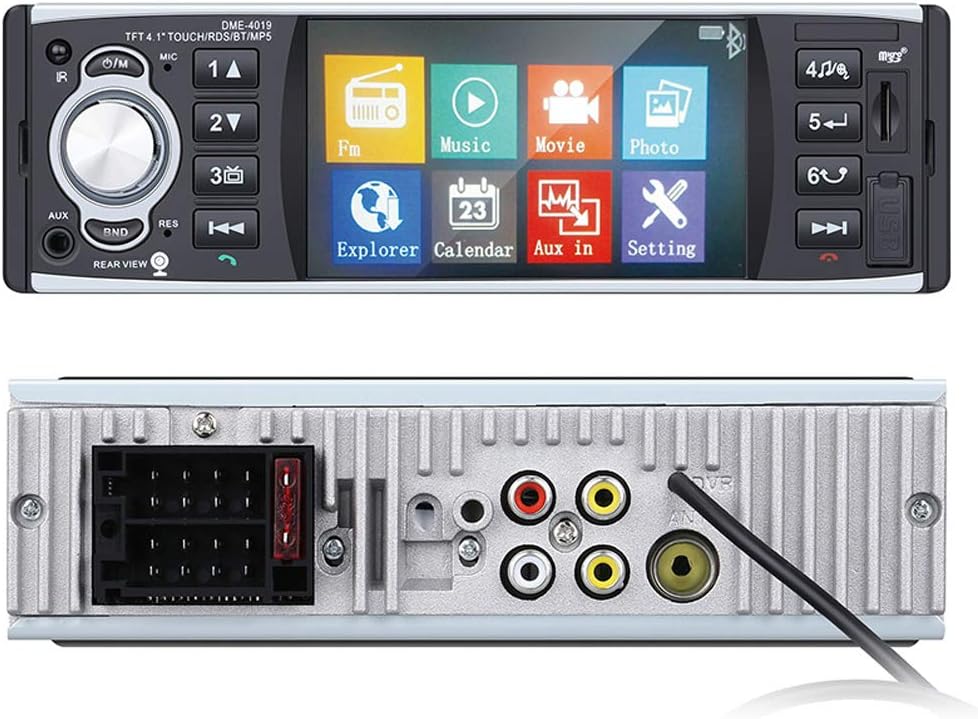
Image 3.1: Front panel showing the touch screen interface and physical controls, along with the rear panel illustrating various input/output ports.
3.2 Radio (FM/AM/RDS)
The unit includes an FM/AM tuner with RDS (Radio Data System) functionality. You can search for stations manually or automatically and save up to 18 preset stations.

Image 3.2: Display showing the radio interface with RDS information, including frequency and station details.
To access RDS functions (ST, PTY, TA, AF), press the corresponding button on the screen or remote control. Use the arrow buttons to navigate and select options.

Image 3.3: Control buttons for RDS functions (ST, PTY, TA, AF) and the 'ENT' (Enter) button for selection.
3.3 Bluetooth Connectivity
The built-in Bluetooth module allows for hands-free calling and wireless audio streaming from compatible devices.

Image 3.4: The car MP5 player displaying Bluetooth connectivity with a smartphone, indicating music playback.
- Pairing: Enable Bluetooth on your smartphone and search for available devices. Select 'DME-4019' (or similar name) to pair.
- Hands-Free Calling: Once paired, you can answer, make, and end calls directly from the unit's touch screen or via the remote control.

Image 3.5: The car MP5 player's screen showing an incoming call interface, demonstrating hands-free calling functionality.
3.4 Media Playback (USB/TF Card)
The unit supports various audio and video formats from USB drives and TF cards. Access the 'Music' or 'Movie' icons on the main menu to browse and play your media files.
- Supported Video Formats: RMVB / RM / FLV / 3GP / MPEG / DVIX / XVID / DTA / VOB / AVI
- Supported Audio Formats: MP3 / WMA / WMV / OGG / APE / ACC / FLAC
- Supported Image Formats: JPEG / BMP / GIF / TIF
3.5 Mirror Link (Android Only)
The Mirror Link function allows you to display the content of your Android phone screen directly on the unit's display. This enables control of your phone's applications, such as navigation or video playback, through the car stereo's touch screen.

Image 3.6: Diagram illustrating the Mirror Link connection process for Android phones, showing the phone screen mirrored on the car MP5 player's display.
Steps for Mirror Link:
- Connect your Android phone to the unit via a USB cable.
- On your phone, enable USB debugging in Developer Options.
- Follow the on-screen prompts on both the phone and the unit to establish the connection.
- Once connected, your phone's screen will be mirrored, and you can operate it from the unit's touch screen.
3.6 Rearview Camera Function
The unit supports a rearview camera input, which automatically displays the camera feed when the vehicle is in reverse gear, enhancing parking safety.
- Ensure the rearview camera is correctly wired to the 'Reversing Video Signal Input' as shown in the wiring diagram (Image 2.1).
- When the vehicle is shifted into reverse, the display will automatically switch to the rearview camera feed.
4. Maintenance
To ensure the longevity and optimal performance of your PolarLander DME-4019 MP5 player, follow these maintenance guidelines:
- Cleaning: Use a soft, dry cloth to clean the screen and exterior. Avoid abrasive cleaners or solvents.
- Temperature: Do not expose the unit to extreme temperatures or direct sunlight for extended periods.
- Moisture: Keep the unit dry. Moisture can damage internal components.
- Firmware Updates: Check the manufacturer's website periodically for any available firmware updates to improve performance and add features.
5. Troubleshooting
If you encounter issues with your MP5 player, refer to the following common problems and solutions:
| Problem | Possible Cause | Solution |
|---|---|---|
| No power | Incorrect wiring, blown fuse, vehicle ignition off | Check power connections (constant 12V, accessory 12V, ground). Inspect vehicle fuses. Ensure ignition is on. |
| No sound | Speaker wires disconnected, volume too low, mute activated | Check speaker wiring. Increase volume. Deactivate mute function. |
| Bluetooth not connecting | Bluetooth off on phone/unit, device not in pairing mode, interference | Ensure Bluetooth is enabled on both devices. Put unit in pairing mode. Try pairing again. Move closer to the unit. |
| USB/TF card not recognized | Unsupported format, corrupted media, improper insertion | Ensure media is in a supported format. Reinsert the USB/TF card. Try a different USB/TF card. |
| Rearview camera not displaying | Camera not connected, reverse signal wire not connected, faulty camera | Check camera video input connection. Verify reverse signal wire is correctly connected. Test camera functionality. |
6. Specifications
Below are the technical specifications for the PolarLander DME-4019 Car MP5 Player:
- Model: DME-4019
- Screen Size: 4.1 inches LCD HD Touch Screen
- DIN Size: 1-DIN
- Connectivity Technology: Bluetooth
- Controller Type: Android (for Mirror Link)
- Special Features: RDS, Touchscreen
- Compatible Devices: Smartphone, Speaker
- Connector Type: 3.5mm Jack, USB
- Audio Output Mode: Stereo
- Output Power: 45 Watts x 4 channels
- Output Wattage (Total): 180 Watts
- Voltage: 12V (Not for 24V Truck)
- Supported Media: USB drive (up to 32GB), TF card (up to 32GB)
- Radio: FM/AM with 18 preset stations
- Bluetooth Version: V2.0 (for hands-free calls)
7. Warranty and Support
For warranty information and customer support, please refer to the documentation provided at the time of purchase or contact your retailer. Keep your purchase receipt as proof of purchase.
For technical assistance or inquiries, please visit the PolarLander official support channels or contact the seller directly.


