Introduction
This user manual provides detailed instructions for the safe and efficient operation, setup, and maintenance of your De'Longhi Autentica ETAM29510B Automatic Espresso and Coffee Machine. Please read this manual thoroughly before using the appliance and keep it for future reference.

Image: The De'Longhi Autentica ETAM29510B automatic coffee machine, black, with two cups of espresso.
Safety Instructions
- Always ensure the appliance is unplugged before cleaning or maintenance.
- Do not immerse the appliance, power cord, or plug in water or other liquids.
- Keep the appliance out of reach of children.
- Avoid contact with hot surfaces and steam. Use handles and knobs.
- Do not operate the appliance if it has a damaged cord or plug, or if it malfunctions.
- Use only original De'Longhi accessories and spare parts.
Product Overview
The De'Longhi Autentica ETAM29510B is a compact automatic espresso and coffee machine designed for home use. It features an integrated conical burr grinder, a manual milk frother, and a user-friendly soft-touch control panel with backlit icons.
Key Features:
- Slim Design: With a width of 19.5 cm, it is one of De'Longhi's slimmest automatic machines.
- One-Touch Operation: Prepare authentic espresso and coffee with simple button presses.
- Customizable Beverages: Adjust coffee strength (bean quantity), volume, and temperature.
- "Cafe Japone" Function: A unique feature that brews a deep-steamed regular coffee, combining the richness of espresso with the clarity of drip coffee.
- "Doppio+" Function: Delivers an extra-strong, aromatic coffee with a long-lasting flavor.
- Manual Milk Frother: Create creamy foam for cappuccinos and lattes.
- Integrated Conical Burr Grinder: Grinds fresh beans for each cup.
- Removable Brew Unit: Easy to clean for optimal hygiene and performance.

Image: De'Longhi Autentica ETAM29510B coffee machine in a kitchen setting.

Image: Close-up of the soft-touch control panel with backlit icons.

Image: Detail of the control panel highlighting the Doppio+ function icon.
Setup
- Unpacking: Carefully remove the machine from its packaging. Remove all protective films and packaging materials.
- Initial Cleaning: Wash the water tank, drip tray, and coffee grounds container with warm water and mild detergent. Rinse thoroughly.
- Water Hardness Test: Use the included water hardness checker to determine your water's hardness. This information is used to set the machine's descaling frequency. Refer to the quick start guide for specific instructions on setting water hardness.
- Fill Water Tank: Fill the removable water tank with fresh, cold tap water up to the MAX level. Insert the tank back into the machine.
- Fill Bean Hopper: Open the coffee bean lid and pour fresh coffee beans into the hopper. Do not fill above the MAX level. Close the lid.
- Power On: Plug the appliance into a suitable power outlet. Press the power button to turn on the machine. The machine will perform an automatic rinse cycle.
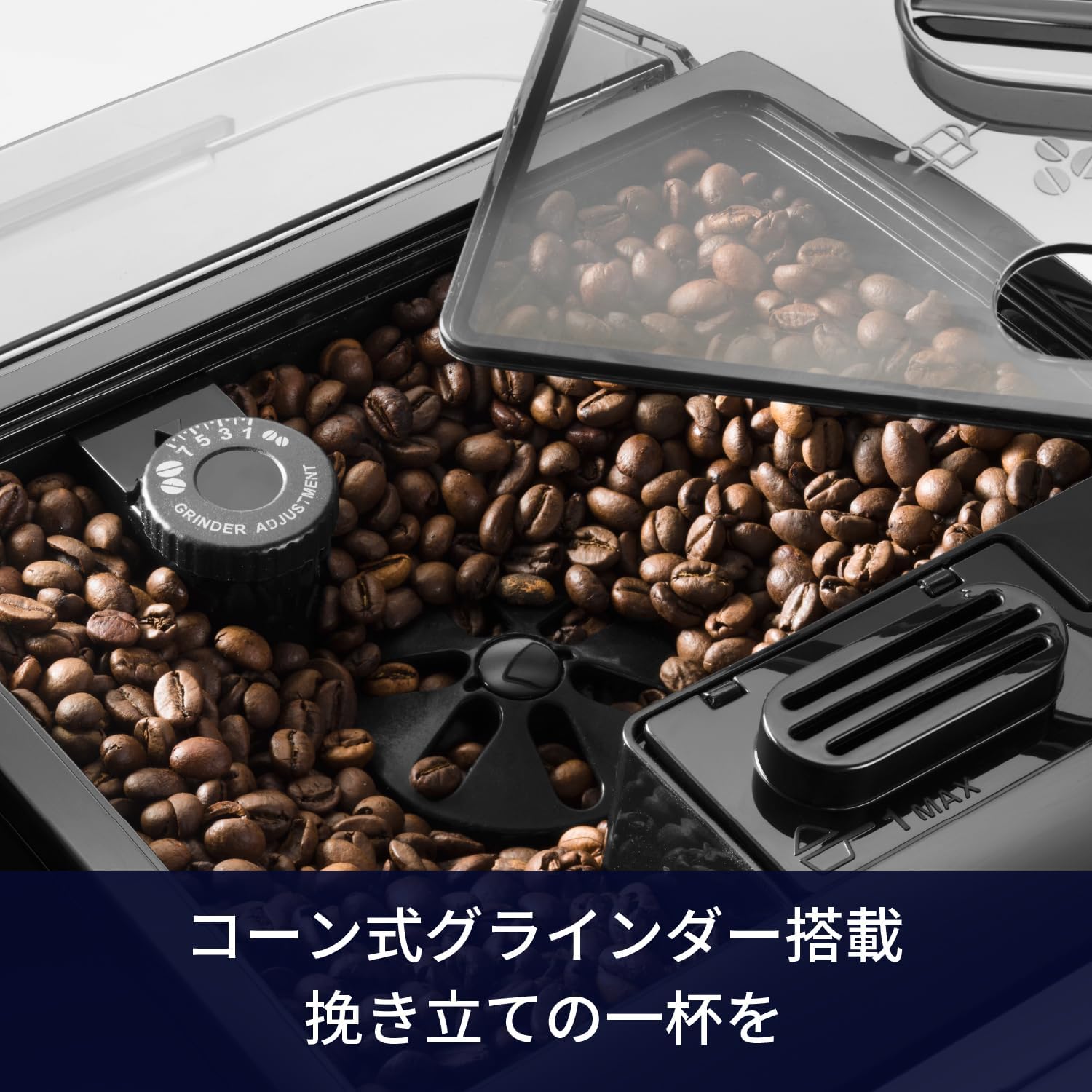
Image: Top view of the coffee bean hopper with the integrated conical burr grinder and adjustment dial.
Operating Instructions
Making Espresso or Coffee:
- Ensure the water tank is filled and the bean hopper contains coffee beans.
- Place one or two cups under the coffee spouts. The height of the spouts is adjustable.
- Select your desired beverage (e.g., Espresso, Coffee, Cafe Japone, Doppio+) by pressing the corresponding button on the control panel.
- The machine will automatically grind the beans, brew, and dispense your coffee.
- To adjust coffee strength, press the aroma button before selecting your drink. To adjust volume, press and hold the beverage button until the desired amount is dispensed, then release.

Image: Espresso being dispensed into two clear glass cups from the machine's adjustable spouts.

Image: A glass of Cafe Japone coffee, illustrating the deep-steamed regular coffee feature.
Using the Manual Milk Frother:
- Fill a milk jug with cold milk.
- Turn the steam knob to the steam position. Wait for the steam indicator light to become steady.
- Immerse the frother nozzle into the milk. Turn the steam knob to release steam and froth the milk.
- Once desired foam is achieved, turn the steam knob off and remove the milk jug.
- Clean the frother nozzle immediately after use by wiping it with a damp cloth and briefly releasing steam into an empty cup.

Image: A hand holding a milk jug under the manual milk frother, creating foam.
Maintenance
Regular maintenance ensures the longevity and optimal performance of your coffee machine.
Daily Cleaning:
- Drip Tray and Coffee Grounds Container: Empty and rinse daily. These components are washable.
- Brew Unit: The brew unit is removable for easy cleaning. Remove it, rinse under running water, and allow it to air dry before reinserting. Refer to the quick start guide for detailed removal and reinsertion steps.
- Water Tank: Rinse the water tank daily and refill with fresh water.

Image: A hand removing the brew unit from the side of the coffee machine for cleaning.
Descaling:
The machine will indicate when descaling is required. Use the included descaling agent and follow the instructions provided in the full manual or on the descaling agent packaging. Regular descaling is crucial to prevent limescale buildup and maintain coffee quality.
Automatic Cleaning Function:
The machine features an automatic cleaning function for internal circuits. Follow the prompts on the display or refer to the full manual for details on activating this cycle.
Troubleshooting
| Problem | Possible Cause | Solution |
|---|---|---|
| No coffee dispensed. | Water tank empty, coffee beans empty, brew unit clogged. | Refill water tank. Refill bean hopper. Clean brew unit. |
| Coffee is too weak. | Insufficient coffee quantity, coarse grind setting. | Increase coffee strength setting. Adjust grinder to a finer setting. |
| Machine leaks water. | Water tank not properly inserted, drip tray full. | Ensure water tank is correctly seated. Empty and reinsert drip tray. |
| Milk frother not producing foam. | Frother nozzle clogged, milk not cold enough. | Clean frother nozzle. Use cold milk. |
For other issues or persistent problems, please consult the comprehensive manual or contact De'Longhi customer support.
Specifications
| Brand | De'Longhi |
| Model Number | ETAM29510B |
| Product Dimensions (W x D x H) | 19.5 cm x 48 cm x 33.5 cm |
| Weight | 9.2 kg (body weight) / 11.34 kg (package weight) |
| Power Consumption | 1450W |
| Water Tank Capacity | 1.35 L |
| Coffee Maker Type | Espresso Machine |
| Operation Mode | Automatic |
| Included Components | Measuring spoon, cleaning brush, water hardness checker, descaling agent, simple manual. |

Image: Diagram showing the dimensions (Width: 195mm, Depth: 480mm, Height: 335mm) of the De'Longhi Autentica ETAM29510B.
Warranty and Support
Your De'Longhi Autentica ETAM29510B comes with a 1-year manufacturer's warranty. You can extend this warranty to 3 years by registering your product with De'Longhi Family.
For warranty registration, product support, or service inquiries, please visit the official De'Longhi website or contact their customer service department.

Image: Promotional image indicating a 3-year warranty extension upon De'Longhi Family registration.
Official De'Longhi Family registration link: delonghi.com/ja-jp/crm


