
1. Introduction
The Hohem iSteady Mobile+ is a sophisticated 3-axis gimbal stabilizer engineered to provide exceptionally smooth and stable video footage with your smartphone. Designed for both iPhone and Android devices, this gimbal enhances your mobile videography capabilities, allowing you to capture professional-grade content with ease. Its intuitive controls and versatile features make it an essential tool for creators of all levels.

Figure 1: Hohem iSteady Mobile+ Gimbal Stabilizer with included accessories and carrying case.
2. What's in the Box
Upon unboxing your Hohem iSteady Mobile+ Gimbal Stabilizer, you should find the following components:
- Hohem iSteady Mobile+ Gimbal Stabilizer
- Mini Tripod
- USB-C Charging Cable
- User Manual
- Quick Start Guide Card
- Semi-hard Carrying Case

Figure 2: All items included in the Hohem iSteady Mobile+ package.
3. Product Specifications
| Specification | Value |
|---|---|
| Model Number | iSteady Mobile Plus |
| Product Dimensions | 4.45 x 12.09 x 4.25 inches |
| Item Weight | 1.09 pounds (495 Grams) |
| Maximum Phone Payload | 280 Grams |
| Phone Thickness Support | Up to 11mm |
| Phone Width Range | 55mm ~ 90mm |
| Battery Type | Lithium Ion (included) |
| Battery Life | Up to 13 hours |
| Charging Port | USB-C |
| Compatible Devices | iPhone (11/12/13/14 series & mini/Plus/Pro/Max), Android Smartphones |
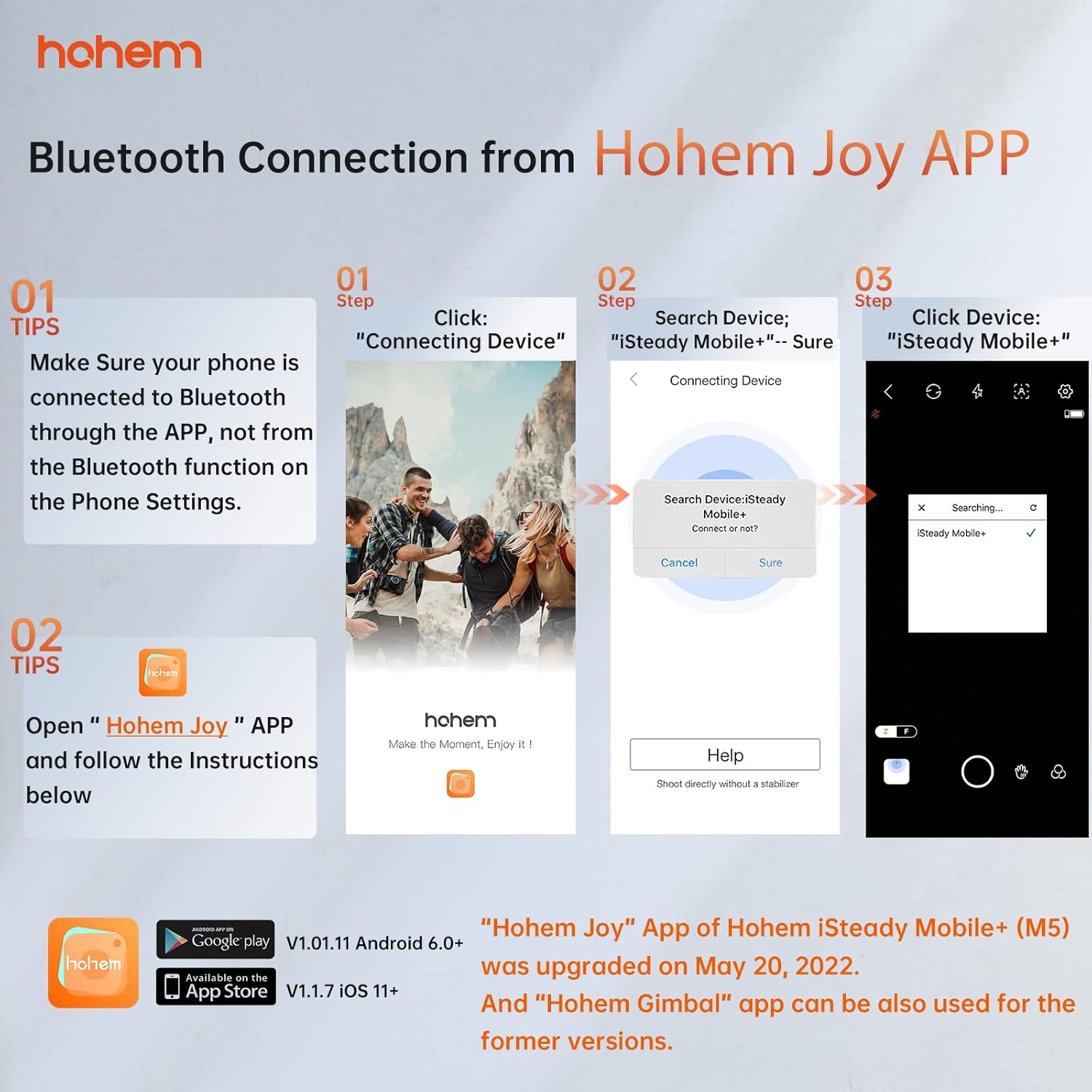
Figure 3: Key physical specifications for smartphone compatibility.
4. Setup
4.1 Mounting and Balancing Your Smartphone
- Ensure the gimbal is powered off before mounting your phone.
- Extend the phone clamp and carefully insert your smartphone.
- Adjust the phone's position within the clamp to achieve proper balance. The phone should remain level when the gimbal is powered off.
4.2 App Download and Bluetooth Connection
To unlock the full potential of your iSteady Mobile+ gimbal, download the Hohem Joy App.
- Scan the QR code in the Quick Start Guide or search for


