
Introduction
This manual provides detailed instructions for the setup, operation, and maintenance of your TFA Dostmann 60.2545.54 Digital Radio-Controlled Alarm Clock. Please read this manual thoroughly before using the device to ensure proper function and longevity.
The TFA Dostmann 60.2545.54 is a compact digital alarm clock featuring radio-controlled time synchronization, indoor temperature display, date display, and an alarm with snooze function. Its design allows it to fit seamlessly into various environments.
Package Contents
- 1x TFA Dostmann 60.2545.54 Digital Radio-Controlled Alarm Clock
- 1x Instruction Manual (this document)
Note: Batteries are required for operation and may not be included. Please refer to the 'Specifications' section for battery type.
Setup
1. Battery Installation
Locate the battery compartment on the back of the alarm clock. Insert the required batteries, ensuring correct polarity (+/-). Close the battery compartment cover securely.
2. Initial Radio Control Synchronization
Upon battery installation, the clock will automatically attempt to synchronize with the DCF77 radio signal. This process ensures maximum time accuracy and automatic adjustment for daylight saving time.
- Place the alarm clock in a location with good radio signal reception, away from electronic interference.
- The initial synchronization may take several minutes. During this time, a signal icon may flash on the display.
- If synchronization is not successful, try placing the product in a different location or initiate manual reception (see Troubleshooting).
3. Time Zone Setting
If you are in a region outside the standard DCF77 signal reception area or require a different time offset, you can adjust the time zone. The clock supports a time zone adjustment of +/- 12 hours. Refer to the operating instructions for specific button presses to adjust the time zone.
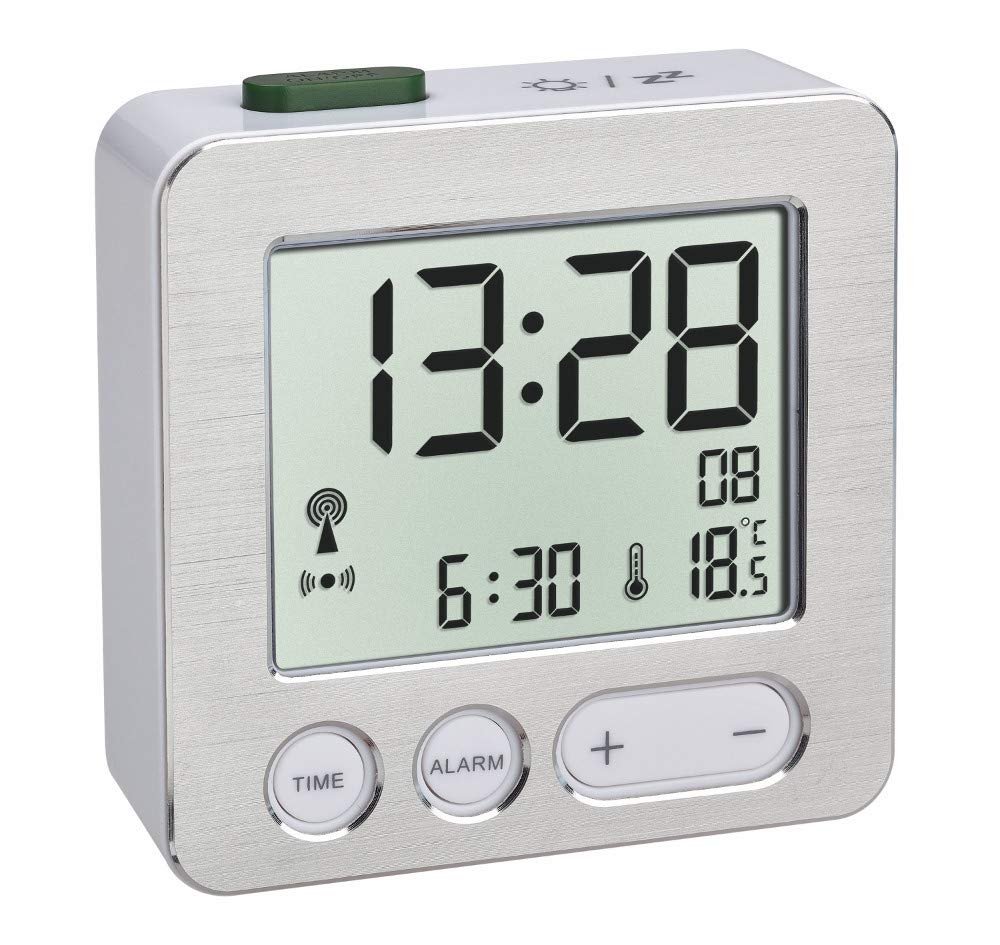
Image: The TFA Dostmann 60.2545.54 Digital Radio-Controlled Alarm Clock displayed on a dark wooden bedside table next to a bed with a patterned duvet. The clock shows the time 13:28, an alarm set for 6:30, and an indoor temperature of 18 degrees Celsius. This image illustrates the typical placement and display of the alarm clock.
Operating Instructions
1. Setting the Alarm
- Press the 'ALARM' button (or equivalent, refer to device buttons).
- Use the '+' and '-' buttons to set the desired alarm time.
- Press 'ALARM' again to confirm and activate the alarm. An alarm icon will appear on the display.
2. Using the Snooze Function
When the alarm sounds, press the 'SNOOZE' button (often a large button on top or a dedicated button). The alarm will pause for a short period (typically 5-10 minutes) and then sound again. This can usually be repeated multiple times.
3. Activating the Backlight
The backlight can be activated by pressing a designated button, often the 'SNOOZE' button or a specific 'LIGHT' button. The backlight will illuminate the display for a few seconds, improving readability in low-light conditions.
4. Display Information
The display typically shows the current time, indoor temperature, and date. The format for time and date may be adjustable (e.g., 12/24 hour format, DD/MM or MM/DD date format). Consult the device's buttons for cycling through display modes or settings.
Maintenance
1. Battery Replacement
When the display dims or the clock functions become erratic, it is time to replace the batteries. Open the battery compartment, remove the old batteries, and insert new ones of the correct type and polarity. Dispose of old batteries responsibly.
2. Cleaning
Clean the alarm clock with a soft, dry cloth. Do not use abrasive cleaners, solvents, or immerse the device in water. Avoid spraying cleaning liquids directly onto the clock.
Troubleshooting
- No Radio Signal Reception: If the clock fails to synchronize or loses the radio signal, hold down the 'WAVE' button (or equivalent) for three seconds to manually initiate reception. Try placing the product in a different location, away from potential interference sources like other electronic devices or metal objects. Reception is often better during the night. Ensure batteries are fresh.
- Incorrect Time Display: Verify the time zone setting. If the radio signal is weak or absent, the time may need to be set manually until a stable signal is acquired.
- Display is Dim or Blank: Replace the batteries. Ensure batteries are inserted with correct polarity.
- Alarm Not Sounding: Check if the alarm is activated (alarm icon visible). Ensure the alarm volume is not set to minimum (if adjustable).
Specifications
| Feature | Detail |
|---|---|
| Model | 60.2545.54 |
| Brand | TFA Dostmann |
| Display Type | Digital |
| Special Feature | Radio-Controlled Time, Alarm, Snooze, Backlight, Indoor Temperature Display |
| Item Weight | 68 Grams |
| Batteries Required | Yes (Specific type not provided, refer to device for markings) |
| Number of Pieces | 1 |
| Manufacturer | TFA Dostmann |
Warranty and Support
For warranty information, please refer to the documentation provided with your purchase or contact your retailer. For technical support or further assistance, please contact the manufacturer, TFA Dostmann, or your point of purchase.


