
1. Introduction
The Scosche LPGM35 Link+ Factory Stereo Replacement Interface Adapter is designed to facilitate the installation of an aftermarket stereo in compatible 2004-2021 GM vehicles. This interface ensures the retention of important factory features such as steering wheel controls and OEM amplifier functionality, providing a seamless integration with your new audio system.
2. Safety Information
Always disconnect the vehicle's negative battery terminal before beginning any electrical installation to prevent short circuits and potential damage. Ensure all connections are secure and properly insulated. If you are unsure about any step, consult a professional installer.
WARNING: This product may contain chemicals known to the State of California to cause cancer and birth defects or other reproductive harm. For more information, go to www.P65Warnings.ca.gov.
3. Package Contents
- LPGM35 Interface Module
- Vehicle-specific wiring harnesses
- Steering Wheel Control connections
4. Compatibility
The Scosche LPGM35 interface is vehicle-specific. Refer to the fit guide below and any special notes to verify compatibility with your vehicle's make, model, and year.

Image: Detailed fit guide for the Scosche LPGM35 interface, listing compatible Buick, Chevrolet, GMC, Hummer, Pontiac, Saturn, and Suzuki models and years from 2004 to 2021.
Important Notes:
- OnStar function will be disabled as this product is not designed for OnStar systems.
- Not compatible with Digital “Premium Bose” Systems (RPO codes: Y91/Y92/Z75).
- Steering wheel controls are not retained on some factory navigation equipped vehicles.
5. Installation Instructions
Follow these steps carefully for proper installation. For a visual guide, refer to the official installation video below.
Video: Scosche Interface Installation Guide
This video demonstrates the general process of installing a Scosche interface, including wiring connections and integration with an aftermarket stereo.
- Disconnect Battery: Before starting, disconnect the negative battery terminal of your vehicle.
- Remove Factory Radio: Carefully remove the factory radio from your vehicle's dashboard. Refer to your vehicle's service manual for specific instructions.
- Prepare Wiring: Connect the provided vehicle-specific wiring harness to the Scosche LPGM35 interface module. Then, connect the harness included with your new aftermarket stereo to the interface module. Use splice connectors to ensure secure connections, matching wire colors as per the EIA standard.
- Make Specific Connections: Some wires may not connect directly to the vehicle harness. These include the amplifier turn-on wire, parking sense wire, and Steering Wheel Control connections. Ensure these are properly connected according to your aftermarket stereo's instructions and the vehicle's requirements.
- Connect to Vehicle: Plug the vehicle harness into the vehicle's factory wiring and the radio harness into your new aftermarket radio.
- Install New Stereo: Secure the new stereo into the dashboard opening.
- Reconnect Battery: Reconnect the negative battery terminal.
- Test Functions: Turn on the vehicle and the new radio to check all functions, including audio, steering wheel controls, and chimes.
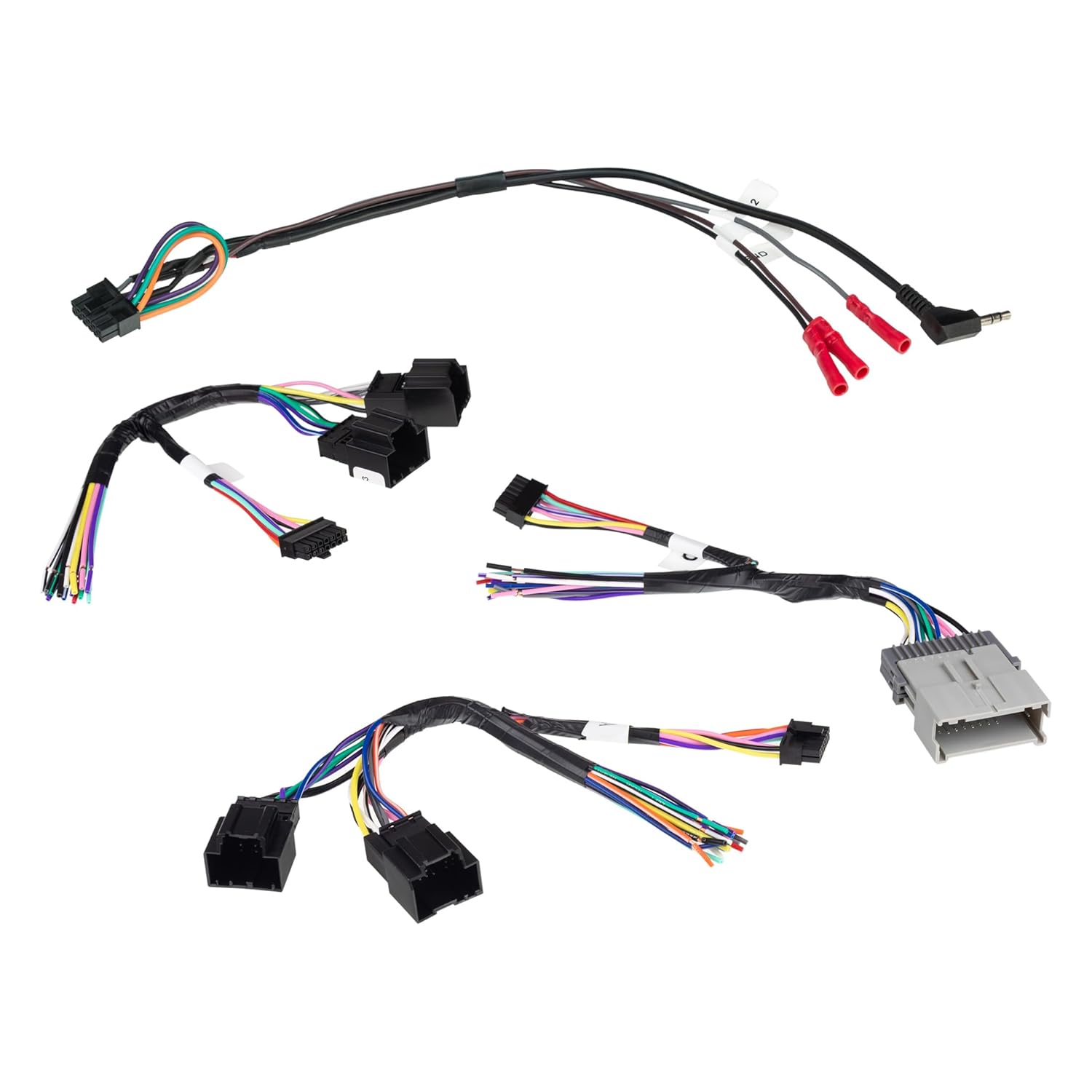
Image: An assortment of wiring harnesses and the Scosche LPGM35 interface module, illustrating the components involved in the installation.
6. Wiring Diagram (EIA Standard)
The color codes used on this car stereo interface harness conform to the E.I.A. (Electronics Industry Association) standard. These colors may differ from the wiring codes found on your stereo. Always refer to your stereo owner's manual for specific wiring details before making any connections.
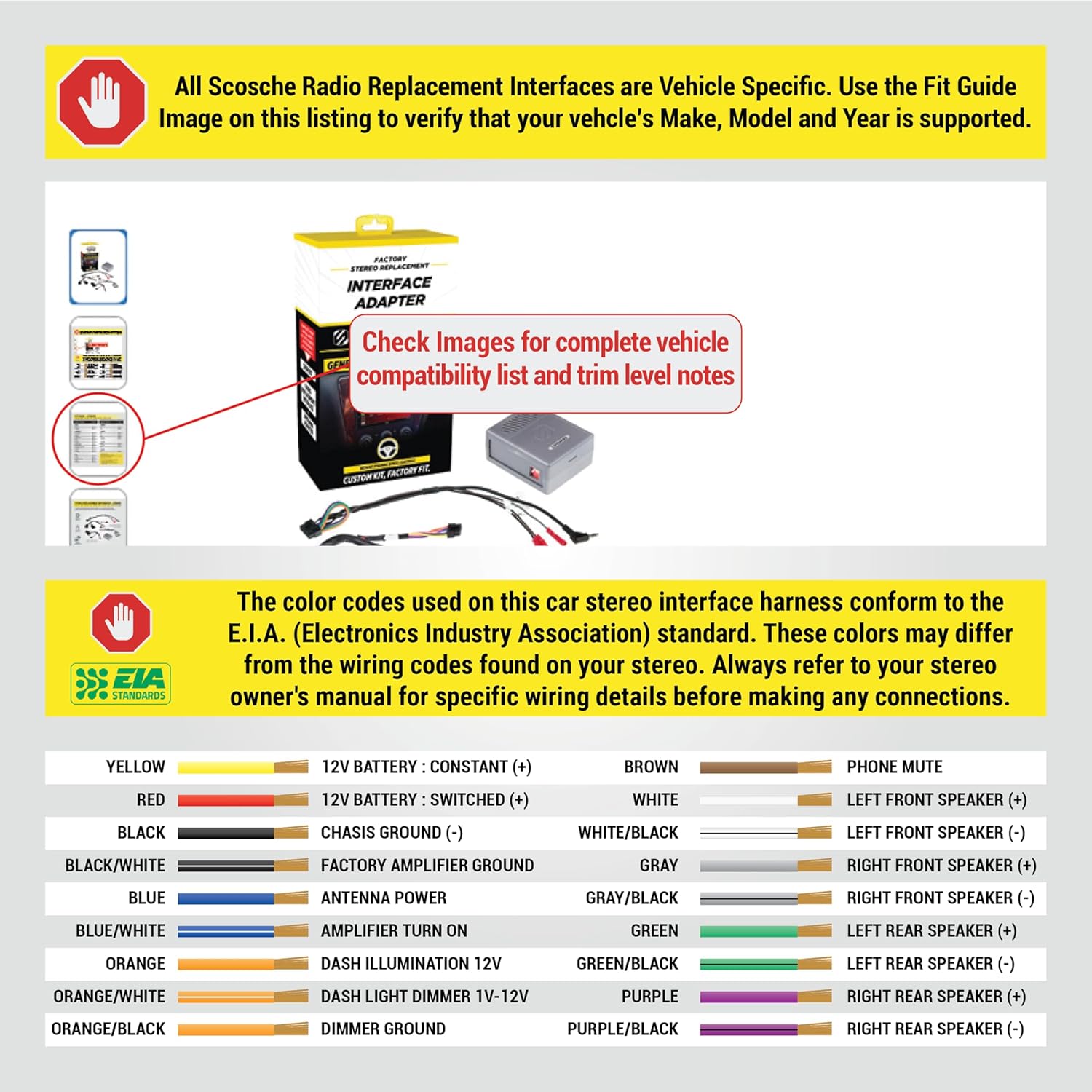
Image: A diagram illustrating the EIA standard wiring color codes for car stereo installation, detailing connections for power, ground, amplifier, illumination, and speaker channels.
| Color | Function | Color | Function |
|---|---|---|---|
| YELLOW | 12V BATTERY : CONSTANT (+) | BROWN | PHONE MUTE |
| RED | 12V BATTERY : SWITCHED (+) | WHITE | LEFT FRONT SPEAKER (+) |
| BLACK | CHASIS GROUND (-) | WHITE/BLACK | LEFT FRONT SPEAKER (-) |
| BLACK/WHITE | FACTORY AMPLIFIER GROUND | GRAY | RIGHT FRONT SPEAKER (+) |
| BLUE | ANTENNA POWER | GRAY/BLACK | RIGHT FRONT SPEAKER (-) |
| BLUE/WHITE | AMPLIFIER TURN ON | GREEN | LEFT REAR SPEAKER (+) |
| ORANGE | DASH ILLUMINATION 12V | GREEN/BLACK | LEFT REAR SPEAKER (-) |
| ORANGE/WHITE | DASH LIGHT DIMMER 1V-12V | PURPLE | RIGHT REAR SPEAKER (+) |
| ORANGE/BLACK | DIMMER GROUND | PURPLE/BLACK | RIGHT REAR SPEAKER (-) |
7. Operation
Steering Wheel Controls:
The LPGM35 interface is designed to retain the functionality of your vehicle's factory steering wheel controls with your new aftermarket stereo. This allows you to safely operate your radio while driving. Note that some factory navigation-equipped vehicles may not retain steering wheel controls.
Safety and Warning Chimes:
This interface also ensures the retention of all safety and warning chimes that are part of your vehicle's factory system.
8. Troubleshooting
- No Power to Stereo: Check the 12V constant (YELLOW) and 12V switched (RED) connections. Ensure the vehicle's battery is properly reconnected.
- No Audio: Verify all speaker wire connections (WHITE, GRAY, GREEN, PURPLE and their black-striped counterparts). Ensure the amplifier turn-on wire (BLUE/WHITE) is correctly connected if your vehicle has a factory amplifier.
- Steering Wheel Controls Not Working: Confirm that the steering wheel control connections are correctly made to the interface module and your aftermarket stereo. Refer to your stereo's manual for specific input requirements. Check the compatibility notes for your specific vehicle model.
- No Chimes: Ensure all connections to the interface module are secure.
- General Issues: Double-check all wiring connections for proper color matching and secure crimps. Ensure the LPGM35 module is correctly connected.
9. Specifications
- Package Dimensions: 11 x 6.63 x 2.38 inches
- Item Weight: 6.4 ounces
- Material: Acrylonitrile Butadiene Styrene
- Connector Type: ISO, RCA
10. Warranty and Support
The Scosche LPGM35 Link+ Factory Stereo Replacement Interface Adapter is backed by Scosche's Limited Lifetime Warranty and Lifetime Tech Support. For assistance, please contact Scosche customer service.
Manufacturer: Scosche
Website: www.scosche.com


