
HOPESTAR A10_Gold
HOPESTAR A10 Portable Wireless Bluetooth Speaker User Manual
Model: A10_Gold
Introduction
Thank you for purchasing the HOPESTAR A10 Portable Wireless Bluetooth Speaker. This manual provides detailed instructions on how to set up, operate, and maintain your speaker to ensure optimal performance and longevity. Please read this manual carefully before using the product and retain it for future reference.
Safety Information
To ensure safe operation and prevent damage, please observe the following precautions:
- Do not expose the speaker to extreme temperatures, direct sunlight, or high humidity.
- Avoid dropping or subjecting the speaker to strong impacts.
- Do not disassemble, repair, or modify the speaker yourself. Refer all servicing to qualified personnel.
- Keep the speaker away from water and liquids. Although it is listed as waterproof, prolonged submersion or exposure to high-pressure water jets should be avoided.
- Use only the provided charging cable and a compatible power adapter.
- Clean the speaker with a soft, dry cloth. Do not use abrasive cleaners or solvents.
Package Contents
Please check the box for the following items:
- 1 x HOPESTAR A10 Bluetooth Speaker
- 1 x Aux Cable
- 1 x USB Charging Cable

Image: The HOPESTAR A10 speaker in gold, showing its compact design and integrated strap.
Product Overview
The HOPESTAR A10 is a compact and portable wireless Bluetooth speaker designed for high-quality audio on the go. It features multiple connectivity options and intuitive controls.
Controls and Ports:
- Power Button: Press and hold to turn on/off.
- Volume Up (+): Short press to increase volume. Long press for next track.
- Volume Down (-): Short press to decrease volume. Long press for previous track.
- Play/Pause Button: Play or pause audio. Answer/end calls.
- Mode Button (M): Switch between Bluetooth, FM Radio, AUX, USB, and TF Card modes.
- USB Port: For USB drive playback.
- TF Card Slot: For TF (Micro SD) card playback.
- AUX Input: For wired connection to audio devices.
- Charging Port: Micro USB port for charging the speaker.
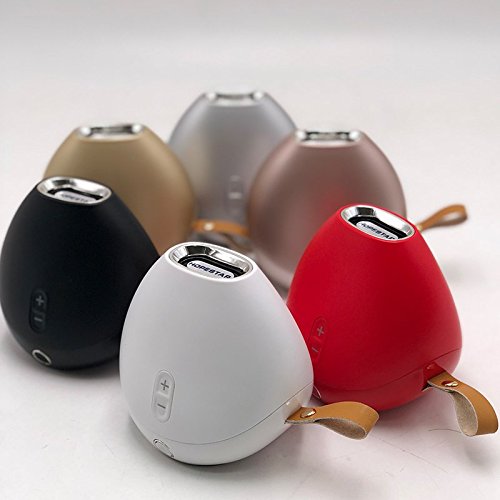
Image: A collection of HOPESTAR A10 speakers showcasing different available colors, highlighting the compact and uniform design across the range.
Setup
1. Charging the Speaker:
- Connect the small end of the USB charging cable to the charging port on the speaker.
- Connect the large end of the USB cable to a USB power adapter (not included) or a computer's USB port.
- The charging indicator light will illuminate. It will turn off or change color once fully charged.
- A full charge typically takes 2-3 hours.
2. Powering On/Off:
- To turn on, press and hold the Power button until you hear an audible prompt.
- To turn off, press and hold the Power button again until the speaker powers down.
Operating Instructions
Bluetooth Mode:
- Turn on the speaker. It will automatically enter Bluetooth pairing mode, indicated by a flashing LED light.
- Enable Bluetooth on your smartphone, tablet, or other Bluetooth-enabled device.
- Search for "HOPESTAR A10" in your device's Bluetooth list and select it to pair.
- Once successfully paired, the speaker will emit an audible confirmation, and the LED light will stop flashing.
- You can now play audio from your device through the speaker.
FM Radio Mode:
- Press the "M" (Mode) button to switch to FM Radio mode.
- To auto-scan for stations, press and hold the Play/Pause button. The speaker will scan and save available stations.
- Use the Volume Up (+) and Volume Down (-) buttons (short press) to navigate between saved stations.
AUX Input Mode:
- Connect one end of the 3.5mm AUX cable to the AUX input port on the speaker.
- Connect the other end of the AUX cable to the audio output jack of your external device (e.g., MP3 player, computer).
- The speaker will automatically switch to AUX mode, or you may need to press the "M" (Mode) button to select it.
- Control playback from your connected device.
USB Drive / TF Card Playback:
- Insert a USB drive or TF (Micro SD) card with MP3 audio files into the respective port/slot.
- The speaker will automatically detect the storage device and begin playing audio files. If not, press the "M" (Mode) button to switch to the correct mode.
- Use the Play/Pause button to control playback.
- Use the Volume Up (+) and Volume Down (-) buttons (long press) to skip tracks.
Maintenance
- Cleaning: Use a soft, dry, lint-free cloth to clean the speaker's surface. Do not use liquid cleaners, aerosols, or solvents.
- Storage: When not in use for extended periods, store the speaker in a cool, dry place, away from direct sunlight and extreme temperatures.
- Battery Care: To prolong battery life, avoid fully discharging the battery frequently. Charge the speaker regularly, even if not in use.
Troubleshooting
| Problem | Possible Cause | Solution |
|---|---|---|
| Speaker does not turn on. | Battery is low or depleted. | Charge the speaker fully. |
| Cannot pair with Bluetooth device. | Speaker is not in pairing mode; Bluetooth is off on device; Device is too far. | Ensure speaker is in pairing mode (flashing LED). Turn on Bluetooth on your device. Move device closer to speaker (within 10 meters). |
| No sound. | Volume is too low; Incorrect mode selected; Cable not connected properly (AUX). | Increase volume on both speaker and connected device. Press "M" button to select correct mode. Reconnect AUX cable securely. |
| Poor FM radio reception. | Weak signal; Environmental interference. | Relocate the speaker to an area with better signal. Extend the AUX cable (if used as antenna). |
Specifications
| Brand | HOPESTAR |
| Model Name | A10 |
| Connectivity Technology | Auxiliary, Bluetooth, USB, Wireless |
| Special Feature | Bluetooth |
| Compatible Devices | Smartphone, Tablet |
| Color | Gold |
| Item Weight | 450 Grams |
| Product Dimensions | 10 x 10 x 8 cm |
| Is Waterproof | TRUE |
Warranty and Support
The HOPESTAR A10 Portable Wireless Bluetooth Speaker comes with a 6-month warranty from the date of purchase. This warranty covers manufacturing defects and workmanship under normal use.
The warranty does not cover damage caused by misuse, accident, unauthorized modification, or natural disasters. Please retain your purchase receipt as proof of purchase for warranty claims.
For technical support, warranty claims, or any inquiries, please contact your retailer or the manufacturer's customer service. Refer to the product packaging or retailer's website for contact information.
Ask a question about this manual
Ask about setup, troubleshooting, compatibility, parts, safety, or missing instructions. Manuals+ will review the question and use this page’s manual context to help answer it.