
1. Introduction
This manual provides essential information for the proper installation, operation, and maintenance of your FOSA LED PIR Motion Detector, Model fosad2uw6i9rz1-01. Please read this manual thoroughly before using the product to ensure safe and efficient operation.
2. Safety Information
- Ensure the power source matches the specified voltage (DC 5-24V) to prevent damage.
- Do not expose the device to extreme temperatures, humidity, or direct water.
- Avoid disassembling the unit, as this may void the warranty and cause electrical hazards.
- Keep out of reach of children.
3. Product Overview
The FOSA LED PIR Motion Detector is a compact infrared sensor designed to detect human movement and automatically control connected LED lighting. It features a USB interface for convenient power supply and output.

Figure 3.1: FOSA LED PIR Motion Detector with USB connections.
Key Features:
- PIR Motion Sensing: Detects human movement by sensing infrared radiation.
- Wide Detection Range: Offers a 120-degree cone angle detection range.
- Energy Efficient: High and stable sensitivity contributes to effective energy saving.
- Automatic Delay Shutdown: Automatically turns off connected devices after a person leaves the detection area.
- Temperature Compensation: Built-in chip reduces the impact of temperature on sensing distance.
- USB Interface: Convenient power supply via USB port (e.g., mobile phone charger, power bank).
- Voltage Output: Output voltage is equal to the input voltage.
- Low Power Consumption: Designed for efficient operation.
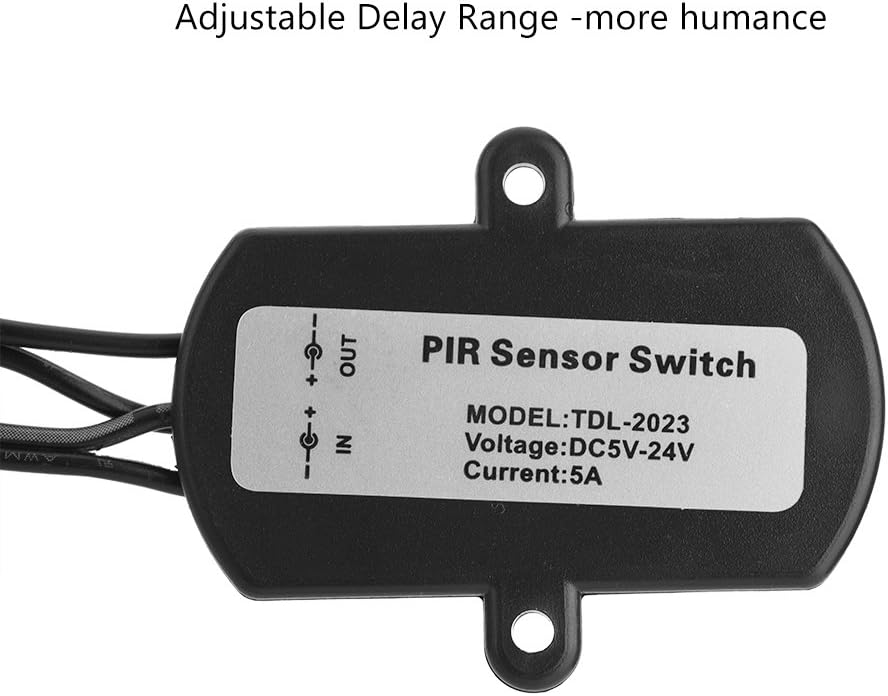
Figure 3.2: Product label indicating model TDL-2023, Voltage DC5V-24V, and Current 5A. Note: The product is identified as Model fosad2uw6i9rz1-01.
4. Specifications
| Specification | Value |
|---|---|
| Brand | FOSA |
| Model Number | fosad2uw6i9rz1-01 |
| Color | Black |
| Power Source | Corded Electric (USB) |
| Input/Output Voltage | DC 5-24V |
| Max Current | 4A (as per product title, some labels may indicate 5A) |
| Item Weight | 0.08 Kilograms (2.82 ounces) |
| Maximum Detection Range | 7 Meters |
| Detection Angle | 120 degrees (cone angle) |
| Mounting Type | Wall Mount |
| Product Dimensions (L x W x H) | 1.97"D x 1.02"W x 0.87"H (5.0cm x 2.6cm x 2.2cm) |
| Item Package Quantity | 1 |
| Batteries Required/Included | No |
| UPC | 792172601719 |

Figure 4.1: Product dimensions.
5. Setup
5.1 Connecting the Device
- Power Input: Connect the male USB plug of the motion detector to a compatible DC 5-24V USB power source (e.g., USB wall adapter, power bank, computer USB port).
- LED Strip Output: Connect your LED strip or other compatible DC 5-24V device to the female USB port of the motion detector. Ensure the polarity is correct for your LED strip.

Figure 5.1: USB wiring polarity diagram. Ensure correct connection for proper function.
5.2 Mounting
The motion detector is designed for wall mounting. Use the integrated mounting holes on the device to secure it to a desired surface using screws (typically included). Ensure the sensor lens faces the area where motion detection is required.
5.3 Placement for Optimal Detection
Position the sensor to maximize its 120-degree cone angle detection range. For ceiling mounting, the detection area spreads outwards. For wall mounting, the detection area extends forward and downwards.

Figure 5.2: Detection range from ceiling and wall mounting.

Figure 5.3: Sensor detection angle and distance.
6. Operating Instructions
Once properly connected and powered, the FOSA LED PIR Motion Detector operates automatically:
- Motion Detection: The sensor continuously monitors its detection area for infrared changes caused by human movement.
- Automatic Activation: Upon detecting motion, the sensor will activate the connected LED strip or device.
- Automatic Deactivation: After the detected motion ceases and the person leaves the area, the sensor will automatically delay for a set period before deactivating the connected device, saving energy. The delay time is fixed and not user-adjustable on this model.
Typical Applications:
- Automatic lighting in corridors, stairwells, and hallways.
- Under-cabinet lighting in kitchens or workshops.
- Wardrobe, closet, or pantry lighting.
- Basement, garage, or storage area illumination.

Figure 6.1: Sensor connected to an LED strip.

Figure 6.2: Examples of motion detector applications.

Figure 6.3: Sensor application in a cabinet.
7. Maintenance
- Cleaning: Gently wipe the sensor lens and housing with a soft, dry cloth. Do not use abrasive cleaners or solvents.
- Inspection: Periodically check the USB connections for any signs of wear or damage.
- Environment: Ensure the operating environment remains within specified temperature and humidity ranges.
8. Troubleshooting
- Device not turning on:
- Check if the USB power source is active and providing the correct voltage (DC 5-24V).
- Ensure the USB connections are secure.
- Verify the connected LED strip or device is functional.
- Device not detecting motion:
- Ensure the sensor lens is clean and unobstructed.
- Check the placement of the sensor; it should have a clear line of sight to the detection area.
- Avoid placing the sensor near heat sources or in direct sunlight, which can interfere with infrared detection.
- Device stays on or turns off too quickly/slowly:
- This model has a fixed delay time. If the device stays on, ensure there is no continuous motion within the detection range.
- If it turns off too quickly, it might be re-detecting motion immediately after the delay, or the detection range might be too small for the application.
9. Warranty and Support
For warranty information or technical support, please refer to the product packaging or contact your retailer. Keep your purchase receipt for warranty claims.