
1. Product Overview
The DOKIO 200W Portable Foldable Monocrystalline Solar Panel Kit is designed to provide mobile solar energy for various outdoor applications. Its lightweight and compact design ensures easy storage and transport, making it ideal for caravans, RVs, trucks, boats, hiking, and general outdoor use.

Image 1.1: The DOKIO 200W Portable Foldable Monocrystalline Solar Panel Kit in its unfolded state, ready for use.
Key Features:
- Pliable and Portable: Ultra-lightweight (4.4kg) with a compact folded size (67x49x2.8cm) and an open size of 195x67x0.7cm, allowing for easy storage and transport.
- IP65 Waterproof: Protects the solar panels against water splashes, occasional rain, and humid fog.
- High-Performance Monocrystalline Solar Panels: Utilizes high-efficiency monocrystalline cells for superior energy conversion.
- Versatile Application: Ideal for mobile energy needs in caravans, RVs, trucks, boats, hiking, skiing, and general outdoor activities.
- Integrated 20A Charge Controller: Features an integrated 20A charge controller with an LED display and two USB ports for outdoor charging.
2. Product Components
The DOKIO 200W Solar Panel Kit comes with all necessary components for immediate use.
- Solar Panels (200W foldable unit)
- Integrated 20A Charge Controller
- Connection Cables
- Various DC Adapters

Image 2.1: Overview of the unique, full-set accessories included with the DOKIO solar panel kit.
3. Setup Instructions
Follow these steps to set up your DOKIO 200W Solar Panel Kit.
3.1. Connecting to a 12V Battery
- Connect the solar panel to the charge controller.
- Connect the charge controller to your 12V battery (compatible with Lead-acid, Lithium, LiFePO4, AGM, CAR/RV batteries).
- Ensure all connections are secure.

Image 3.1: Step-by-step diagram for connecting the solar panel to a 12V battery.
3.2. Connecting to a Power Station
- Connect the solar panel to the appropriate DC adapter for your power station.
- Connect the DC adapter to the power station's input port.
- Ensure all connections are secure.
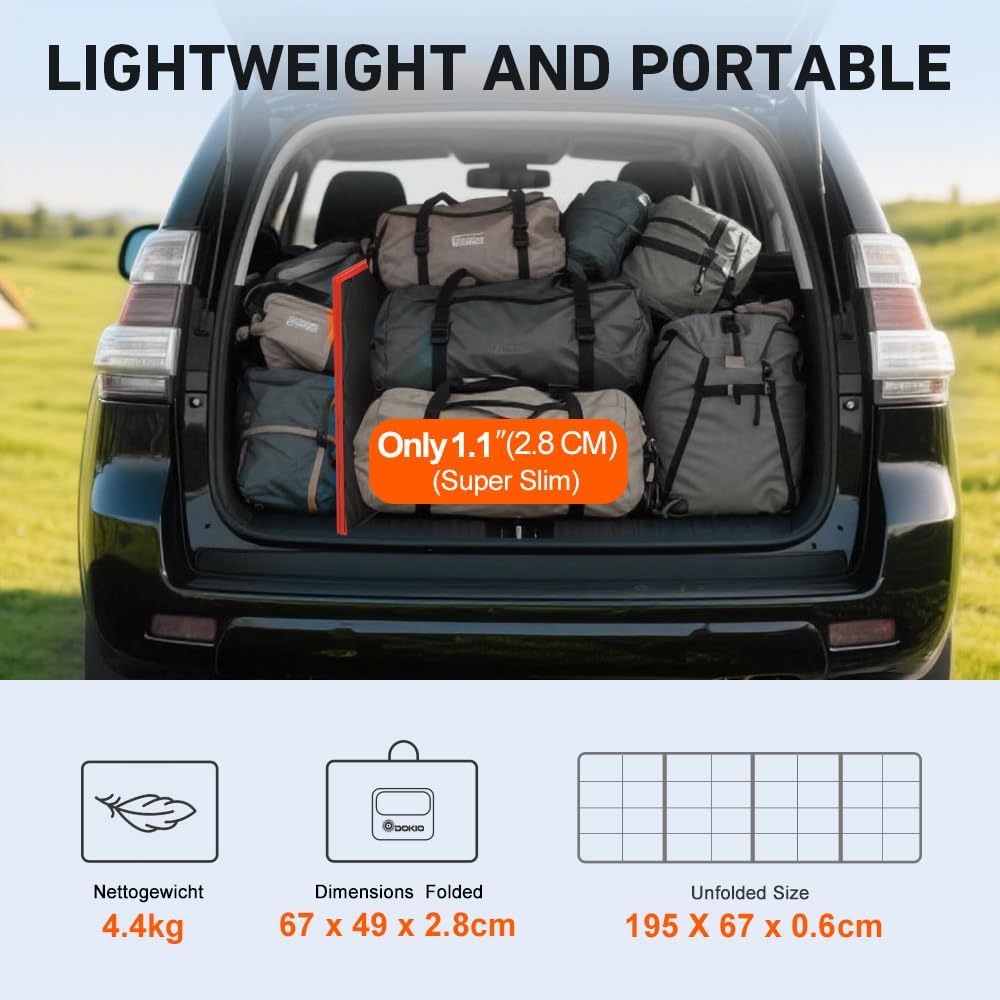
Image 3.2: Step-by-step diagram for connecting the solar panel to a power station using various DC adapters.
4. Operating Instructions
4.1. Maximizing Power Output
To ensure optimal performance and maximize power output from your solar panel, consider the following:
- Angle Towards the Sun: Solar panels perform best when angled directly (ideally 90°) toward the sun, especially during peak sunlight hours (around noon).
- Keep Panel Uncovered and Shadow-Free: Ensure no objects or shadows obstruct the solar panel surface. Even partial shading can significantly reduce efficiency.
- Check Power Station Input: Be aware of your power station's maximum input wattage. Some power stations may cap the input regardless of the charger's output.

Image 4.1: Guidelines for maximizing power output and a summary of technical details.
4.2. General Usage Scenarios
The DOKIO 200W Solar Panel Kit is versatile and suitable for various outdoor charging needs:
- Camping: Power your devices and small appliances while enjoying the outdoors.
- RVs/Caravans: Keep your RV batteries charged for extended trips.
- Hiking: A portable power source for remote adventures.
- Emergency Power: A reliable backup power source during outages.

Image 4.2: The DOKIO solar panel provides power for camping, RVs, hiking, and emergency situations.

Image 4.3: The long cable (9.84ft) allows for flexible placement of the solar panel.
5. Maintenance
Proper maintenance ensures the longevity and efficiency of your DOKIO solar panel.
5.1. Cleaning the Solar Panel
Regularly wipe the solar panel surface with a damp cloth to remove dust, dirt, and debris. This helps maintain optimal sunlight absorption and power generation.
5.2. Water Resistance
The solar panel is rated IP65 waterproof, protecting it from water splashes, light rain, and humid conditions. However, it is not designed for submersion. Ensure the controller and connections are kept as dry as possible.

Image 5.1: Details highlighting the water-resistant design and high-efficiency cells.
6. Troubleshooting
The integrated 20A charge controller is equipped with multiple protection features to ensure safe and reliable operation.
6.1. Controller Protection Features
The controller provides the following safeguards:
- Overcharge Protection: Prevents battery damage from excessive charging.
- Overload Protection: Protects against drawing too much current from the system.
- Over-discharge Protection: Prevents batteries from being drained too low, extending their lifespan.
- Reverse Polarity Protection: Safeguards the system from damage if connections are made incorrectly.
- Temperature Compensation: Adjusts charging parameters based on ambient temperature for optimal battery health.
- Short-circuit Protection: Automatically shuts down in case of a short circuit to prevent damage.

Image 6.1: The protective features of the LCD controller ensure safe operation and battery health.
6.2. Common Issues and Solutions
- Low Power Output: Ensure the panel is angled directly towards the sun and is free from shadows or dirt. Check all connections for looseness.
- Controller Display Not Working: Verify that the solar panel is receiving sufficient sunlight and that the battery is connected correctly. Check for any loose wires.
- Devices Not Charging: Confirm that the output ports (USB, DC) are correctly connected to your devices. Ensure the battery connected to the controller has sufficient charge.
7. Specifications
Detailed technical specifications for the DOKIO 200W Portable Foldable Monocrystalline Solar Panel Kit.
| Specification | Value |
|---|---|
| Manufacturer | DOKIO |
| Model Number | dokio-002 |
| Product Dimensions (Folded) | 67 x 49 x 2.8 cm |
| Product Dimensions (Unfolded) | 195 x 67 x 0.7 cm |
| Weight | 4.1 Kilograms |
| Material | Monocrystalline Silicon |
| Maximum Power (Pmax) | 200 Watt (220 Wp ± 3%) |
| Open Circuit Voltage (Voc) | 22.50 V |
| Short-circuit Current (Isc) | 12.36 A |
| Maximum Power Voltage (Vmp) | 18.00 V |
| Maximum Power Current (Imp) | 12.22 A |
| Amperage | 20 A (Controller) |
| Maximum Voltage | 24 Volts |
| Efficiency | High Efficiency |
| Included Components | Solar Panels, Controller, Cable |
| Batteries Included/Required | No |
| UPC | 682559949056, 663577565732 |
8. Warranty and Support
DOKIO is committed to providing quality products and customer satisfaction.
8.1. Product Support
For any questions, technical assistance, or support regarding your DOKIO solar panel kit, please visit the official DOKIO brand store on Amazon or contact DOKIO customer service through the platform where you purchased the product. The brand store can be accessed via this link: DOKIO Brand Store.
8.2. Spare Parts Availability
Information regarding the availability of spare parts for this product is currently not provided by the manufacturer.


