
Introduction
This manual provides detailed instructions for the setup, operation, and maintenance of your TOZO T8 True Wireless Earbuds. Please read this manual thoroughly before using the product to ensure proper function and longevity.
What's in the Box
Upon unpacking, please ensure all items listed below are present:
- TOZO T8 True Wireless Earbuds (Left and Right)
- Charging Case
- USB Charging Cable
- User Manual
- Ear Cushions (3 sets: Small, Medium, Large)

Image: Contents of the TOZO T8 package, including earbuds, charging case, and accessories.
Setup
1. Initial Charging
Before first use, fully charge the earbuds and the charging case. Connect the provided USB cable to the charging port on the case and a power source. The indicator light on the case will show charging status.

Image: The TOZO T8 charging case with earbuds, illustrating the charging process.
2. Pairing with Your Device
- Remove both earbuds from the charging case. They will automatically power on and connect to each other. You will hear an audio cue "Connected", followed by "Left Channel" and "Right Channel".
- Enable Bluetooth on your mobile phone or other device.
- Search for available Bluetooth devices and select "TOZO-T8-R". Do not select "TOZO-T8-L".
- Once connected, you will hear "Second Device Connected", and you can begin playing audio.

Image: Visual guide demonstrating the steps to pair TOZO T8 earbuds with a mobile device.
3. Wearing the Earbuds
Select the ear tip size that provides the best fit and seal for optimal sound quality and comfort. Gently insert the earbud into your ear canal and slightly rotate it to ensure a secure and comfortable fit.
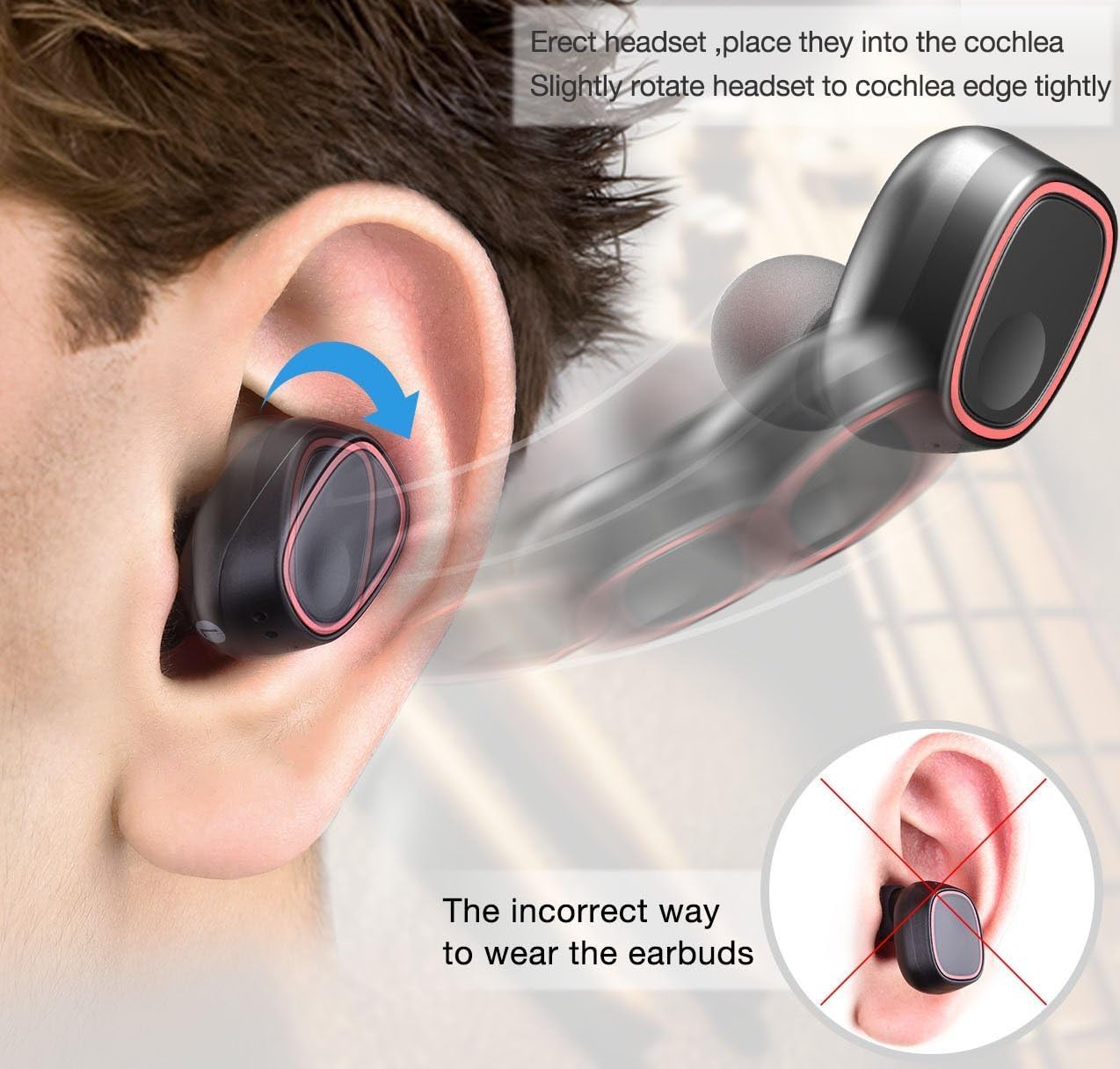
Image: Illustration detailing the proper method for wearing the earbuds and an example of an incorrect fit.
Operating Instructions
The TOZO T8 earbuds feature touch controls for various functions:
- Play/Pause: Tap the button on either earbud once.
- Answer/End Call: Tap the button on either earbud once.
- Reject Call: Press and hold the button on either earbud for 2 seconds.
- Next Track: Double-tap the button on the right earbud.
- Previous Track: Double-tap the button on the left earbud.
- Voice Assistant: Triple-tap the button on either earbud.
The earbuds can be used individually. To use a single earbud, simply remove one from the charging case. It will automatically enter single-earbud mode. To switch back to stereo, remove the other earbud from the case.
Maintenance
- Keep the earbuds and charging case clean and dry. Use a soft, dry cloth to wipe them.
- Avoid exposing the product to extreme temperatures, humidity, or corrosive substances.
- Store the earbuds in their charging case when not in use to protect them and keep them charged.
- Regularly clean the charging contacts on both the earbuds and the case to ensure proper charging.
Troubleshooting
| Problem | Solution |
|---|---|
| Earbuds not pairing with each other. | Place both earbuds back into the charging case, then remove them again. Ensure they are fully charged. |
| Earbuds not connecting to device. | Ensure Bluetooth is enabled on your device. Forget "TOZO-T8-R" from your device's Bluetooth list and re-pair following the setup instructions. |
| Only one earbud working. | Place both earbuds back into the charging case. Ensure both are charging. Remove them simultaneously to re-establish stereo connection. |
| Poor sound quality or low volume. | Ensure earbuds are properly seated in your ears and try different sized ear tips for a better seal. Clean any debris from the earbud grilles. |
| Charging case not charging. | Check the USB cable and power adapter. Ensure the cable is securely connected to both the case and the power source. |
Specifications
| Feature | Detail |
|---|---|
| Brand | TOZO |
| Model Number | T8 |
| Connectivity Technology | Wireless (Bluetooth) |
| Bluetooth Version | 4.1 |
| Bluetooth Range | 10 Meters |
| Ear Placement | In Ear |
| Noise Control | Sound Isolation |
| Battery Average Life (Earbuds) | 2.5 Hours |
| Battery Charge Time (Earbuds) | 1 Hour |
| Carrying Case Battery Average Life | 6 Hours (provides 2-3 full charges for earbuds) |
| Water Resistance Level | Waterproof |
| Item Weight | 0.1 Kilograms |
| Material | Silicone (Ear tips) |
Warranty and Support
For warranty information or technical support, please refer to the official TOZO website or contact their customer service directly. Details can typically be found on the product packaging or the TOZO official support page.


