
Utilitech GYQ27-W
Utilitech GYQ27-W Motion Sensor Instruction Manual
Model: GYQ27-W
Product Overview
The Utilitech GYQ27-W is a white wire-in replacement motion sensor designed for outdoor lighting applications. It provides automatic light control by detecting motion and activating the light for a set duration. This sensor offers wide coverage and includes features for energy efficiency and manual override.
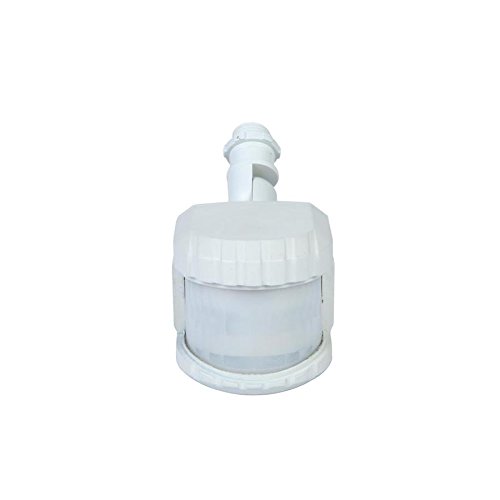
Figure 1: Front view of the Utilitech GYQ27-W White Wire-in Replacement Motion Sensor. The sensor features a compact, white housing with a translucent detection lens at the front and a threaded base for wire-in installation.
Key Features
- Automatic Light Control: Turns lights on when motion is detected.
- Adjustable Timer: Light remains on for 1, 3, or 10 minutes after motion ceases, with a 5-second test mode.
- Wide Coverage: Provides up to 240° coverage and 69-ft of downward perimeter protection.
- Dusk-to-Dawn Sensor: Automatically activates at dusk and deactivates at dawn.
- Broad Compatibility: Compatible with dimmable LED, dimmable CFL, halogen, and incandescent bulbs.
- Energy Efficiency: Features 2-level brightness technology.
- Manual Override: Allows the light to operate constantly for a selected period.
Setup and Installation
Proper installation is crucial for optimal performance and safety. It is recommended to consult a qualified electrician if you are unsure about any steps.
Safety Precautions
- Always turn off power at the circuit breaker before installation or servicing.
- Ensure wiring connections are secure and comply with local electrical codes.
- Do not exceed the maximum wattage rating of the connected lighting fixture.
Installation Steps
- Turn Off Power: Locate the circuit breaker controlling the outdoor light fixture and switch it to the OFF position. Verify power is off using a voltage tester.
- Remove Existing Sensor (if applicable): Carefully disconnect the wiring from the old motion sensor or light fixture.
- Connect Wiring: Follow the wiring diagram provided with your specific light fixture. Typically, this involves connecting the sensor's wires (line, load, neutral) to the corresponding wires from the power supply and the light fixture. Ensure all connections are tight and insulated with wire nuts.
- Mount Sensor: Securely mount the Utilitech GYQ27-W motion sensor to the desired location. Ensure it has a clear line of sight to the area you wish to monitor.
- Restore Power: Once all connections are secure and the sensor is mounted, turn the power back on at the circuit breaker.
Operating Instructions
The GYQ27-W motion sensor offers several adjustable settings to customize its operation.
Adjusting Settings
- Time Setting: The sensor allows you to set the duration the light remains on after motion is detected. Common settings are 1, 3, or 10 minutes. Refer to the sensor's physical controls for specific adjustment methods (e.g., dial, switch).
- Test Mode: A 5-second test mode is available for initial setup and aiming. In this mode, the light will turn on for approximately 5 seconds each time motion is detected, regardless of the set time.
- Dusk-to-Dawn Feature: The integrated photocell automatically prevents the light from activating during daylight hours, conserving energy. The sensor will only activate the light when ambient light levels fall below a certain threshold.
- Sensitivity Adjustment: Some models may include a sensitivity dial to adjust the range or sensitivity of motion detection. Adjust this to prevent false triggers from small animals or distant objects.
Manual Override
To keep the light on continuously for a period, you can typically activate the manual override function. This is often done by quickly turning the light switch OFF and then ON within a few seconds. The light will then stay on until the override period expires or the switch is cycled again. Consult the specific instructions that came with your sensor for precise manual override steps.
Maintenance
The Utilitech GYQ27-W motion sensor requires minimal maintenance to ensure long-term performance.
- Cleaning: Periodically wipe the sensor lens with a soft, damp cloth to remove dust, dirt, or cobwebs that may obstruct the sensor's view. Do not use abrasive cleaners.
- Inspection: Annually inspect the wiring and mounting for any signs of wear, damage, or loosening. Ensure the sensor is still securely positioned.
- Environmental Factors: Keep the area around the sensor clear of obstructions like tree branches or tall shrubs that could block the detection field or cause false triggers due to wind movement.
Troubleshooting
If your Utilitech GYQ27-W motion sensor is not functioning as expected, refer to the following common issues and solutions:
| Problem | Possible Cause | Solution |
|---|---|---|
| Light does not turn on when motion is detected. |
|
|
| Light stays on continuously. |
|
|
| Light turns on for no apparent reason (false triggers). |
|
|
Specifications
| Attribute | Value |
|---|---|
| Model Number | GYQ27-W |
| Brand | Utilitech |
| Color | White |
| Power Source | Corded Electric |
| Product Dimensions | 5 x 3 x 2 inches |
| Item Weight | 1.2 Pounds |
| Maximum Range | 69 Feet |
| Coverage Angle | Up to 240° |
| Compatible Bulbs | Dimmable LED, Dimmable CFL, Halogen, Incandescent |
Warranty and Support
Information regarding specific warranty terms for the Utilitech GYQ27-W motion sensor is not provided in this manual. For warranty details, technical support, or replacement parts, please refer to the original product packaging or contact Utilitech customer service directly.
You may also visit the official Utilitech website for the most up-to-date information and support resources.
Related documentsGYQ27-W


Ask a question about this manual
Ask about setup, troubleshooting, compatibility, parts, safety, or missing instructions. Manuals+ will review the question and use this page’s manual context to help answer it.