
1. Product Overview
The Zerone Multi-Language Translator Bluetooth Earphone is a portable wireless device designed for real-time language translation and audio playback. It features Bluetooth 4.1 connectivity, high-fidelity audio output, and a compact in-ear design for comfortable use during various activities.

Image 1.1: Main view of the Zerone Multi-Language Translator Bluetooth Earphone.
2. Package Contents
Please verify that all items listed below are included in your package:
- Zerone Multi-Language Translator Bluetooth Earphone
- USB Charging Cable
- Additional Ear Tips (various sizes)
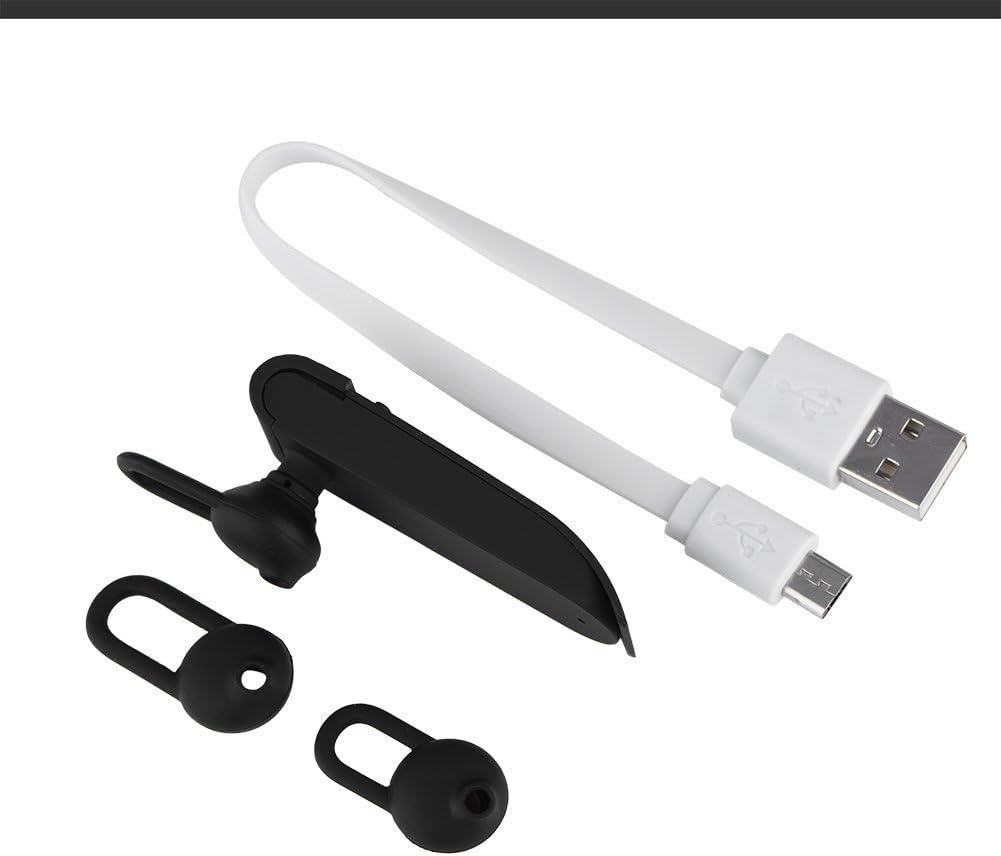
Image 2.1: The earphone with its charging cable and two additional ear tips.
3. Product Features
- Multi-Language Translation: Supports up to 16 languages for real-time translation. Speak into the earphone, and it will translate into the desired language.
- High Fidelity Audio Output: Equipped with an 8mm moving coil speaker for clear, smooth audio and enhanced bass.
- True Wireless In-Ear Design: Mini and compact, offering a stable and comfortable fit without tangled wires, suitable for various activities.
- Bluetooth 4.1 Connectivity: Optimized Bluetooth 4.1 version ensures a stable and fast wireless connection with a range of up to 10 meters.
- Extended Battery Life: Built-in 90mAh rechargeable lithium battery provides approximately 5-8 hours of playback time and up to 13 hours of talk time.

Image 3.1: Visual representation of the 16 languages translation feature.

Image 3.2: Illustration of the high fidelity audio output with an 8mm moving coil speaker.

Image 3.3: Visual representation of the Bluetooth true wireless connection with a 10-meter transmission range.

Image 3.4: Details on the earphone's 90mAh rechargeable lithium battery and extended usage times.
4. Setup
4.1 Charging the Earphone
Before initial use, fully charge the earphone. Connect the provided USB charging cable to the earphone's charging port and the other end to a USB power source (e.g., computer, wall adapter). The charging time is approximately 2 hours.
4.2 Bluetooth Pairing
- Ensure the earphone is fully charged and powered off.
- Press and hold the multi-function button on the earphone until the indicator light flashes red and blue alternately, indicating pairing mode.
- On your smartphone or Bluetooth-enabled device, navigate to the Bluetooth settings.
- Search for available devices and select "Zerone Translator Earphone" (or similar name) from the list.
- Once connected, the indicator light will typically turn solid blue or flash blue slowly.
4.3 Companion Application (for Translation)
To utilize the multi-language translation feature, you will need to download and install a compatible companion application on your smartphone. Refer to the packaging or product documentation for the specific app name and download instructions. Ensure your phone is connected to the internet for translation services.
5. Operating Instructions
5.1 Power On/Off
- Power On: Press and hold the multi-function button for approximately 3 seconds until the indicator light turns blue.
- Power Off: Press and hold the multi-function button for approximately 5 seconds until the indicator light turns red.
5.2 Music Playback
- Play/Pause: Short press the multi-function button.
- Next Track: Double-press the multi-function button.
- Previous Track: Triple-press the multi-function button.
5.3 Call Management
- Answer/End Call: Short press the multi-function button.
- Reject Call: Press and hold the multi-function button for 2 seconds.
5.4 Using the Translation Function
After successfully pairing the earphone with your device and setting up the companion application:
- Open the translation application on your smartphone.
- Select the source and target languages within the app.
- Activate the translation mode as instructed by the application (this may involve pressing a button on the earphone or within the app).
- Speak clearly into the earphone's microphone. Your speech will be translated and played back through the earphone or your phone's speaker, depending on the app's settings.

Image 5.1: A conceptual image demonstrating the earphone's translation capability between two languages.
6. Maintenance
- Cleaning: Use a soft, dry cloth to clean the earphone. Do not use abrasive cleaners or immerse the device in water.
- Storage: Store the earphone in a cool, dry place away from direct sunlight and extreme temperatures.
- Battery Care: To prolong battery life, avoid fully discharging the earphone frequently. Charge it regularly, even if not in use for extended periods.
7. Troubleshooting
| Problem | Possible Cause | Solution |
|---|---|---|
| Earphone does not power on | Low battery | Charge the earphone for at least 30 minutes. |
| Cannot pair with device | Earphone not in pairing mode; Bluetooth off on device; device too far | Ensure earphone is in pairing mode (flashing red/blue). Turn on Bluetooth on your device. Move device closer to earphone (within 10m). |
| No sound during playback/calls | Volume too low; earphone not connected; media output not selected | Increase volume on both earphone and connected device. Re-pair the earphone. Check device's audio output settings. |
| Translation function not working | Companion app not open/configured; no internet connection; microphone blocked | Ensure the companion app is open and correctly configured. Verify internet connectivity. Check if the earphone's microphone is clear. |
8. Specifications
| Feature | Detail |
|---|---|
| Model Number | 4351510494 |
| Connectivity Technology | Wireless (Bluetooth) |
| Bluetooth Version | 4.1 |
| Bluetooth Range | Up to 10 meters |
| Battery Capacity | 90mAh Lithium Battery |
| Playing Time | 5-8 hours |
| Talking Time | Up to 13 hours |
| Charging Time | Approximately 2 hours |
| Headphones Jack | USB (for charging) |
| Material | Plastic |
| Ear Placement | In Ear |
| Form Factor | In Ear |
| Control Type | Media Control, Touch |
| Noise Control | Active Noise Cancellation |
| Item Weight | 2.39 ounces |
9. Warranty and Support
For warranty information and technical support, please refer to the documentation included with your purchase or visit the official Zerone website. Keep your proof of purchase for warranty claims.