1. Product Overview
The Energizer 40776 LED Motion-Activated Wireless Flood Light is designed to provide instant, bright illumination for outdoor spaces. This battery-operated security light features two adjustable LED heads, motion detection, and weather-resistant construction for reliable year-round use.
Key Features:
- 800 Lumens: Provides powerful illumination.
- Motion-Activated: Detects motion up to 25 feet within a 120-degree angle.
- Wireless & Battery Operated: Requires 4 D batteries (not included) for easy, wire-free installation.
- Adjustable Heads: Each light head rotates 280° vertically, and the base swivels 180° horizontally for precise light direction.
- Weather-Resistant: IP54 rated for outdoor use, designed to withstand various weather conditions.
- Automatic Shut-off: Lights turn off 20 seconds after motion is no longer detected.

This image displays the Energizer 40776 LED Motion-Activated Wireless Flood Light alongside its retail packaging. The packaging highlights key features such as 800 lumens, motion activation, weather resistance, and battery operation. The flood light itself is black with two adjustable LED heads.
2. Setup and Installation
Follow these steps for proper installation of your Energizer Flood Light.
2.1 Package Contents
- Energizer Motion-Activated Wireless LED Spotlight (Model 40776)
- Mounting hardware (screws and anchors)
Note: 4 D batteries are required and not included in the package.

This image shows the Energizer 40776 flood light, its separate mounting plate, and the included screws and anchors. It also indicates the requirement for 4 D batteries, which are not supplied with the product.
2.2 Battery Installation
- Locate the battery compartment on the back of the flood light unit.
- Open the battery compartment cover.
- Insert 4 D batteries, ensuring correct polarity (+/-).
- Securely close the battery compartment cover.
2.3 Mounting the Light
The separate mounting plate allows for quick and easy installation and battery access.
- Choose a suitable outdoor location for mounting, such as an entry door, porch, patio, fence post, shed, garage, or driveway. Ensure the location allows for optimal motion detection and light coverage.
- Use the included screws and anchors to securely attach the mounting plate to the desired surface.
- Once the mounting plate is secure, attach the flood light unit to the plate.

This image illustrates the three simple steps for installing the flood light: 1. Mount the plate using screws. 2. Insert batteries into the light unit. 3. Attach the light unit to the mounted plate. The final result shows the light installed and illuminated on an outdoor wall.
3. Operating Instructions
3.1 Motion Detection
The flood light is equipped with a motion sensor that activates the lights in dark settings when movement is detected. The sensor has a detection range of up to 25 feet and a 120-degree angle.
- When motion is detected, the LED lights will turn on automatically.
- The lights will remain on as long as motion is continuously detected within the sensor's range.
- After motion is no longer detected, the lights will automatically turn off after approximately 20 seconds.
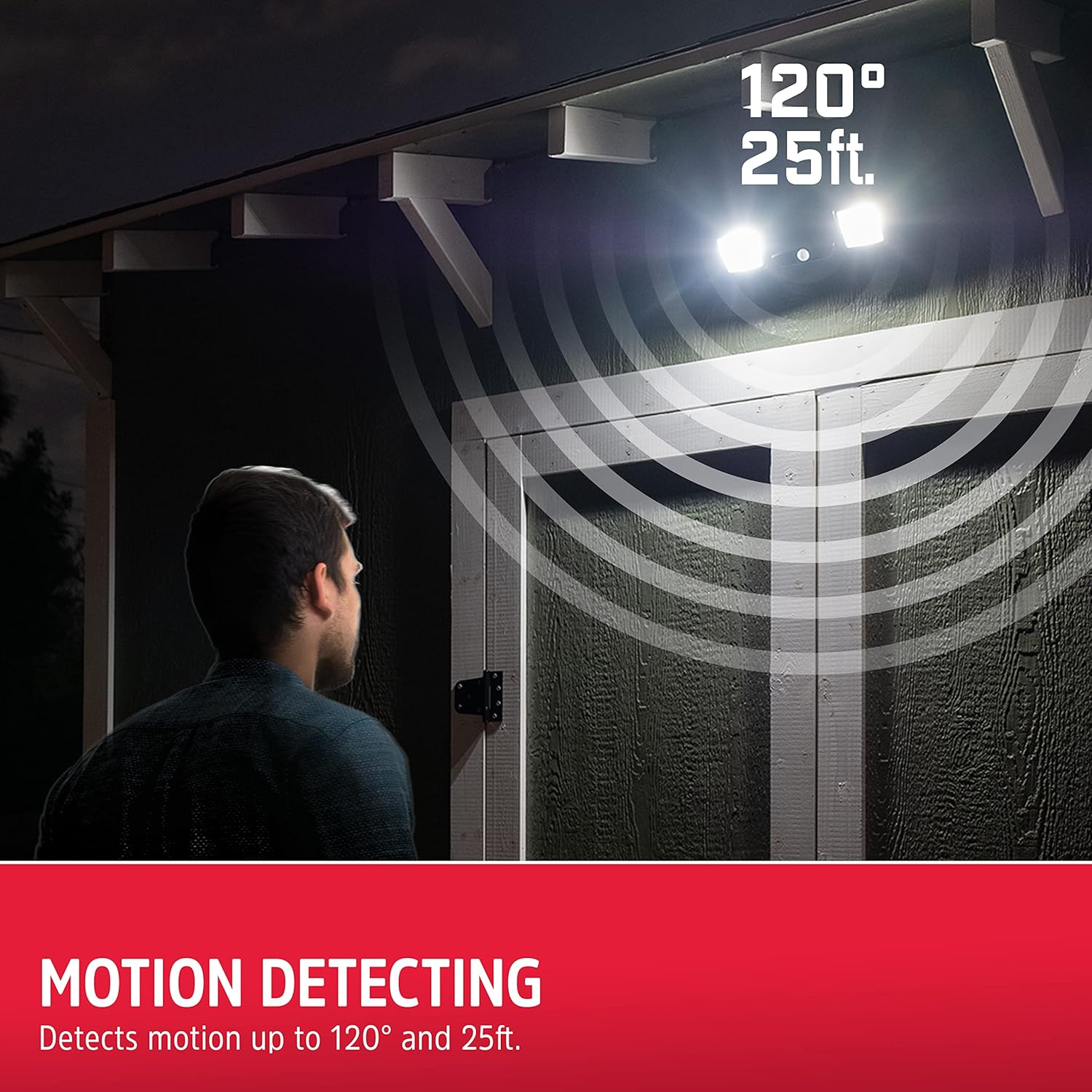
This image depicts the flood light installed on an outdoor wall, illuminating an area where a person is walking. It visually represents the 120-degree detection angle and 25-foot range, showing how the light activates upon detecting movement.
3.2 Adjusting Light Position
The dual light heads and base are designed for maximum flexibility to direct light where it's needed most.
- Each light head can be rotated vertically up to 280 degrees.
- The entire base of the light can be swiveled horizontally up to 180 degrees.
- Gently adjust the light heads and base to achieve the desired illumination angle and coverage.

This diagram shows the flood light with arrows indicating its range of motion: 180 degrees horizontal swivel for the base and 280 degrees vertical rotation for each light head. This highlights the product's flexibility in directing light.
4. Maintenance
4.1 Battery Replacement
When the light output diminishes or the unit stops activating, it is time to replace the batteries.
- Remove the flood light unit from its mounting plate.
- Open the battery compartment.
- Remove the old D batteries and dispose of them according to local regulations.
- Insert 4 new D batteries, ensuring correct polarity.
- Close the battery compartment and reattach the unit to the mounting plate.
4.2 Cleaning
To ensure optimal performance and longevity, periodically clean the flood light.
- Wipe the exterior of the light with a soft, damp cloth.
- Do not use abrasive cleaners or solvents, as these may damage the finish or components.
- Ensure the motion sensor lens is clear of dirt and debris for proper operation.
4.3 Weather Resistance
The Energizer 40776 is designed to be weather-resistant (IP54 rated) for outdoor use. While it can withstand rain and various weather conditions, avoid submerging the unit in water.
5. Troubleshooting
If your flood light is not functioning as expected, refer to the following common issues and solutions:
| Problem | Possible Cause | Solution |
|---|---|---|
| Light does not turn on. |
|
|
| Light stays on too long or turns on frequently without apparent motion. |
|
|
| Light is dim. |
|
|
6. Specifications
| Feature | Detail |
|---|---|
| Model Number | 40776 |
| Light Source | LED |
| Brightness | 800 Lumens |
| Power Source | 4 x D Batteries (not included) |
| Voltage | 6 Volts |
| Wattage | 8 Watts |
| Motion Detection Range | Up to 25 feet |
| Motion Detection Angle | 120 degrees |
| Auto Shut-off Time | 20 seconds after motion stops |
| Light Head Rotation | 280 degrees vertical |
| Base Swivel | 180 degrees horizontal |
| Weather Resistance | IP54 Rated |
| Material | Polyvinyl Chloride |
| Color | Black |
| Product Dimensions | 7.5"L x 5.4"W x 4.4"H |
| Item Weight | 1.04 pounds |
| UPC | 030878407762 |

This image shows the Energizer 40776 flood light with a silhouette of a person for scale, indicating its dimensions as 4.4 inches (11 cm) in height.
7. Warranty Information
This Energizer 40776 LED Motion-Activated Wireless Flood Light comes with a 1-year warranty from the date of purchase. This warranty covers defects in materials and workmanship under normal use.
For warranty claims or further details, please retain your proof of purchase and contact Energizer customer support.
8. Customer Support
If you have any questions, require assistance with installation, or need troubleshooting help that is not covered in this manual, please contact Energizer customer support.
Please refer to the Energizer official website or product packaging for the most current contact information.


