
Introduction
Thank you for choosing the RECCAZR MP2000 Computer Speakers. These 2.0 channel USB-powered multimedia speakers are designed to provide clear audio for your desktop, laptop, TV, PC, or smartphone. This manual provides essential information for proper setup, operation, and maintenance of your speakers.
Safety Information
Please keep this product away from children. The speakers support a maximum input of 5V 0.5A. Do not exceed this power rating.
Product Overview
Package Contents
- RECCAZR MP2000 Computer Speakers (2 units)
- Integrated USB power cable
- Integrated 3.5mm audio cable
Features
- 2.0 Channel Stereo Sound: Delivers balanced audio for an enhanced listening experience.
- USB Powered: Conveniently powered via a standard USB port (5V 0.5A max).
- 3.5mm Audio Input: Universal compatibility with devices featuring a 3.5mm audio jack.
- In-line Volume Control: Easy access to adjust audio levels.
- Four Diaphragm Design: Engineered for enhanced bass performance.

Image: Front view of a RECCAZR MP2000 speaker, illustrating its 2.0 stereo sound capability with balanced sound quality.
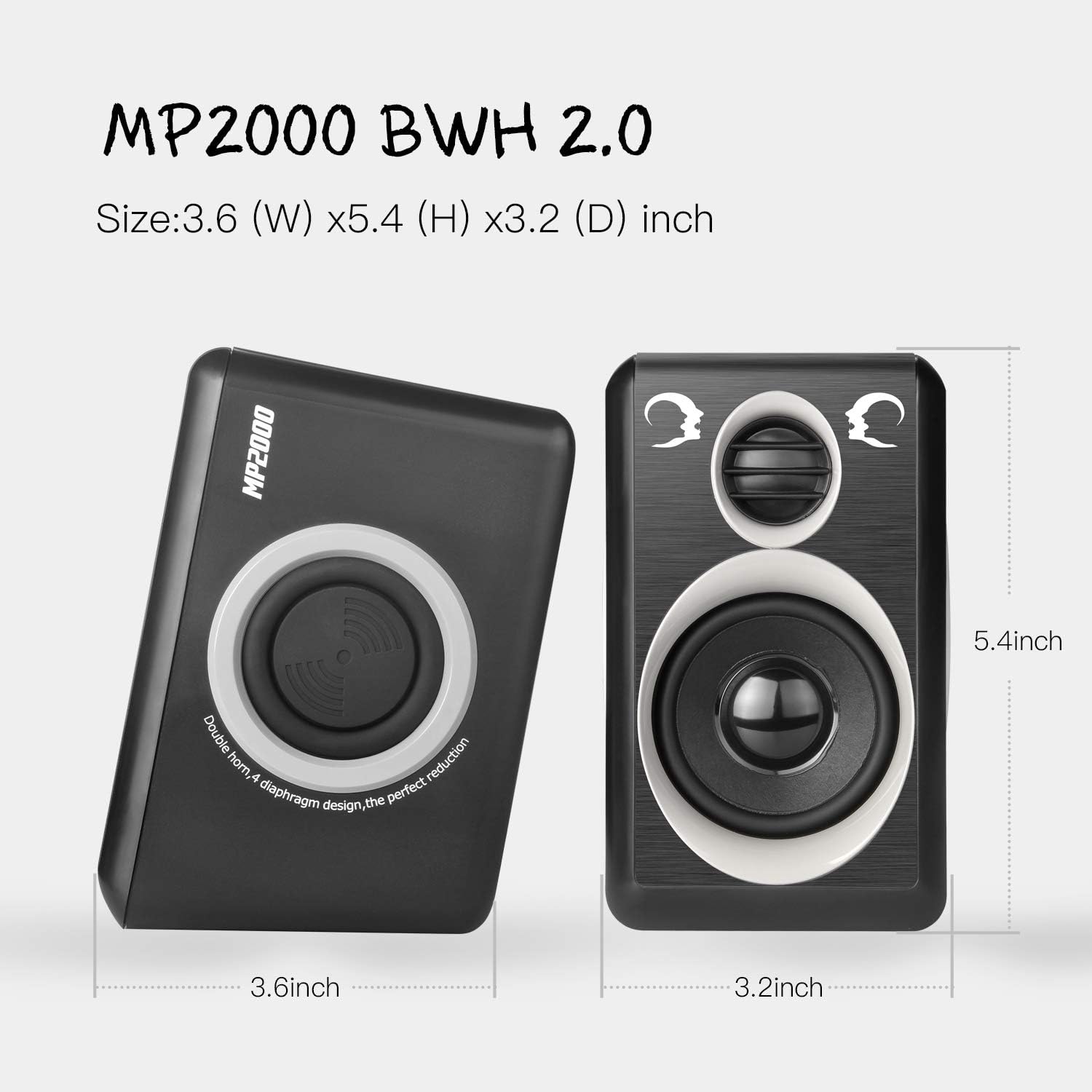
Image: Front and side views of the RECCAZR MP2000 speakers, showing their compact dimensions: 3.6 (W) x 5.4 (H) x 3.2 (D) inches.

Image: Rear view of a RECCAZR MP2000 speaker, highlighting the 4-diaphragm design for enhanced bass effects.
Setup Instructions
- Positioning: Place the two speakers on either side of your computer monitor, TV, or desired listening area. Ensure they are on a stable, flat surface.
- Connect Audio: Insert the 3.5mm audio plug into the audio output jack of your device (e.g., laptop, PC, smartphone, TV).
- Connect Power: Insert the USB plug into an available USB port on your computer, a USB wall adapter, or a power bank. The speakers require 5V 0.5A power.
- Verify Connection: Ensure both the USB and 3.5mm audio plugs are securely connected.

Image: Close-up of the USB and 3.5mm audio plugs connected to a laptop, demonstrating the plug-and-play setup and the in-line volume control.

Image: Diagram showing how to connect the RECCAZR MP2000 speakers to various devices like mobile phones, music players, laptops, and projectors, using the USB power cable and 3.5mm audio jack.
Operating Instructions
- Power On/Off: The speakers power on automatically when the USB cable is connected to a powered USB port. There is no separate power switch.
- Volume Adjustment: Use the in-line rotary volume control located on the cable to adjust the sound level. Turn the knob clockwise to increase volume and counter-clockwise to decrease it. You can also adjust the volume from your connected device.
- Audio Playback: Once connected and powered, play audio from your device. The sound will be routed through the RECCAZR MP2000 speakers.

Image: A close-up of the in-line volume control unit on the speaker cable, indicating its position and function for quick volume adjustments.
Maintenance
- Cleaning: Use a soft, dry cloth to clean the speaker surfaces. Do not use liquid cleaners or abrasive materials.
- Storage: When not in use for extended periods, disconnect the speakers from power and store them in a cool, dry place.
- Cable Care: Avoid bending or crimping the cables excessively to prevent damage.
- Environment: Do not expose the speakers to extreme temperatures, humidity, or direct sunlight.
Troubleshooting
| Problem | Possible Cause | Solution |
|---|---|---|
| No sound from speakers |
|
|
| Sound is distorted or unclear |
|
|
| Speakers make popping/crackling noise |
|
|
Specifications
| Feature | Detail |
|---|---|
| Model Name | MP2000 |
| Speaker Type | Multimedia, 2.0 Channel Stereo |
| Power Source | USB Powered (5V 0.5A max) |
| Connectivity Technology | Auxiliary (3.5mm), USB |
| Speaker Maximum Output Power | 6 Watts |
| Frequency Response | 18 KHz |
| Impedance | 4 Ohms |
| Product Dimensions (each speaker) | 37.4"D x 90.55"W x 57.09"H (Note: These dimensions seem unusually large for small computer speakers, please refer to product images for visual scale.) |
| Item Weight | 1.32 Pounds |
| Material | Plastic |
| Compatible Devices | Laptop, Personal Computer, Television, Smartphone |
| Included Components | USB cable, 3.5mm audio cable |
Warranty and Support
The RECCAZR MP2000 Computer Speakers come with a Limited Warranty. Please refer to the warranty card included in your product packaging for specific terms and conditions.
For technical support or customer service inquiries, please contact RECCAZR customer support. Contact information can typically be found on the product packaging or the official RECCAZR website.