
Introduction
This instruction manual provides detailed guidance for the safe and efficient use of your Lenco Xemio-768 Digital Media Player. Please read this manual thoroughly before operating the device and retain it for future reference.
The Lenco Xemio-768 is a versatile digital media player capable of playing MP3/MP4 files, displaying photos, reading e-books, and recording voice memos. It features Bluetooth connectivity for wireless audio and an expandable memory via Micro SD card.
Package Contents
- Lenco Xemio-768 Digital Media Player
- USB Cable
- In-Ear Headphones
- 8GB Micro SD Card (pre-installed or included separately)
- Instruction Manual (this document)
Device Overview
Familiarize yourself with the various parts and controls of your Xemio-768 player.
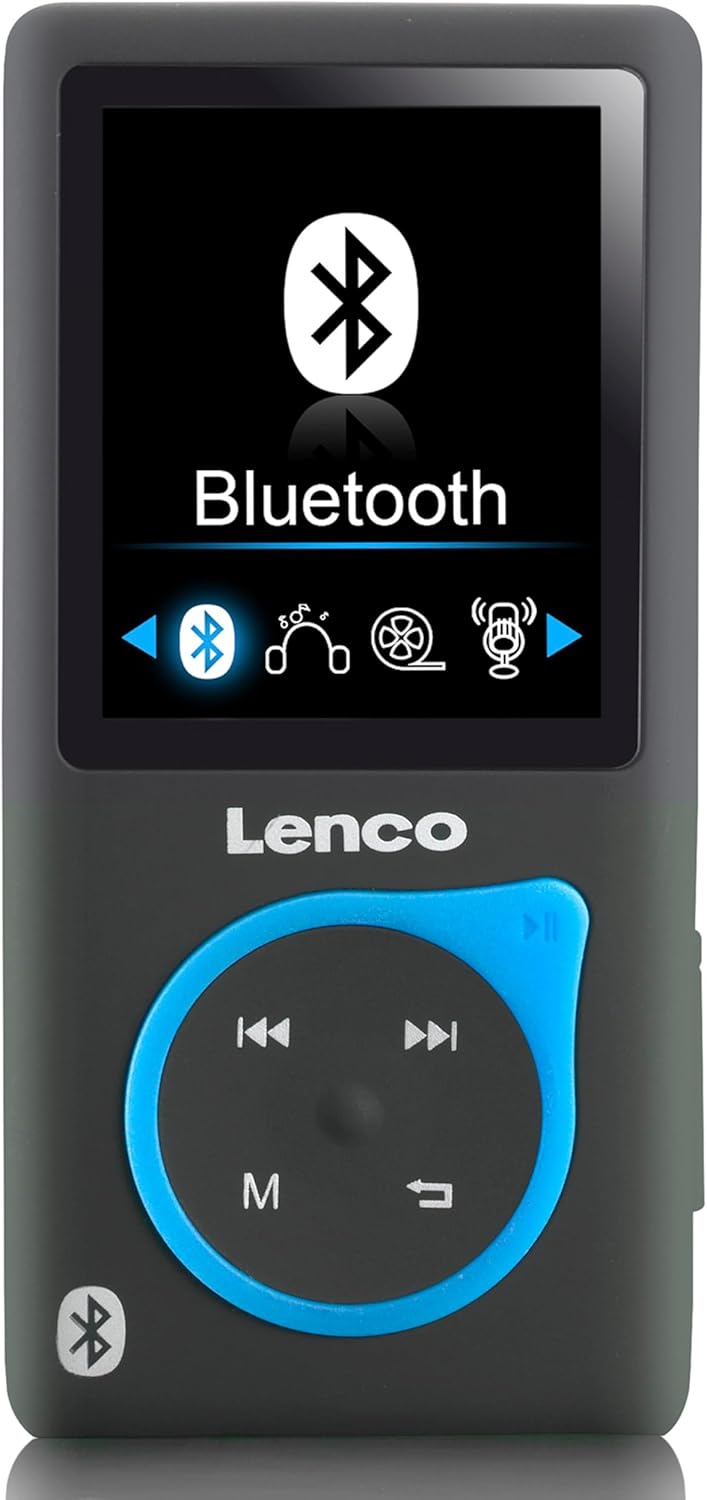
Image 1: Front view of the Lenco Xemio-768 Digital Media Player. The screen displays the Bluetooth menu option. Below the screen are the Lenco logo and a circular control pad with playback buttons (previous, next, play/pause) and a menu button (M). A Bluetooth symbol is also visible on the bottom left of the device.
Key Controls and Ports:
- 1.8-inch TFT LCD Screen: Displays menus, media, and settings.
- Control Pad: Navigation and playback controls (Play/Pause, Next/Fast Forward, Previous/Rewind, Menu).
- Micro USB Port: For charging and data transfer.
- Micro SD Card Slot: For memory expansion (supports up to 32GB).
- 3.5 mm Headphone Jack: For wired headphone connection.
- Built-in Microphone: For voice recording.
Setup
1. Charging the Device
- Connect the small end of the included USB cable to the Micro USB port on the player.
- Connect the larger end of the USB cable to a powered USB port on a computer or a USB wall adapter (not included).
- The battery indicator on the screen will show charging status. A full charge typically takes approximately 3 hours.
- Disconnect the USB cable once fully charged.
2. Inserting a Micro SD Card (Optional)
The player comes with an 8GB Micro SD card. If you wish to expand the storage, you can replace it with a card up to 32GB.
- Locate the Micro SD card slot on the side of the player.
- Gently insert the Micro SD card with the gold contacts facing down until it clicks into place.
- To remove, gently push the card in until it clicks, then release, and it will spring out.
3. Connecting Headphones
- Wired Headphones: Plug the 3.5 mm jack of the included in-ear headphones (or your own compatible headphones) into the headphone port on the player.
- Bluetooth Headphones/Speakers: Refer to the "Bluetooth Connectivity" section under Operating for wireless connection instructions.
4. Transferring Files
- Connect the player to your computer using the USB cable.
- The player will appear as a removable disk drive on your computer.
- Drag and drop your desired music (MP3, WMA), videos (AMV, AVI), photos (JPG, BMP, GIF), or e-books (TXT) into the appropriate folders on the player's internal memory or Micro SD card.
- Once files are transferred, safely eject the removable disk from your computer before disconnecting the USB cable.
Operating Instructions
Power On/Off
- To power on, press and hold the Power button (usually on the side) until the screen lights up.
- To power off, press and hold the Power button until the device shuts down.
Menu Navigation
- Use the directional buttons on the control pad to navigate through menu options.
- Press the central button (often Play/Pause) to select an option.
- Press the 'M' (Menu) button to go back to the previous menu or to access context-sensitive options during playback.
Music Playback
- From the main menu, select "Music".
- Browse through your folders and files to find the desired track.
- Press the central button to play the selected track.
- Use the Previous and Next buttons to skip tracks.
- Press the central button again to pause/resume playback.
Video Playback
- From the main menu, select "Video".
- Navigate to your video files (AMV, AVI format).
- Select a video to begin playback.
Photo Viewer
- From the main menu, select "Photos".
- Browse your image files (JPG, BMP, GIF format).
- Select an image to view it.
E-book Reader
- From the main menu, select "E-book".
- Navigate to your text files (TXT format).
- Select a file to open and read.
Voice Recording
- From the main menu, select "Recorder" or "Voice Memo".
- Select "Start Recording" to begin.
- Press the central button to stop recording.
- Recordings are saved and can be accessed from the "Recordings" menu.
Bluetooth Connectivity
- Ensure your Bluetooth headphones or speaker are in pairing mode. Refer to their respective manuals for instructions.
- On the Xemio-768, navigate to the "Bluetooth" menu.
- Select "Search for Devices" or "Pair New Device".
- Once your device appears in the list, select it to initiate pairing.
- Confirm pairing on both devices if prompted.
- Once connected, audio will be routed wirelessly to your Bluetooth device.
Maintenance
Cleaning
- Use a soft, dry, lint-free cloth to clean the device's exterior.
- Do not use abrasive cleaners, alcohol, or solvents, as these may damage the surface.
- Avoid getting moisture into any openings.
Battery Care
- To prolong battery life, avoid fully discharging the battery frequently.
- Charge the device regularly, even if not in use for extended periods.
- Store the device in a cool, dry place away from direct sunlight and extreme temperatures.
Troubleshooting
| Problem | Possible Cause | Solution |
|---|---|---|
| Device does not turn on. | Battery is depleted. | Charge the device using the provided USB cable. |
| Cannot connect via Bluetooth. | Bluetooth device not in pairing mode; interference; device out of range. | Ensure your Bluetooth headphones/speaker are in pairing mode. Move closer to the player. Try restarting both devices. |
| Files are not recognized or played. | Incorrect file format; corrupted file; Micro SD card issue. | Ensure files are in supported formats (MP3, WMA, AMV, AVI, JPG, BMP, GIF, TXT). Check if the Micro SD card is properly inserted or try another card. |
| No sound from headphones. | Headphones not properly connected; volume too low; corrupted audio file. | Check headphone connection. Increase volume. Test with different headphones or audio files. |
Specifications
- Model: Xemio-768
- Display: 1.8-inch TFT LCD
- Internal Memory: 8 GB (via Micro SD card)
- Expandable Memory: Up to 32 GB (Micro SD card)
- Supported Audio Formats: MP3, WMA
- Supported Video Formats: AMV, AVI
- Supported Image Formats: JPG, BMP, GIF
- Supported E-book Format: TXT
- Connectivity: Bluetooth, Micro USB
- Headphone Jack: 3.5 mm
- Battery Type: Lithium Polymer
- Battery Life: Approximately 3 hours (playback)
- Dimensions: 0.09 x 4.15 x 8.5 cm
- Weight: 28.5 g
Warranty and Support
For warranty information and technical support, please refer to the warranty card included with your product or visit the official Lenco website. Keep your proof of purchase for any warranty claims.


