BENINCA to.GO 2 A Garage Opener Remote Control Instruction Manual
Model: to.GO 2 A
Brand: BENINCA
Introduction
This manual provides comprehensive instructions for the setup, operation, and maintenance of your BENINCA to.GO 2 A Garage Opener Remote Control. Please read this manual thoroughly before using the device to ensure proper function and safety.
Product Overview
The BENINCA to.GO 2 A is a 2-button remote control designed for garage door openers, utilizing ARC 128-bit encoding for enhanced security and reliability. This remote operates on a frequency of 433.92 MHz.

Figure 1: Front view of the BENINCA to.GO 2 A remote control, showing two white buttons and the BENINCA logo.
Key features include:
- ARC 128-bit Encoding: Advanced Rolling Code (ARC) technology provides a unique and inimitable transmission code, significantly enhancing security compared to older 64-bit systems.
- Two Buttons: Allows control of two distinct functions or devices.
- Operating Frequency: 433.92 MHz.
- Durable Design: Constructed from plastic or alloy metal for longevity.

Figure 2: Image illustrating the TO.GO2A model with ARC encoding and 433.92 MHz frequency.

Figure 3: Overview of various BENINCA TO.GO remote control models and their encoding types, highlighting the ARC 128-bit system.
Setup and Programming
The BENINCA to.GO 2 A remote control typically requires programming to your specific garage door opener or receiver. The programming process varies depending on the receiver model. Refer to your garage door opener's manual for specific instructions on how to pair a new remote control.
General Programming Steps (Consult your receiver's manual for exact procedure):
- Access Receiver: Locate the programming button or learn button on your garage door opener's motor unit or external receiver.
- Activate Learning Mode: Press and release the programming button. An indicator light on the receiver will typically illuminate or flash, indicating it is in learning mode.
- Transmit Signal: Within a few seconds, press and hold the desired button on your new BENINCA to.GO 2 A remote control.
- Confirm Pairing: The indicator light on the receiver may flash, change color, or turn off to confirm successful pairing. Release the remote button.
- Test Operation: Test the remote control to ensure it operates your garage door correctly.
Important Notes on ARC Encoding:
The ARC 128-bit encoding provides enhanced security. If you are replacing an older remote or adding a new one to an existing installation, ensure your receiver is compatible with ARC encoding. Some older installations may require a specific procedure or a compatible receiver to utilize ARC remotes.
For detailed information on ARC compatibility and programming, refer to the official BENINCA documentation or website. The image below provides some general guidance on ARC devices and frequently asked questions.
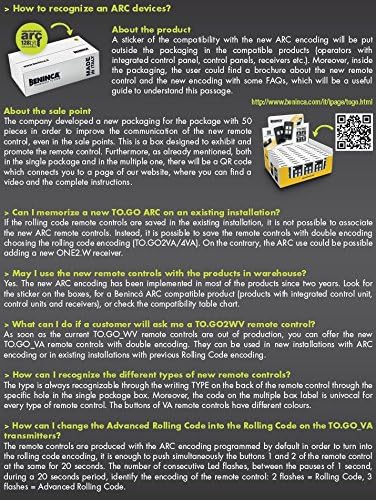
Figure 4: Information on how to recognize ARC devices and answers to frequently asked questions regarding ARC compatibility and programming.
Changing from Advanced Rolling Code to Rolling Code (if applicable):
Some BENINCA transmitters, including the TO.GO_VA series, allow switching between Advanced Rolling Code (ARC) and standard Rolling Code. To change the encoding, simultaneously press and hold buttons 1 and 2 of the remote control for 20 seconds. The remote's LED will flash. 2 flashes indicate Rolling Code, 3 flashes indicate Advanced Rolling Code. This feature may not be available on all models.
Operating Instructions
Once programmed, operating your BENINCA to.GO 2 A remote control is straightforward:
- Opening/Closing: Press the programmed button once to activate your garage door opener. The door will begin to open or close.
- Stopping: Press the same button again while the door is in motion to stop it.
- Range: The remote offers a good operating range. For optimal performance, ensure there are no significant obstructions between the remote and the receiver.
Video Demonstration:
The following video provides a general overview of the BENINCA TO.GO series, showcasing its versatility and design. While not a specific programming guide, it illustrates the product line.
Video 1: "TO GO Everywhere" - A short video showcasing the BENINCA TO.GO remote control series and its applications.
Maintenance
The BENINCA to.GO 2 A remote control requires minimal maintenance.
- Battery Replacement: If the remote's range decreases or the LED indicator does not light up when a button is pressed, the battery may need replacement. Consult the remote's internal compartment for battery type (typically a coin cell battery) and replacement instructions.
- Cleaning: Wipe the remote with a soft, dry cloth. Do not use abrasive cleaners or immerse the remote in water.
- Storage: Store the remote in a dry place, away from extreme temperatures and direct sunlight.
Troubleshooting
| Problem | Possible Cause | Solution |
|---|---|---|
| Remote does not work. | Battery is dead or low. | Replace the battery. |
| Remote not programmed. | Remote has not been paired with the receiver. | Follow the programming steps in the "Setup and Programming" section. |
| Limited range. | Low battery or interference. | Replace battery. Check for sources of radio interference near the receiver. |
| Remote works intermittently. | Weak battery, interference, or receiver issue. | Replace battery. Reprogram the remote. Consult your garage door opener's manual. |
Specifications
- Model: to.GO 2 A
- Brand: BENINCA
- Encoding: ARC 128-bit
- Frequency: 433.92 MHz
- Buttons: 2
- Color: Black
- Material: Plastic or Alloy Metal
- Operation Mode: Automatic
- UPC: 712038744701
- ASIN: B07CV1QL2T
- Date First Available: May 3, 2018
Warranty and Support
For warranty information and technical support, please refer to the official BENINCA website or contact your authorized BENINCA dealer. Keep your purchase receipt as proof of purchase for warranty claims.
Manufacturer: BENINCA
Website: www.beninca.com


