
Introduction
This manual provides essential information for the safe and efficient operation of your Behringer EUROPORT MPA200BT portable PA system. Please read these instructions thoroughly before using the device to ensure proper setup, usage, and maintenance. Retain this manual for future reference.
The Behringer EUROPORT MPA200BT is an all-in-one portable PA system designed for various applications, featuring 200 watts of power, Bluetooth connectivity for audio streaming, and a wireless microphone for vocal performances or presentations. Its battery operation allows for use in locations without direct power access.
Important Safety Instructions
Always follow these basic safety precautions when using electrical equipment:
- Read all instructions before operating the product.
- Do not use this product near water or in wet environments.
- Clean only with a dry cloth.
- Do not block any ventilation openings. Install in accordance with the manufacturer's instructions.
- Do not install near any heat sources such as radiators, heat registers, stoves, or other apparatus (including amplifiers) that produce heat.
- Do not defeat the safety purpose of the polarized or grounding-type plug. A polarized plug has two blades with one wider than the other. A grounding-type plug has two blades and a third grounding prong. The wide blade or the third prong are provided for your safety. If the provided plug does not fit into your outlet, consult an electrician for replacement of the obsolete outlet.
- Protect the power cord from being walked on or pinched, particularly at plugs, convenience receptacles, and the point where they exit from the apparatus.
- Only use attachments/accessories specified by the manufacturer.
- Unplug this apparatus during lightning storms or when unused for long periods of time.
- Refer all servicing to qualified service personnel. Servicing is required when the apparatus has been damaged in any way, such as power-supply cord or plug is damaged, liquid has been spilled or objects have fallen into the apparatus, the apparatus has been exposed to rain or moisture, does not operate normally, or has been dropped.
Package Contents
Upon unpacking your Behringer EUROPORT MPA200BT, please verify that all components are present and in good condition:
- Behringer EUROPORT MPA200BT Portable PA System
- Wireless Microphone (ULM300M)
- USB Receiver for Wireless Microphone (ULM300USB)
- Power Cable
- User Manual (this document)

Image: The Behringer EUROPORT MPA200BT portable PA system shown with its accompanying wireless microphone.
Product Overview: Controls and Connections
Familiarize yourself with the various controls and connection points on your MPA200BT unit.

Image: Rear panel of the MPA200BT, highlighting the main control interface, inputs, and outputs.

Image: Detailed view of the MPA200BT's control panel, including display, rotary encoder, and buttons.
Control Panel Features:
- Display Screen: Shows current settings, input levels, and Bluetooth status.
- Rotary Encoder: Used to navigate menus and adjust parameters. Press to confirm selections.
- PROCESS Button: Activates or deactivates sound processing effects.
- SETUP Button: Enters the system setup menu.
- EXIT Button: Exits current menu or setting.
- ENTER Button: Confirms selections within menus.
- Bluetooth Button: Initiates Bluetooth pairing mode.
Input/Output Connections:
- INPUT 1 & 2 (XLR/TRS Combo Jacks): For connecting microphones or line-level instruments.
- WIRELESS SYSTEM (USB Port): For connecting the ULM300USB wireless microphone receiver.
- MP3 Input (3.5mm Stereo Jack): For connecting external audio players.
- MIX OUTPUT (XLR): For sending the mixed audio signal to another PA system or recording device.
- AC Power Inlet: For connecting the power cable.
Setup
- Power Connection:
Connect the supplied power cable to the AC Power Inlet on the rear of the MPA200BT and then to a suitable power outlet. The unit can also operate on its internal battery.
- Initial Power On:
Press the power switch to turn on the unit. The display will illuminate.
- Positioning:
Place the MPA200BT on a stable, flat surface or mount it on a speaker stand (sold separately). Ensure proper ventilation around the unit.
- Connecting Inputs:
- Wired Microphones/Instruments: Connect to INPUT 1 or INPUT 2 using XLR or 1/4" TRS cables.
- External Audio Players: Connect to the MP3 Input using a 3.5mm stereo cable.
Operating Instructions
Bluetooth Audio Streaming

Image: The Bluetooth logo, representing wireless audio streaming capability.
- Ensure the MPA200BT is powered on.
- Press the Bluetooth button on the control panel. The Bluetooth icon on the display will flash, indicating pairing mode.
- On your smartphone or Bluetooth-enabled device, navigate to the Bluetooth settings and select "BEHRINGER MPA200BT" from the list of available devices.
- Once paired, the Bluetooth icon on the MPA200BT display will stop flashing and remain solid.
- You can now stream audio from your device to the MPA200BT. Adjust the volume using your device's controls and the MPA200BT's master volume.
Wireless Microphone Usage (ULM300M/ULM300USB)
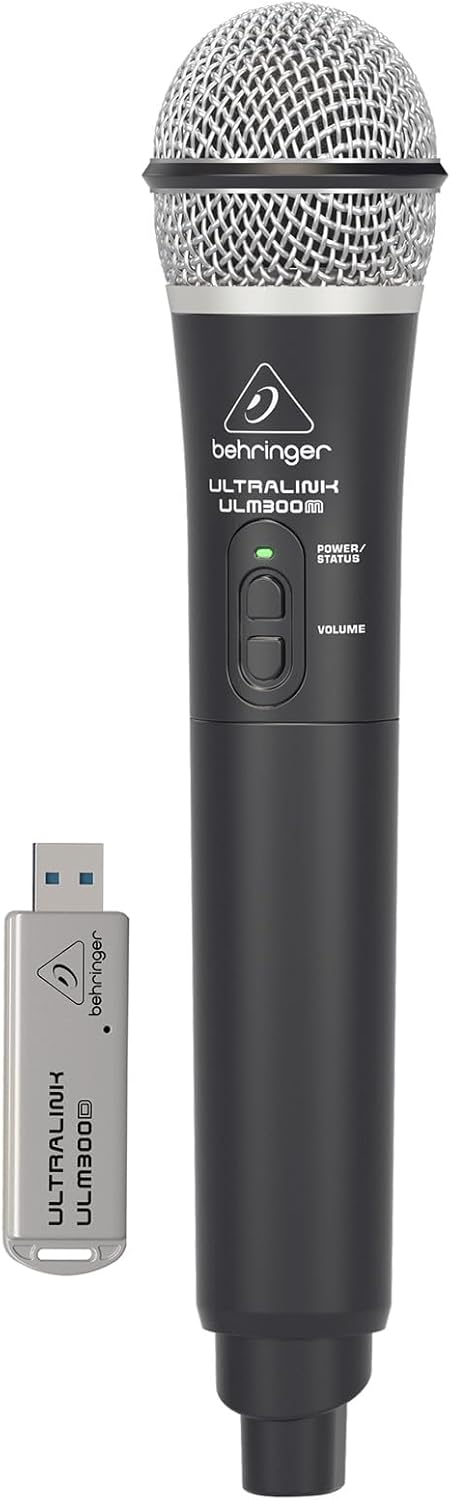
Image: The Behringer ULM300M wireless microphone shown with its USB receiver, the ULM300USB.
- Insert the ULM300USB receiver into the WIRELESS SYSTEM USB port on the MPA200BT.
- Ensure the ULM300M wireless microphone has fresh batteries installed.
- Power on the wireless microphone. The status LED on both the microphone and the receiver should indicate a successful connection (usually a solid green light).
- Adjust the microphone's volume using the controls on the microphone itself and the MPA200BT's input gain settings.
Remote Control via Smartphone App

Image: A smartphone screen showing the graphical user interface of the Behringer remote control application, used to manage the PA system settings.
The MPA200BT can be controlled remotely using a dedicated smartphone application. This allows for adjustments to volume, EQ, and effects from a distance.
- Download the official Behringer MPA200BT control app from your device's app store (iOS/Android).
- Ensure your smartphone is connected to the MPA200BT via Bluetooth (as described in the "Bluetooth Audio Streaming" section).
- Open the app. It should automatically detect and connect to your MPA200BT unit.
- Use the app's interface to control various parameters of the PA system.
Battery Operation
The MPA200BT features an internal rechargeable battery for portable use.
- The battery charges automatically when the unit is connected to AC power.
- A battery level indicator on the display shows the remaining charge.
- For optimal battery life, fully charge the unit before its first use and periodically when not in use for extended periods.
Maintenance
- Cleaning: Use a soft, dry cloth to clean the exterior of the unit. Do not use abrasive cleaners or solvents.
- Storage: When not in use, store the MPA200BT in a cool, dry place, away from direct sunlight and extreme temperatures.
- Battery Care: If storing for extended periods, ensure the battery is partially charged (around 50%) and recharge it every few months to prevent deep discharge.
- Ventilation: Ensure that the ventilation openings are not obstructed during operation to prevent overheating.
Troubleshooting
| Problem | Possible Cause | Solution |
|---|---|---|
| No power | Power cable not connected; unit not switched on; battery depleted. | Check power cable connection; ensure power switch is ON; charge battery. |
| No sound output | Volume too low; input source not connected or selected; faulty cable; microphone off. | Increase master volume and input gain; check input connections; test cables; ensure microphone is powered on and paired. |
| Bluetooth pairing fails | MPA200BT not in pairing mode; device too far; interference. | Press Bluetooth button to enter pairing mode; move device closer; restart both devices. |
| Wireless microphone not working | USB receiver not connected; microphone off; depleted batteries in microphone; interference. | Ensure ULM300USB is fully inserted; power on microphone; replace microphone batteries; ensure clear line of sight. |
| Squealing/Feedback | Microphone too close to speaker; microphone gain too high. | Move microphone further from speaker; reduce microphone input gain. |
Specifications
| Feature | Detail |
|---|---|
| Model | EUROPORT MPA200BT |
| Output Wattage | 200 Watts |
| Power Source | Battery Powered / AC Power |
| Connectivity Technology | Bluetooth |
| Number of Channels | 2 |
| Item Weight | 12.1 kg (26.6 lbs) |
| Product Dimensions (L x W x H) | 11.02 x 10.11 x 16.53 inches |
| Mounting Type | Tabletop |
| Compatible Devices | Smartphone |
| Manufacturer | Music Tribe US |
Warranty and Support
For detailed warranty information and technical support, please refer to the official Behringer website or contact their customer service. Keep your purchase receipt as proof of purchase.
Online Resources: www.behringer.com
Manufacturer: Music Tribe US
Official Product Videos
No relevant official product videos from the seller were found in the provided data for embedding.


