
1. Introduction
This manual provides detailed instructions for the installation, operation, and maintenance of your Furrion FS5W 5-inch Outdoor RV Speaker. Please read this manual thoroughly before using the product to ensure proper function and safety.
The Furrion FS5W is designed to deliver quality audio in an RV environment, projecting sound from your TV and radio. Its robust design is suitable for outdoor use within an RV setting.
2. Safety Information
WARNING: Failure to follow these safety instructions could result in fire, electric shock, or other injury or damage.
- Ensure all power is disconnected before installation or maintenance.
- This speaker is designed for 12V power systems, typical in RVs. Ensure proper voltage and polarity when connecting.
- While designed for outdoor RV use, the speaker is not waterproof. Do not expose it to direct water immersion or extreme weather conditions.
- Only use accessories and attachments specified by the manufacturer.
- Keep out of reach of children.
3. Package Contents
Carefully unpack the box and ensure all items are present and in good condition. If any items are missing or damaged, contact your dealer immediately.
- Furrion FS5W 5-inch Outdoor RV Speaker (1 unit)
4. Product Overview
The Furrion FS5W speaker is designed for integration into your RV's audio system. It features a 5-inch driver for clear sound reproduction.
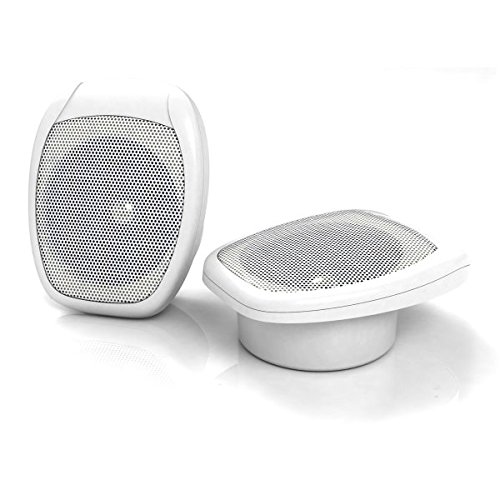
Figure 1: Furrion FS5W 5-inch Outdoor RV Speaker. This image shows the front view of the white speaker unit.
Key Features:
- Projects sound from TV and radio sources.
- Designed for mounting within an RV environment.
- White finish to complement RV interiors.
5. Setup and Installation
Proper installation is crucial for optimal performance and safety. If you are unsure about any steps, consult a qualified technician.
5.1 Mounting
- Choose Location: Select a suitable mounting location within your RV that allows for proper sound dispersion and access for wiring. Consider the ceiling mount specification.
- Prepare Opening: If flush mounting, carefully cut an opening in the mounting surface according to the speaker's dimensions. Ensure no wires or structural components are damaged.
- Secure Speaker: Insert the speaker into the opening and secure it using the provided mounting hardware. Ensure it is firmly attached to prevent vibration.
5.2 Wiring
- Power Connection: Connect the speaker to a 12V power supply. Observe correct polarity (positive to positive, negative to negative) to prevent damage.
- Audio Input: Connect the speaker to your RV's audio source (e.g., TV, radio, stereo system) using appropriate audio cables. The speaker is passive, meaning it requires an external amplifier or head unit to function.
- Test Connections: Before finalizing the installation, briefly power on your audio system to confirm sound output and correct wiring.
6. Operating Instructions
Once installed, the Furrion FS5W speaker integrates with your RV's audio system.
6.1 Basic Operation
- Power On: Ensure your RV's audio head unit or amplifier is powered on.
- Select Source: Choose the desired audio source (e.g., TV, radio) from your audio system.
- Adjust Volume: Control the volume through your audio system's controls.
6.2 Bluetooth Connectivity
To use Bluetooth, ensure your audio source (e.g., RV stereo system) is Bluetooth-enabled. Refer to your audio source's manual for pairing instructions, as the speaker is a passive component of the overall system.
6.3 Remote Control
Utilize the remote control provided with your RV's main audio system to manage functions such as power, volume, and source selection, as the speaker integrates with the system's control method.
7. Maintenance
Regular maintenance ensures the longevity and performance of your speaker.
- Cleaning: Wipe the speaker's exterior with a soft, damp cloth. Do not use harsh chemicals or abrasive cleaners.
- Inspection: Periodically check speaker grilles and connections for any signs of damage or corrosion.
- Storage: If the RV is stored for extended periods, ensure the speaker is protected from extreme environmental conditions.
8. Troubleshooting
If you encounter issues with your Furrion FS5W speaker, refer to the following common problems and solutions:
| Problem | Possible Cause | Solution |
|---|---|---|
| No sound output |
|
|
| Distorted sound |
|
|
| Speaker not responding to remote |
|
|
9. Specifications
| Model Number | FS5W |
| Speaker Type | Outdoor, Surround Sound |
| Speaker Size | 5 Inches |
| Subwoofer Diameter | 5 Inches (Note: This refers to the main driver size.) |
| Colour | White |
| Mounting Type | Ceiling Mount |
| Recommended Uses | For Televisions, Radio |
| Power Source | AC (Note: Refers to the power source for the amplifier/head unit that drives the passive speaker.) |
| Voltage | 12 Volts |
| Is Waterproof | False (Note: Implies weather resistance, but not immersion.) |
| Item Weight | 1 kg 10 g |
| Package Dimensions | 23.4 x 18.3 x 9.4 cm |
| Included Components | Speaker |
| Control Method | Remote (Note: Refers to the control method of the integrated audio system.) |
| Wireless Communication Technology | Bluetooth (Note: Refers to the capability of the audio system it integrates with, as this is a passive speaker.) |
10. Warranty and Support
Furrion products are manufactured to high-quality standards. For specific warranty information, please refer to the warranty card included with your purchase or visit the official Furrion website.
For technical support, troubleshooting assistance, or to inquire about replacement parts, please contact Furrion customer service through their official channels.


