
Product Overview
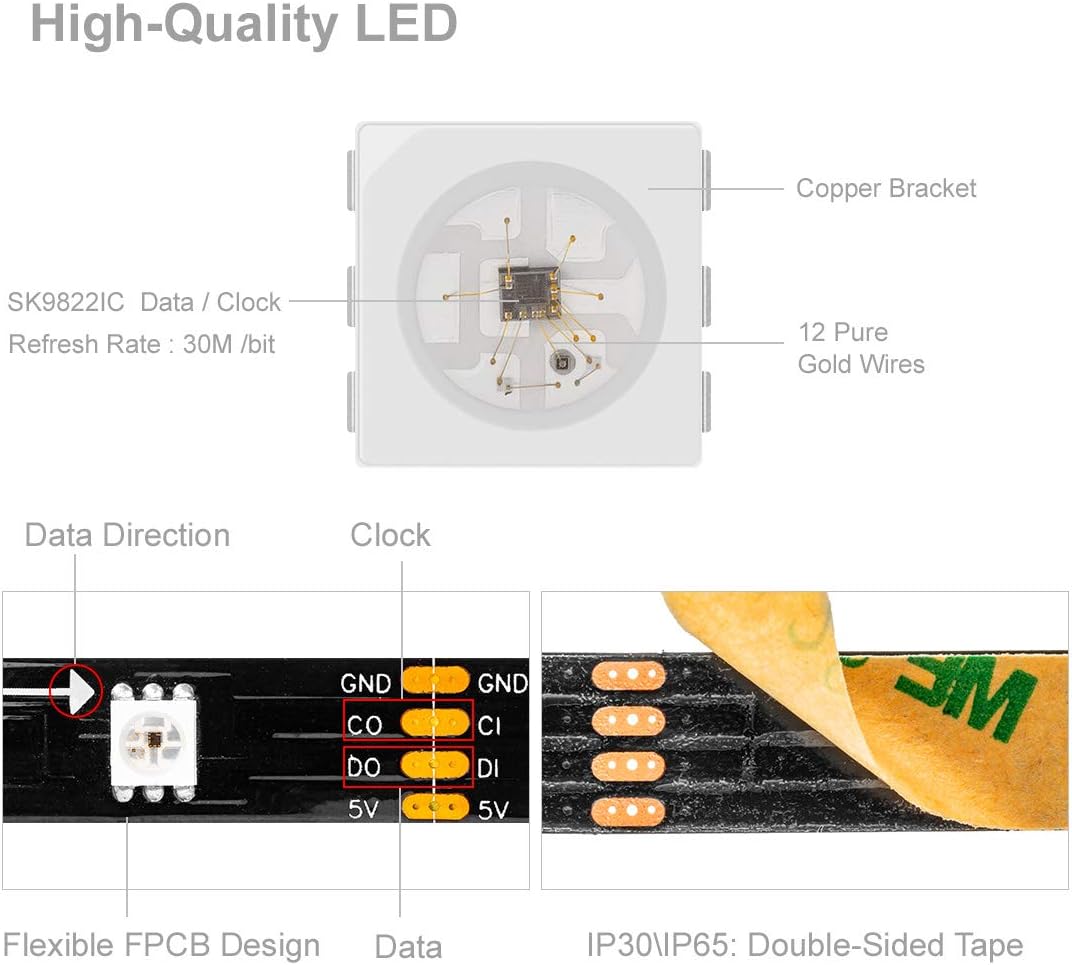
The BTF-LIGHTING SK9822 Individually Addressable LED Strip offers advanced lighting capabilities with its integrated SK9822 IC, which functions similarly to the APA102C. This 5-meter (16.5ft) strip features 30 pixels/LEDs per meter, totaling 150 LEDs, providing full 24-bit color depth. Designed for high intensity and reliability, it utilizes a two-signal system (Data and Clock) for stable and fast performance. The non-waterproof strip comes with a black PCB and 3M adhesive tape for easy installation, making it suitable for various indoor decorative and display applications.

Key Features
- Individually Addressable LEDs: Each SMD5050 LED on the strip contains an SK9822 IC, allowing for individual control of color and brightness. This enables complex lighting effects and animations.
- Dual Signal Control (Data & Clock): Unlike single-wire LED strips, the SK9822 uses separate data and clock lines. This two-signal system ensures more stable data transmission and faster refresh rates, leading to smoother and more reliable lighting performance.
- High Intensity and Reliability: Engineered for durability and consistent performance, these LEDs offer high brightness and a long operational lifespan.
- Easy Installation: The strip features a flexible FPCB (Flexible Printed Circuit Board) and comes with pre-applied 3M adhesive tape on the back for simple peel-and-stick mounting. It includes 4-pin JST connectors on both ends for easy daisy-chaining.
- Versatile Applications: Ideal for creating LED walls, advertising boards, and decorative lighting in hotels, KTVs, bars, and for festive occasions like Christmas or wedding parties.
Technical Specifications
| Property | Value |
|---|---|
| IC Type | SK9822 (Similar to APA102C) |
| LED Type | SMD5050 RGB |
| Gray Level | 256 |
| View Angle | 120° |
| Input Voltage | DC5V |
| Color Depth | Full Color 24-bit |
| FPCB Board Color | Black |
| Power Consumption | 9W/meter (0.3W/LED), Total 45W for 5m |
| Recommended Power Supply | DC5V 10A (50W) |
| Standard Reel Length | 5 meters (16.4 ft) |
| Operating Temperature | -20°C to +50°C |
| Dimensions (LxWxH) | 5000mm x 10mm x 2.13mm |
| Wavelength (nm) | Red: 650nm; Green: 520nm; Blue: 460nm |
| Waterproof Level | IP30 (Non-waterproof) |
| Included Components | 1x 4-pin SM female connector (Power supply and controller not included) |
Setup and Installation
The SK9822 LED strip requires a DC5V power supply and an external controller (not included) to function. Ensure you have these components before beginning installation.
- Prepare the Surface: Clean and dry the surface where the LED strip will be installed. Ensure it is smooth and free of dust or grease for optimal adhesion.
- Measure and Cut (Optional): The LED strip can be cut at designated cut marks (indicated by copper pads) to fit your desired length. Use sharp scissors and cut only along the marked lines. Note: Cutting the strip will require re-soldering connections if you wish to use the cut-off sections.
- Connect Power and Controller: Connect the 4-pin JST connector of the LED strip to your DC5V power supply and compatible SK9822/APA102C controller. Ensure correct polarity: 5V to 5V, GND to GND, Data Out (DO) from controller to Data In (DI) on strip, and Clock Out (CO) from controller to Clock In (CI) on strip.
- Peel and Stick: Carefully peel off the protective backing from the 3M adhesive tape on the back of the LED strip. Press the strip firmly onto the prepared surface, ensuring even contact along its entire length.
- Daisy-Chaining (Optional): For longer installations, multiple strips can be connected end-to-end using the integrated JST connectors. Ensure your power supply is sufficient for the total length of connected strips.

Operation Guide
The BTF-LIGHTING SK9822 LED strip requires an external controller to operate. The type of controller will determine the available lighting modes, effects, and control methods (e.g., remote control, app control, programming via microcontrollers like Arduino or Raspberry Pi).
- Power On: Once the LED strip is correctly connected to a DC5V power supply and a compatible controller, power on the supply.
- Controller Operation: Refer to the specific instructions provided with your chosen LED controller for details on how to select colors, patterns, brightness, and other effects.
- Programming (Advanced Users): For custom lighting sequences and integrations, the SK9822/APA102C protocol is widely supported by various microcontrollers (e.g., Arduino, ESP32, Raspberry Pi) and software libraries (e.g., FastLED, Adafruit NeoPixel).


Maintenance
To ensure the longevity and optimal performance of your BTF-LIGHTING SK9822 LED strip, follow these simple maintenance guidelines:
- Cleaning: Gently wipe the surface of the LED strip with a soft, dry cloth to remove dust. Avoid using abrasive cleaners or excessive moisture, as the strip is non-waterproof (IP30).
- Avoid Physical Stress: Do not bend the strip sharply or apply excessive force, especially near the LED chips or connection points, to prevent damage to the PCB or internal wiring.
- Environmental Conditions: As this is an IP30 non-waterproof product, avoid exposing it to water, high humidity, or extreme temperatures outside the specified operating range (-20°C to +50°C).
- Power Supply Check: Periodically ensure your power supply is providing stable DC5V and is adequately rated for the total length of the LED strip in use.
Troubleshooting
If you encounter issues with your BTF-LIGHTING SK9822 LED strip, refer to the following common problems and solutions:
| Problem | Possible Cause & Solution |
|---|---|
| LED strip does not light up. |
|
| Flickering or inconsistent colors. |
|
| Only part of the strip lights up or colors are incorrect. |
|
Warranty and Support
For warranty information, technical support, or further assistance with your BTF-LIGHTING SK9822 LED strip, please contact BTF-LIGHTING customer service through their official channels or the retailer from whom you purchased the product. Keep your purchase receipt as proof of purchase.
You can visit the official BTF-LIGHTING store on Amazon for more information and contact options: BTF-LIGHTING Amazon Store


