
Introduction
This manual provides detailed instructions for the setup, operation, maintenance, and troubleshooting of your iBasso DX150 High Performance Digital Audio Player. Please read this manual thoroughly before using the device to ensure proper functionality and to maximize your listening experience.
1. Setup
1.1 Package Contents
Verify that all items are present in the package:
- iBasso DX150 Digital Audio Player
- AMP6 Amplifier Card (pre-installed)
- USB-C Cable
- Protective Case (may vary by region/bundle)
1.2 Charging the Device
Before first use, fully charge the iBasso DX150. Connect the provided USB-C cable to the device's USB-C port and to a compatible USB power adapter (not included). The device supports PD2.0 and QC2.0 quick charging protocols.
The DX150 is equipped with a 3.8V 4400mAh Li-polymer battery. A full charge provides approximately 10.5 hours of playback, depending on resolution and headphone impedance.
1.3 Inserting a MicroSD Card
The iBasso DX150 has 32GB of internal eMMC storage. For expanded storage, a microSD card can be inserted into the dedicated slot.

Image: Side view of the iBasso DX150 highlighting the microSD card slot for expandable storage.
- Locate the microSD card slot on the side of the device.
- Gently insert the microSD card with the gold contacts facing down until it clicks into place.
- To remove, press the card inward until it springs out.
Ensure the microSD card is formatted correctly for optimal performance. The device supports various file systems.
1.4 Initial Power On
Press and hold the power button located on the side of the device until the screen illuminates. The device will boot into the Android 6.0 operating system.
2. Operating Instructions
2.1 User Interface and Navigation
The DX150 features a 4.2-inch high-resolution touchscreen. Navigate the Android 6.0 interface by tapping, swiping, and using the physical buttons.

Image: The iBasso DX150's touchscreen interface showing the main music playback menu.
Physical buttons on the side include:
- Power Button: Power on/off, screen on/off.
- Volume Knob: Adjusts playback volume.
- Playback Control Buttons: Play/Pause, Next Track, Previous Track.

Image: Side view of the iBasso DX150, illustrating the physical volume knob and playback control buttons.
2.2 Music Playback
The DX150 supports various audio formats and resolutions, including PCM up to 384kHz (8/16/24/32bits) and native DSD64/128/256. Use the pre-installed music player application or other compatible Android applications to manage and play your audio files.
To play music:
- Tap "All Music" or "My Music" on the home screen.
- Browse by Artist, Album, Genre, or Directory.
- Select a track to begin playback.
- Use the physical buttons or on-screen controls for play/pause, skipping tracks, and volume adjustment.
2.3 Connectivity
- Wi-Fi: Supports 802.11 (b/g/n/ac) on 2.4GHz/5GHz bands for network access and streaming (if supported by installed apps).
- Bluetooth: Features Bluetooth 4.1 for wireless headphone or speaker connection.
- USB DAC Function: The device can function as a USB DAC using the XMOS XU208 and Thesycon USB driver, allowing it to process audio from a computer.
2.4 Replaceable Amplifier Card (AMP6)
The DX150 comes with the AMP6 amplifier card pre-installed. This modular design allows for future upgrades or customization with other compatible amplifier cards (sold separately).
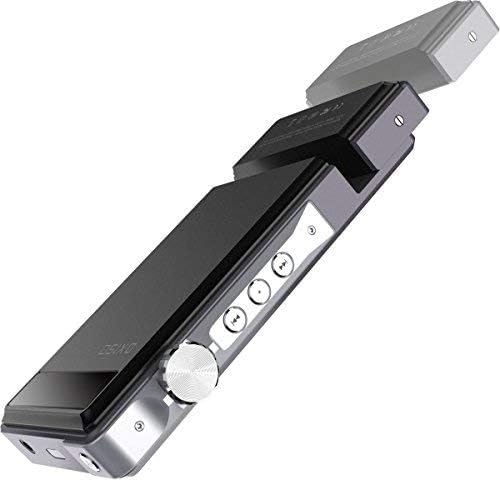
Image: The iBasso DX150 demonstrating the removable amplifier module, allowing for customization.
To replace the AMP card:
- Power off the device completely.
- Locate the screws securing the AMP card to the main unit.
- Carefully remove the screws and slide out the AMP card.
- Align the new AMP card and gently slide it into place, then secure it with the screws.
3. Maintenance
3.1 Cleaning
Use a soft, dry, lint-free cloth to clean the device's screen and body. Avoid using harsh chemicals, solvents, or abrasive materials, as these can damage the finish or screen.
3.2 Battery Care
To prolong battery life:
- Avoid fully discharging the battery frequently.
- Do not expose the device to extreme temperatures.
- If storing the device for an extended period, charge it to approximately 50% before storage.
3.3 Storage
Store the device in a cool, dry place away from direct sunlight and excessive humidity. Use the provided protective case to prevent scratches and minor impacts.
4. Troubleshooting
This section addresses common issues you might encounter with your iBasso DX150.
4.1 Device Not Powering On
- Ensure the device is sufficiently charged. Connect it to a power source and allow it to charge for at least 30 minutes before attempting to power on again.
- Try a different USB-C cable and power adapter.
- Perform a hard reset by holding the power button for an extended period (e.g., 10-15 seconds).
4.2 MicroSD Card Not Detected
- Ensure the microSD card is fully inserted into the slot.
- Try removing and re-inserting the card.
- Verify the card is not damaged and is formatted to a compatible file system (e.g., FAT32, exFAT).
- Test with a different microSD card if available.
4.3 Music Playback Issues (Skipping, Lag)
- Ensure the audio files are not corrupted. Try playing different files.
- Check if the device's internal storage or microSD card is nearly full, which can affect performance.
- Close any unnecessary background applications.
- Consider updating the device's firmware to the latest version (refer to iBasso's official support for instructions).
4.4 Wi-Fi or Bluetooth Connectivity Problems
- Toggle Wi-Fi/Bluetooth off and on in the device settings.
- Ensure you are within range of the Wi-Fi network or Bluetooth device.
- Forget the network/device and attempt to reconnect.
- Restart the DX150.
4.5 App Functionality Limitations (e.g., Google Play Store)
The iBasso DX150 runs on a customized Android 6.0 system. Certain Google services or applications may have limited functionality or require specific firmware versions or workarounds. Refer to official iBasso support forums or documentation for guidance on specific app compatibility or installation methods.
5. Specifications
5.1 General Device Specifications
| Operating System | Android 6.0 |
| CPU | 64bit 8 Cores A53 |
| RAM | 2G LPDDR3 |
| Internal Storage (ROM) | 32G eMMC |
| DAC | Dual AK4490EQ |
| Sample Rate (PCM) | 8kHz-384kHz (8/16/24/32bits) |
| Native DSD | DSD64/128/256 |
| USB DAC Function | XMOS XU208, Thesycon USB driver |
| Wi-Fi | 802.11 (b/g/n/ac) (2.4Ghz/5Ghz) |
| Bluetooth | Bluetooth 4.1 |
| Battery | 3.8V 4400mAh Li-polymer |
| Quick Charge | PD2.0, compatible with QC2.0 |
| Dimensions | 128.5mm x 69mm x 19.5mm (5.06 x 2.72 x 0.77 inches) |
| Weight | 245g (0.54 lbs) |
| Average Play Time | Approximately 10.5 hours (varies with usage) |
| Screen Size | 4.2 Inches |
| Special Feature | Hi-Res Audio, Touch Screen |
| Color | Black |
5.2 AMP6 Module Specifications (Measured with DX150)
2.5mm Balanced Output:
- Output Voltage: 4.8Vrms (without load), 3.7Vrms (32Ω load), 425mW
- THD+N: <0.001% (0.00028% without load @2.4Vrms, 0.00032% 32Ω load @2.4Vrms)
- Frequency Response: 10Hz-40KHz +/-0.5dB
- Dynamic Range: 118dB
- S/N: 118dB
- Crosstalk: -119dB
3.5mm Single Ended Output:
- Output Voltage: 2.4Vrms (without load), 2.4Vrms (32Ω load), 185mW
- THD+N: <0.001% (0.0004% without load @1.2Vrms, 0.0004% 32Ω load @1.2Vrms)
- Frequency Response: 10Hz-40KHz +/-0.5dB
- Dynamic Range: 117dB
- S/N: 117dB
- Crosstalk: -115dB
Line Out:
- Output Voltage: 2.4Vrms
- Frequency Response: 10Hz-40KHz +/-0.5dB
- THD+N: 0.0004% (without load @1.5Vrms)
- Dynamic Range: 118dB
- S/N: 117dB
6. Warranty and Support
6.1 Warranty Information
Warranty terms and conditions for the iBasso DX150 Digital Audio Player are provided by the manufacturer, iBasso, and/or your retailer at the time of purchase. Please retain your proof of purchase for warranty claims. For specific details regarding warranty coverage, duration, and procedures, refer to the documentation included with your product or visit the official iBasso website.
Optional protection plans may be available from your retailer to extend coverage beyond the standard manufacturer's warranty.
6.2 Customer Support
For technical assistance, firmware updates, or further inquiries, please contact iBasso customer support through their official website or the retailer from whom you purchased the device. Always refer to official sources for the most accurate and up-to-date information.


