Introduction
Thank you for choosing the Power Dynamics PD632H Wireless Microphone System. This system provides a practical setup of two 20-channel UHF wireless microphones, suitable for various professional audio applications. This manual will guide you through the setup, operation, and maintenance to ensure optimal performance and longevity of your device.
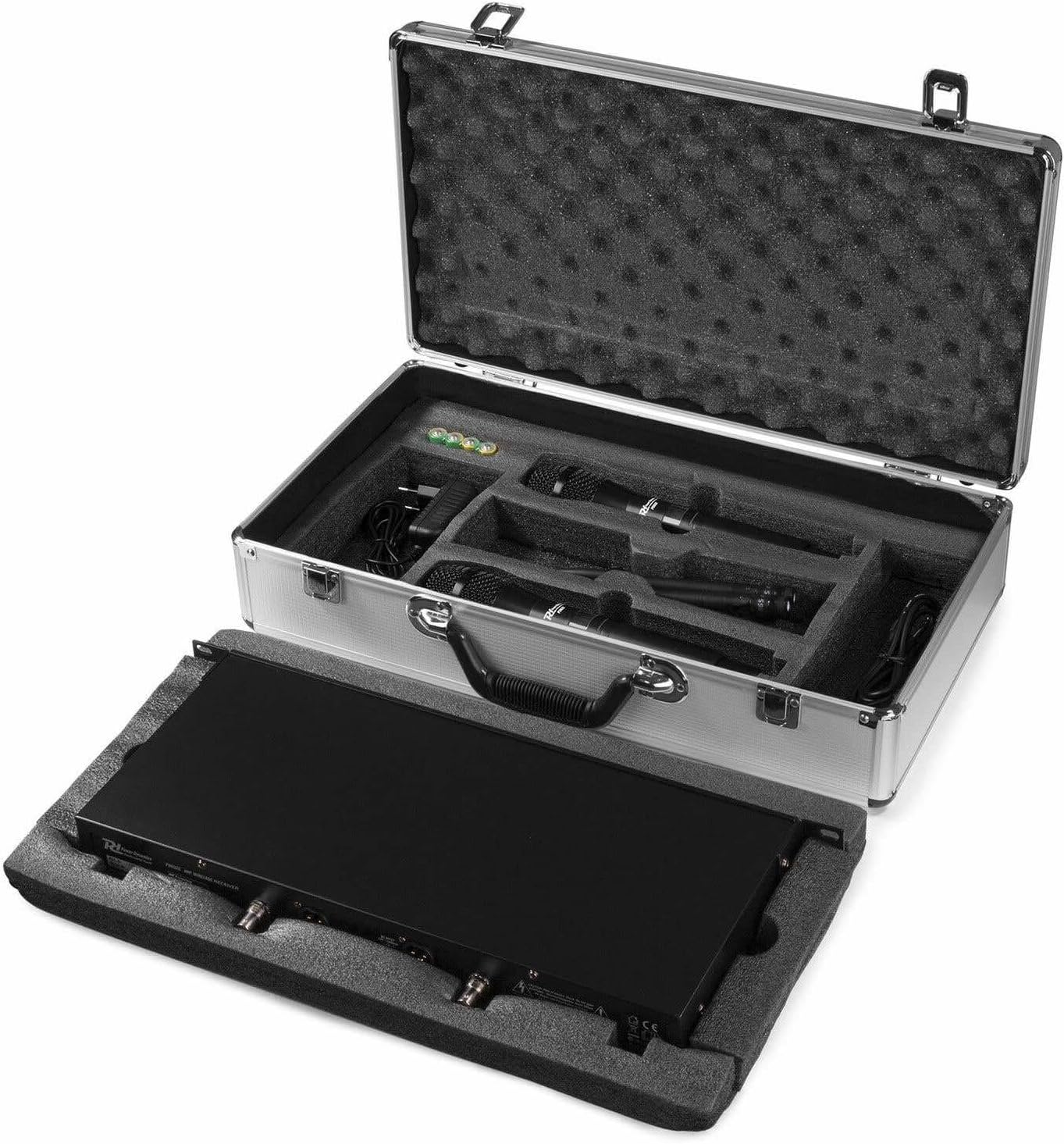
Image: The Power Dynamics PD632H Wireless Microphone System neatly packed in its robust aluminum carrying case.
Package Contents
Please check the package contents upon unboxing to ensure all components are present:
- 1 x Receiver Unit
- 2 x Handheld Microphones
- 1 x Aluminum Carrying Case
- 1 x Power Adapter (12V)
- User Manual (available in Spanish, German, French, English, Dutch, Polish)

Image: All components of the PD632H system, including the receiver, two handheld microphones, power adapter, and cables, organized within the protective carrying case.
Setup Instructions
Follow these steps to set up your Power Dynamics PD632H Wireless Microphone System:
- Unpack the System: Carefully remove all components from the aluminum carrying case.
- Connect the Receiver:
- Attach the antennas to the receiver unit.
- Connect the power adapter to the receiver's 12V DC input and plug it into a power outlet (100-240V ~ | 50/60 Hz).
- Connect the receiver's XLR outputs to your amplifier, mixer, or PA system. The system features two balanced XLR microphone outputs.

Image: The rear panel of the PD632H receiver, highlighting the antenna ports, DC power input, and balanced XLR audio outputs for connection to external audio equipment.
- Install Microphone Batteries: Each handheld microphone requires 2 x 1.5V AA batteries (not included). Open the microphone's battery compartment and insert the batteries, observing polarity.
- Power On: Turn on the receiver unit using the On/Off button on the front panel. Turn on each microphone.
- Frequency Pairing (if necessary): The receiver unit transfers frequency to the microphone via infrared. If pairing is needed, follow the instructions in the "Operating Instructions" section.
Video: How to connect the receiver and audio devices
Video: This video demonstrates the process of connecting the wireless microphone receiver to various audio devices, ensuring proper setup for sound output.
Operating Instructions
Operating your PD632H system is straightforward:
- Power On: Ensure both the receiver and microphones are powered on. The LED power lamp on the receiver should illuminate.
- Frequency Selection: The system features 2 x 20 UHF transmission frequencies (863.000 - 865.000 MHz). The receiver unit can transfer frequencies to the microphones via infrared. Use the controls on the receiver to select and adjust frequencies if needed. Separate adjustable transmission frequencies are available.
- Volume Control: Adjust the volume for each microphone using the volume regulators on the receiver.
- Mute Function: The microphones may include a mute function for temporary silence. Refer to the microphone's specific controls.
- Signal Monitoring: The receiver has an LED radio frequency light to indicate signal reception from the microphones.

Image: The front panel of the PD632H receiver, displaying active channels and frequencies, along with volume controls for each microphone.
Video: Operation video of one-to-two wireless microphone
Video: A demonstration of the operational features of a one-to-two wireless microphone system, including basic usage and controls.
Maintenance
To ensure the longevity and optimal performance of your wireless microphone system, follow these maintenance guidelines:
- Cleaning: Use a soft, dry cloth to clean the receiver and microphones. Avoid using abrasive cleaners or solvents.
- Battery Replacement: Replace microphone batteries promptly when the low battery indicator appears. Always use fresh 1.5V AA batteries.
- Storage: When not in use, store the system in its aluminum carrying case in a cool, dry place, away from direct sunlight and extreme temperatures.
- Antenna Care: Handle antennas with care to prevent bending or breakage.
Troubleshooting
If you encounter issues with your PD632H system, refer to the following common problems and solutions:
- No Sound Output:
- Ensure the receiver is powered on and connected correctly to the amplifier/mixer.
- Check that microphones are powered on and have fresh batteries.
- Verify that the microphone volume controls on the receiver are not set to minimum.
- Confirm that the microphones are properly paired with the receiver (check LED RF light).
- Interference or Poor Sound Quality:
- Change the operating frequency on the receiver to avoid interference from other wireless devices. The system offers 2 x 20 UHF frequencies.
- Ensure there are no obstructions between the microphones and the receiver.
- Keep the receiver away from other electronic devices that may cause interference.
- Check microphone battery levels.
- Microphone Not Pairing:
- Ensure both the microphone and receiver are powered on.
- Follow the infrared (IR) pairing procedure as described in the "Operating Instructions" or the relevant video.
- Ensure the IR windows on both devices are aligned during pairing.
Video: How to reset transmitter and receiver
Video: This video provides a step-by-step guide on how to reset and re-pair the transmitter and receiver units of a wireless microphone system, useful for troubleshooting connection issues.
Specifications
| Feature | Specification |
|---|---|
| Model | PD632H |
| Brand | Power Dynamics |
| Microphone Form Factor | Handheld |
| Number of Channels | 20 (x2 for dual microphones) |
| Transmission Frequency | 863.000 - 865.000 MHz (UHF) |
| Frequency Response | 60 - 18,000 Hz |
| Signal-to-Noise Ratio | > 97 dB |
| Receiver Connections | 2 x XLR Microphone Outputs |
| Microphone Power | 2 x 1.5V AA batteries (not included) |
| Receiver Power | 100 - 240 V ~ | 50/60 Hz (via 12V adapter) |
| Receiver Dimensions (WxHxL) | Approx. 42 x 4.4 x 22 cm |
| Receiver Weight | Approx. 1.7 kg |
| Microphone Dimensions (LxØ) | Approx. 25 x 5 cm |
| Microphone Weight | Approx. 400 g |
| Special Features | Rack-mountable (48 cm), PLL technology, Infrared frequency transfer |
Warranty and Support
For warranty information and technical support, please refer to the documentation provided with your purchase or visit the official Power Dynamics website. Keep your proof of purchase for any warranty claims.
For further assistance, you may contact Power Dynamics customer service through their official channels. The user manual included in the package is available in multiple languages including Spanish, German, French, English, Dutch, and Polish.
Official website: www.power-dynamics.eu