
1. Introduction
Thank you for choosing the Baseus Encok S06 Magnetic Bluetooth In-Ear Earphones. This manual provides essential information for the proper setup, operation, maintenance, and troubleshooting of your new earphones. Please read this manual thoroughly before use to ensure optimal performance and longevity of the product.
The Baseus Encok S06 features a dual battery design for extended playback, Bluetooth 4.1 for stable connectivity, and a magnetic design for convenient storage. It includes an in-built microphone with CVC Noise Suppression and a 3-button remote for easy control of music and calls.

Image 1.1: Overview of the Baseus Encok S06 Earphones.
This image displays the complete Baseus Encok S06 earphones, highlighting their in-ear design, magnetic earbuds, and the inline control module. The black color and sleek design are visible.
2. What's in the Box
Upon unboxing your Baseus Encok S06 earphones, please verify that all the following components are present:
- Baseus Encok S06 Earphones
- Ear-hooks (various sizes)
- Ear-muffs (small and big sizes)
- Charging Cable (Micro USB)

Image 2.1: Contents of the product package.
This image shows all items included in the Baseus Encok S06 package: the earphones themselves, two pairs of ear-hooks, two pairs of ear-muffs (small and large), and a Micro USB charging cable.
3. Setup
3.1 Charging the Earphones
Before first use, fully charge your earphones.
- Locate the charging port on the inline control module.
- Connect the provided Micro USB charging cable to the port.
- Connect the other end of the cable to a USB power source (e.g., computer USB port, wall adapter).
- The indicator light will show charging status (refer to product specific LED behavior, typically red for charging, blue/off for fully charged).
- Charging typically takes approximately 1-2 hours for a full charge.
3.2 Pairing with a Bluetooth Device
To connect your earphones to a smartphone, tablet, or other Bluetooth-enabled device:
- Ensure the earphones are turned off.
- Press and hold the multi-function button (usually the center button on the inline remote) for approximately 5-7 seconds until the indicator light flashes red and blue alternately. This indicates pairing mode.
- On your device, enable Bluetooth and search for new devices.
- Select "Baseus Encok S06" (or similar name) from the list of available devices.
- Once connected, the indicator light on the earphones will typically flash blue slowly or turn off.
- If prompted for a password, enter "0000".
The earphones will automatically attempt to reconnect to the last paired device when turned on.
4. Operating Instructions
The Baseus Encok S06 features an intuitive 3-button inline remote for easy control.
| Button/Action | Function |
|---|---|
| Multi-function Button (Center) |
|
| Volume Up (+) Button |
|
| Volume Down (-) Button |
|
The magnetic design allows the earbuds to snap together when not in use, preventing tangles and making them easy to wear around your neck.
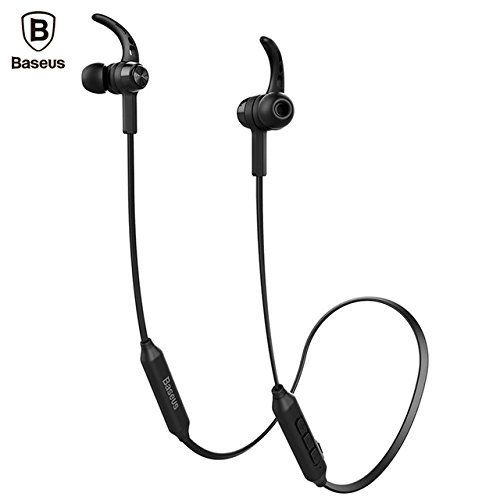
Image 4.1: Close-up of the inline control module.
This image provides a detailed view of the Baseus Encok S06 earphones, specifically highlighting the inline control module with its three buttons and the magnetic earbuds.
5. Maintenance
Proper maintenance ensures the longevity and optimal performance of your earphones.
- Cleaning: Use a soft, dry, lint-free cloth to clean the earphones. Do not use harsh chemicals, cleaning solvents, or strong detergents. For ear tips, remove them and clean with a mild soap solution, then rinse thoroughly and dry completely before reattaching.
- Storage: When not in use, store the earphones in a cool, dry place, away from direct sunlight and extreme temperatures. The magnetic design helps keep the cables tangle-free.
- Avoid Moisture: Do not expose the earphones to water or excessive moisture. While designed for daily use, they are not waterproof.
- Handle with Care: Avoid dropping the earphones or subjecting them to strong impacts. Do not pull on the cable excessively.
6. Troubleshooting
If you encounter issues with your Baseus Encok S06 earphones, refer to the following common solutions:
| Problem | Possible Cause / Solution |
|---|---|
| Earphones won't turn on. |
|
| Cannot pair with device. |
|
| No sound or low volume. |
|
| Call quality is poor. |
|
7. Specifications
| Feature | Detail |
|---|---|
| Model Name | ENCKS6 |
| Brand | Baseus |
| Connectivity Technology | Wireless (Bluetooth) |
| Wireless Communication Technology | Bluetooth 4.1 |
| Ear Placement | In Ear |
| Form Factor | In Ear |
| Control Method | Button (3-button inline remote) |
| Special Features | Magnetic design, Built-in microphone with CVC Noise Suppression, Dual Battery |
| Item Weight | 60 Grams |
8. Warranty and Support
8.1 Warranty Information
This product comes with a 6-month warranty provided by the manufacturer from the date of purchase. Please retain your proof of purchase for warranty claims. The warranty covers manufacturing defects and malfunctions under normal use. It does not cover damage caused by misuse, accidents, unauthorized modifications, or normal wear and tear.
8.2 Customer Support
For further assistance, technical support, or warranty inquiries, please contact Baseus customer service through their official website or the retailer from whom you purchased the product.
Important: Do not attempt to disassemble or repair the earphones yourself, as this will void the warranty.