
1. Introduction
The AdirOffice ADI682-48 Key Security Cabinet is designed for secure and organized storage of keys. Constructed from durable 16-gauge steel with a scratch-resistant finish, this wall-mounted cabinet provides long-term reliability and enhanced protection for your keys. It features a continuous piano hinge for optimal security and durability. The cabinet is available in various capacities, including 48 key slots, and includes key tags for efficient organization. Its design accommodates larger key rings, eliminating the need to remove keys from their rings for storage. This model is equipped with a combination lock, offering over 1,000 possible combinations that can be reset as needed, providing convenient access for authorized users.

Figure 1: Front view of the AdirOffice ADI682-48 Key Security Cabinet.
2. Package Contents
Please verify that all components are present before proceeding with installation and setup:
- AdirOffice ADI682-48 Key Security Cabinet
- Key Tags (quantity corresponds to cabinet capacity)
- Mounting Hardware (screws and wall anchors)
3. Safety Information
- Ensure the cabinet is mounted to a structurally sound wall capable of supporting its weight and the weight of its contents.
- Use appropriate tools and follow all safety precautions during installation.
- Keep the combination confidential and store it in a secure location separate from the cabinet.
- Do not allow children to play with the cabinet or its locking mechanism.
4. Setup and Installation
The AdirOffice Key Security Cabinet is designed for wall mounting. Four pre-drilled holes are located on the back of the unit for easy and stable installation.
4.1 Wall Mounting
- Choose a suitable location on a sturdy wall.
- Hold the cabinet against the wall at the desired height and mark the positions of the four pre-drilled mounting holes.
- Drill pilot holes at the marked locations using an appropriate drill bit for your wall type (e.g., masonry bit for concrete, wood bit for studs).
- Insert the provided wall anchors into the pilot holes if mounting into drywall or masonry.
- Align the cabinet with the drilled holes and secure it to the wall using the provided screws. Ensure the cabinet is firmly attached and stable.
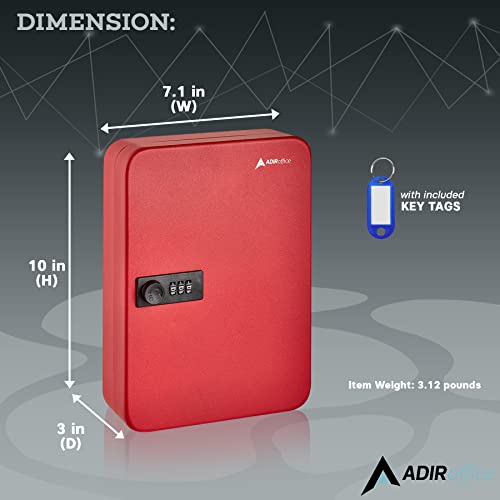
Figure 2: Cabinet dimensions for planning installation.
4.2 Initial Combination Setting
Your cabinet comes with a factory-set combination. Refer to the sticker on the back of the cabinet or inside the door for the default combination. It is highly recommended to change this combination immediately after installation.
5. Operating Instructions
5.1 Opening the Cabinet
- Enter your current combination using the dial or buttons (depending on the specific lock mechanism).
- Turn the handle or knob to unlock the door.
- Open the cabinet door.
5.2 Changing the Combination
The combination lock allows for easy resetting. The exact procedure may vary slightly based on the lock type, but generally involves these steps:
- With the cabinet door open, locate the reset lever or button on the inside of the lock mechanism.
- Move the reset lever to the 'SET' position or press and hold the reset button.
- Enter your new desired combination.
- Return the reset lever to the 'NORMAL' position or release the reset button.
- Test the new combination several times with the door open before closing it.
Important:
- Do not close the door until you have successfully tested the new combination.
- Write down your new combination and store it in a secure, memorable location, separate from the cabinet.

Figure 3: Interior view showing key hooks and organization.
5.3 Organizing Keys
Use the provided key tags to label and organize your keys. Attach each key or set of keys to a tag and hang them on the corresponding hooks inside the cabinet. The cabinet's depth is designed to accommodate larger key rings without interference.
6. Maintenance
The AdirOffice Key Security Cabinet requires minimal maintenance.
- Cleaning: Wipe the exterior with a soft, damp cloth. Avoid abrasive cleaners or solvents that could damage the finish.
- Lock Mechanism: The combination lock is designed for long-term use. Do not lubricate the lock mechanism unless specifically instructed by the manufacturer.
- Hinge: The continuous piano hinge is robust. Periodically check for any signs of wear or damage.
7. Troubleshooting
7.1 Cabinet Will Not Open
- Incorrect Combination: Ensure you are entering the correct combination. Double-check the sequence and direction of turns if applicable.
- Combination Change Error: If the combination was recently changed, try the old combination as well, in case the change was not successful.
- Lock Malfunction: If the lock mechanism feels jammed or unresponsive, do not force it. Contact customer support for assistance.
7.2 Cabinet Door is Loose
- Mounting Screws: Check if the wall mounting screws are tight. Retighten if necessary.
- Hinge Damage: Inspect the continuous piano hinge for any visible damage or bending. If damaged, contact customer support.
8. Specifications
| Model Number | ADI682-48 |
| Material | 16-Gauge Alloy Steel |
| Color | Red |
| Lock Type | Combination Lock |
| Key Capacity | 48 Keys |
| Mounting Type | Wall Mount |
| Product Dimensions (D x W x H) | 7.62 x 18.03 x 25.4 cm (3 x 7.1 x 10 inches) |
| Item Weight | 1.42 kg (3.13 lbs) |
| Special Feature | Durable, Scratch-resistant finish |
9. Warranty Information
AdirOffice products are manufactured to high-quality standards. This product is covered by the manufacturer's standard warranty against defects in materials and workmanship. Please refer to the warranty card included with your purchase or visit the official AdirOffice website for detailed warranty terms and conditions. Keep your proof of purchase for warranty claims.
10. Customer Support
If you have any questions, require assistance with installation, or need to report a defect, please contact AdirOffice customer support. Contact information can typically be found on the product packaging, the official AdirOffice website, or through your retailer.
When contacting support, please have your product model number (ADI682-48) and proof of purchase readily available.
