
Important Safety Information
- Always operate the metal detector responsibly and in accordance with local laws and regulations.
- Avoid searching in areas where unexploded ordnance or dangerous materials may be present.
- Exercise caution when digging to avoid damaging underground utilities or historical artifacts.
- Keep batteries out of reach of children. Dispose of used batteries properly.
- The Digger knife is sharp. Handle with care and store safely.
Product Overview
The Teknetics T2+ Metal Detector Bundle is a high-performance, multi-purpose professional-grade metal detecting system designed for various treasure hunting and relic recovery applications. This bundle includes the T2+ metal detector, a Tek-Point waterproof pinpointer, and a Digger 12-inch carbon steel digging knife.

Figure 1: Teknetics T2+ Metal Detector Bundle. This image displays the complete bundle, including the T2+ metal detector, Tek-Point pinpointer, and Digger knife.
Included Components:
- Teknetics T2+ Metal Detector
- Tek-Point Waterproof Pinpointer
- Digger 12-inch Carbon Steel Digging Knife
- Free Refurbishment Certificate with Transferable and Extended Warranty
Setup and Assembly
1. Assembling the T2+ Metal Detector
- Attach the Searchcoil: Secure the 11-inch Open-Frame Bi-Axial Searchcoil to the lower stem using the provided bolt and washers. Ensure it is snug but do not overtighten.
- Connect Stems: Insert the lower stem into the middle stem, and then the middle stem into the upper stem (control housing). Adjust the length to a comfortable operating position and secure with the locking collars.
- Mount the Control Housing: Slide the control housing onto the upper stem.
- Wrap the Cable: Carefully wrap the searchcoil cable around the stem, leaving enough slack near the searchcoil for movement. Plug the cable connector into the receptacle on the control housing. Ensure the connection is secure.
- Install Batteries: Open the battery compartment on the control housing. Insert four (4) AA batteries, observing the correct polarity. Close the compartment securely.
2. Tek-Point Pinpointer Setup
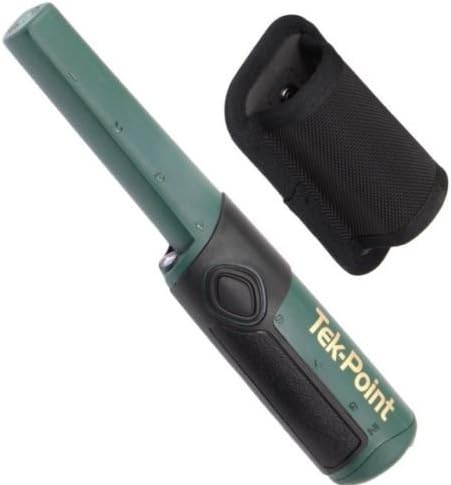
Figure 2: Tek-Point Waterproof Pinpointer. This image shows the Tek-Point pinpointer, a handheld device used for precise target location.
The Tek-Point pinpointer requires a 9V battery (not included). Open the battery cap at the rear of the unit, insert the 9V battery with correct polarity, and securely close the cap. The pinpointer is ready for use once the battery is installed.
3. Digger Knife
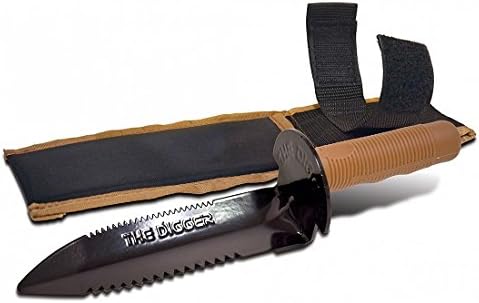
Figure 3: Digger 12-inch Carbon Steel Digging Knife. This image displays the Digger knife with its sheath, designed for excavating targets.
The Digger knife comes with a protective sheath. Always store the knife in its sheath when not in use to prevent injury and protect the blade.
Operating Instructions
1. Teknetics T2+ Metal Detector Operation
- Power On/Off: Press and hold the power button to turn the detector on or off.
- LCD Display: The large, easy-to-read LCD displays target identification (0-99), depth, mineralization bar graph, and current settings.
- Operating Frequency: The T2+ operates at a 13 kHz frequency, suitable for a wide range of targets and ground conditions.
- Discrimination Modes: Utilize the Double Filter Discrimination Modes to filter out unwanted metals (e.g., iron) and focus on desirable targets. Refer to the on-screen prompts for adjusting discrimination levels.
- Boost Mode: Activate Boost Mode for enhanced depth detection, particularly useful for deeply buried targets.
- Ground Balance (FASTGRAB): The Trigger-Actuated FASTGRAB feature allows for quick and accurate ground balancing, essential for stable operation in varying soil conditions. Squeeze the trigger and pump the searchcoil to perform an automatic ground balance.
- Searchcoil Usage: The Waterproof 11-inch Open-Frame Bi-Axial Searchcoil can be submerged in water. Swing the searchcoil slowly and steadily over the search area, keeping it parallel to the ground.
2. Tek-Point Pinpointer Operation
- Power On/Off: Press the power button to turn the pinpointer on. It will emit a short tone or vibration. Press again to turn off.
- Mode Selection: Cycle through the three settings (vibrate only, audible only, vibrate/audible) by pressing the mode button.
- Sensitivity Adjustment: Adjust the sensitivity (low, medium, high) within each mode to fine-tune detection. Higher sensitivity detects smaller or deeper targets but may be more susceptible to interference.
- Waterproof Design: The Tek-Point is waterproof, allowing for use in wet conditions or shallow water. Ensure the battery cap is securely fastened before submersion.
3. Digger Knife Usage
Use the Digger knife to carefully excavate targets located by the metal detector and pinpointer. Its carbon steel construction and serrated edge are designed for efficient digging in various soil types. Always dig away from yourself and others, and be mindful of the surrounding environment.
Maintenance
- Cleaning: After each use, wipe down the metal detector, pinpointer, and Digger knife with a damp cloth to remove dirt and debris. For the T2+ control housing, use a dry cloth. Avoid harsh chemicals.
- Battery Care: Remove batteries from the T2+ and Tek-Point if storing the devices for extended periods to prevent leakage. Replace batteries when the low battery indicator appears or performance degrades.
- Storage: Store all components in a clean, dry place, away from extreme temperatures and direct sunlight. Ensure the Digger knife is sheathed.
- Searchcoil Protection: While the searchcoil is waterproof, avoid unnecessary impacts or abrasions. Consider using a searchcoil cover (sold separately) for added protection.
Troubleshooting
| Problem | Possible Cause | Solution |
|---|---|---|
| Detector does not power on | Dead or incorrectly installed batteries | Check battery polarity; replace with fresh AA batteries. |
| Erratic signals or false positives | Poor ground balance, electromagnetic interference (EMI), high sensitivity | Perform ground balance (FASTGRAB); move away from power lines or other electronics; reduce sensitivity. |
| Poor depth detection | Incorrect ground balance, low sensitivity, Boost Mode not active | Re-ground balance; increase sensitivity; activate Boost Mode. |
| Pinpointer not detecting | Dead battery, incorrect mode/sensitivity | Replace 9V battery; adjust mode and sensitivity settings. |
Specifications
| Feature | Specification |
|---|---|
| Brand | Teknetics |
| Model | T2+GWP |
| Operating Frequency | 13 kHz |
| Searchcoil | Waterproof 11-inch Open-Frame Bi-Axial |
| Power Source (T2+) | 4 AA batteries (required) |
| Power Source (Tek-Point) | 1 9V battery (not included) |
| Item Weight (T2+) | 4 Pounds |
| Product Dimensions | 26 x 16.5 x 6.5 inches |
| Material (Digger) | Carbon Steel |
| International Protection Rating (T2+) | IP54 |
Warranty and Support
The Teknetics T2+ Bundle includes a free refurbishment certificate with a transferable and extended warranty. For specific details regarding warranty coverage, duration, and claims, please refer to the documentation provided with your purchase or visit the official Teknetics website. For technical support or service inquiries, please contact Teknetics customer service.


