
Sharp HT-SBW110
Sharp HT-SBW110 2.1 Bluetooth Soundbar System User Manual
Model: HT-SBW110 | Brand: Sharp
1. Introduction
Thank you for purchasing the Sharp HT-SBW110 2.1 Bluetooth Soundbar System. This manual provides essential information for setting up, operating, and maintaining your soundbar system. Please read it thoroughly before use to ensure proper functionality and safety.
The HT-SBW110 is a powerful 2.1 channel soundbar system designed to enhance your audio experience, featuring 180W total RMS power, a dedicated wireless subwoofer, and versatile connectivity options including Bluetooth, HDMI ARC, Optical, and AUX inputs.

Figure 1.1: Sharp HT-SBW110 Soundbar and Subwoofer
This image displays the Sharp HT-SBW110 soundbar and its accompanying separate subwoofer, showcasing their sleek black design.
2. Package Contents
Please check that all items are present in the package:
- Sharp HT-SBW110 Soundbar
- Wireless Subwoofer
- Remote Control
- Power Cable for Soundbar
- Power Cable for Subwoofer
- User Manual (this document)
- Batteries for Remote Control (1 x CR2)
3. Safety Information
Always follow basic safety precautions when using this product to reduce the risk of fire, electric shock, or injury:
- Do not expose this appliance to dripping or splashing.
- Do not place objects filled with liquids, such as vases, on the apparatus.
- Ensure adequate ventilation. Do not block any ventilation openings.
- Do not place the soundbar or subwoofer near heat sources such as radiators, heat registers, stoves, or other apparatus (including amplifiers) that produce heat.
- Use only attachments/accessories specified by the manufacturer.
- Unplug this apparatus during lightning storms or when unused for long periods of time.
- Refer all servicing to qualified service personnel.
4. Setup
4.1 Placement
Soundbar: Place the soundbar on a flat, stable surface directly in front of your TV, centered for optimal sound dispersion. Ensure there are no obstructions in front of the soundbar's speakers.
Subwoofer: The wireless subwoofer can be placed anywhere in the room, ideally within 5-10 meters of the soundbar, for best bass response. Avoid placing it in enclosed spaces that might muffle the sound.
The soundbar is also wall-mountable. Refer to the included wall-mounting template (if provided) for proper installation.
4.2 Connections
Connect your soundbar to your TV or other audio sources using one of the following methods:

Figure 4.1: Soundbar Rear Panel Connections
This image shows the rear panel of the Sharp HT-SBW110 soundbar, highlighting the various input ports including HDMI ARC, Optical, and AUX.
- HDMI ARC (Recommended):
Connect an HDMI cable from the HDMI ARC port on your soundbar to the HDMI ARC port on your TV. This allows audio from your TV to be sent to the soundbar and enables control of the soundbar volume using your TV remote (if your TV supports HDMI CEC).
- Optical:
Connect an optical audio cable from the OPTICAL input on your soundbar to the optical digital audio output on your TV or other audio source.
- AUX:
Connect a 3.5mm audio cable from the AUX input on your soundbar to the headphone jack or audio output of your device (e.g., smartphone, MP3 player).
- Power Connection:
Connect the power cables to the soundbar and subwoofer, then plug them into a wall outlet (AC 220-240V, 50Hz).
The subwoofer will automatically pair with the soundbar once both are powered on. A blue indicator light on the subwoofer will confirm a successful connection.
5. Operating Instructions
5.1 Remote Control Overview
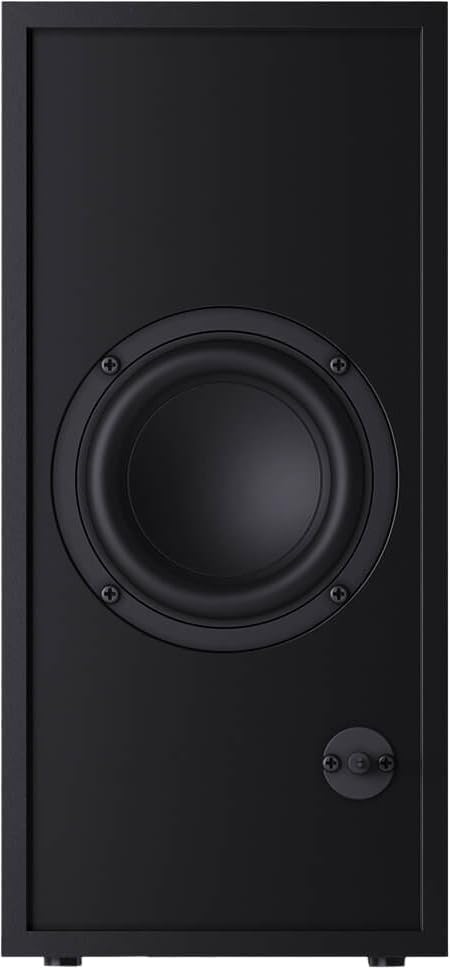
Figure 5.1: Remote Control
This image displays the sleek, minimalist remote control for the Sharp HT-SBW110 soundbar, showing its various buttons for power, input selection, volume, bass, treble, and EQ modes.
The remote control allows you to manage all functions of your soundbar system. Insert the provided CR2 battery into the remote control before first use.
- Power Button (⏷): Turns the soundbar On/Off.
- Input/Source Button (↵): Switches between HDMI ARC, Optical, AUX, and Bluetooth inputs.
- Volume Up/Down (+/-): Adjusts the master volume level.
- Mute Button (🔇): Mutes or unmutes the sound.
- Bass +/-: Adjusts the bass level of the subwoofer.
- Treble +/-: Adjusts the treble level.
- EQ Button: Cycles through preset equalizer modes: Music, Film, Talk.
- Bluetooth Button (Ⓘ): Enters Bluetooth pairing mode.
5.2 Basic Operation
- Power On/Off: Press the Power button on the remote or on the soundbar's top panel.
- Select Input: Press the Input/Source button repeatedly to cycle through available inputs (HDMI ARC, Optical, AUX, Bluetooth). The LED indicator on the soundbar will change color to indicate the selected input.
- Adjust Volume: Use the Volume +/- buttons on the remote or the soundbar to adjust the listening level.
- Change EQ Mode: Press the EQ button to select between Music, Film, or Talk sound modes.
5.3 Bluetooth Pairing
- Press the Input/Source button on the soundbar or remote until the Bluetooth input is selected (usually indicated by a blue LED).
- The soundbar will automatically enter pairing mode, and the Bluetooth LED will flash.
- On your Bluetooth device (smartphone, tablet, etc.), enable Bluetooth and search for available devices.
- Select "SHARP HT-SBW110" from the list of devices.
- Once paired, the Bluetooth LED on the soundbar will stop flashing and remain solid blue. You can now play audio from your device through the soundbar.
6. Maintenance
- Cleaning: Use a soft, dry cloth to clean the surfaces of the soundbar and subwoofer. Do not use liquid cleaners or aerosol sprays.
- Ventilation: Ensure that the ventilation openings on the soundbar and subwoofer are not blocked by dust or debris.
- Storage: If storing the unit for an extended period, unplug it from the power outlet and store it in a cool, dry place.
7. Troubleshooting
| Problem | Possible Cause | Solution |
|---|---|---|
| No power | Power cable not connected; Power outlet not active. | Ensure power cables are securely connected to the soundbar, subwoofer, and wall outlet. Try a different outlet. |
| No sound | Incorrect input selected; Volume too low; Cables not connected properly. | Select the correct input source. Increase volume. Check all audio cable connections. Ensure TV audio output is set to external speakers. |
| Bluetooth pairing fails | Soundbar not in pairing mode; Device too far; Interference. | Ensure soundbar is in Bluetooth pairing mode (flashing blue LED). Move device closer to soundbar. Avoid strong electromagnetic interference. Try unpairing and re-pairing. |
| Remote control not working | Batteries depleted; Obstruction between remote and soundbar. | Replace batteries. Ensure clear line of sight between remote and soundbar's IR receiver. |
If the problem persists, please refer to the Warranty and Support section for further assistance.
8. Specifications
| Audio Channels | 2.1 Channels |
| Total RMS Power | 180 W |
| Soundbar RMS Power | 30 W |
| Subwoofer RMS Power | 30 W |
| Frequency Range | 60 - 20000 Hz |
| Connectivity Technology | Wired & Wireless |
| Bluetooth Version | 4.2 |
| HDMI Ports | 1 (ARC) |
| Optical Audio Input | 1 |
| AUX Input | Yes |
| AC Input Voltage | 220 - 240 V |
| AC Input Frequency | 50 Hz |
| Typical Power Consumption | 30 W |
| Standby Power Consumption | 0.5 W |
| Soundbar Dimensions (W x D x H) | 800 x 60 x 60 mm (31.5 x 2.4 x 2.4 inches) |
| Soundbar Weight | 1.3 kg (2.9 lbs) |
| Subwoofer Dimensions (W x D x H) | 150 x 320 x 220 mm (5.9 x 12.6 x 8.7 inches) |
| Subwoofer Weight | 2.7 kg (6 lbs) |
| Color | Black |
| Wall Mountable | Yes |
| Remote Control | Included |
| Certifications | CE (EMC), CB (Safety), ErP (Energy) |
9. Warranty and Support
This Sharp HT-SBW110 Soundbar System comes with a limited warranty. Please refer to the warranty card included in your package for specific terms and conditions.
Spare parts availability is guaranteed for 1 year from the date of purchase.
For technical support, troubleshooting beyond this manual, or warranty claims, please contact Sharp customer service or visit the official Sharp website for your region. Contact information can typically be found on the product packaging or Sharp's official website.
Ask a question about this manual
Ask about setup, troubleshooting, compatibility, parts, safety, or missing instructions. Manuals+ will review the question and use this page’s manual context to help answer it.