
Remax RB-S9
Remax Sport Wireless Bluetooth Earphone RB-S9 User Manual
Model: RB-S9
Introduction
Thank you for purchasing the Remax Sport Wireless Bluetooth Earphone RB-S9. This manual provides essential information for the proper setup, operation, and maintenance of your new earphones. Please read it thoroughly before use to ensure optimal performance and longevity of the product.

Image: Remax brand logo.
Safety Information
- Do not expose the earphones to extreme temperatures, humidity, or corrosive environments.
- Avoid dropping or subjecting the earphones to strong impacts.
- Do not disassemble or modify the earphones. This may void the warranty and cause damage.
- Keep out of reach of children and pets.
- Use only the provided or certified charging cables.
- Prolonged listening at high volume levels can cause hearing damage. Adjust volume to a safe level.
Package Contents
Please check the package for the following items:
- Remax Sport Wireless Bluetooth Earphone RB-S9
- USB Charging Cable
- Ear Cushions (various sizes)
- User Manual (this document)

Image: The retail packaging for the Remax Sport Bluetooth Earphone S9, showing the product name and a lion graphic.
Product Overview
Familiarize yourself with the components of your Remax RB-S9 earphones.
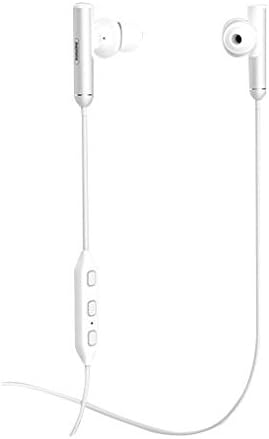
Image: Front view of the white Remax RB-S9 wireless earphones, showing the earbuds and inline control panel.
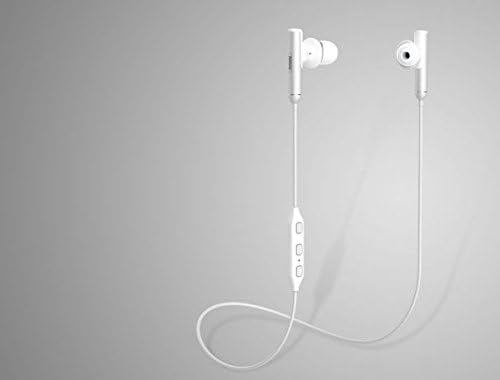
Image: The white Remax RB-S9 earphones displayed on a neutral grey background, highlighting their design.
Key Components:
- Earbuds: Designed for in-ear comfort and sound delivery.
- Inline Control Panel: Contains buttons for power, volume, and call management.
- Microphone: Integrated into the control panel for hands-free calls.
- Charging Port: Typically located on the control panel.
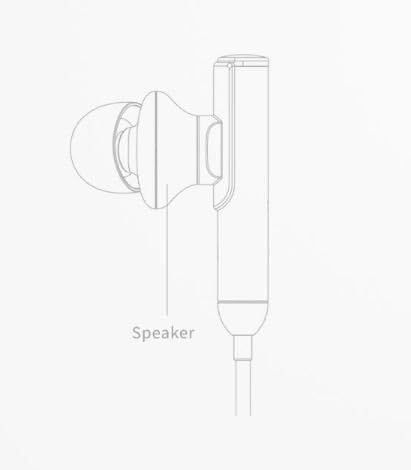
Image: A line drawing illustrating the speaker component of an earbud.
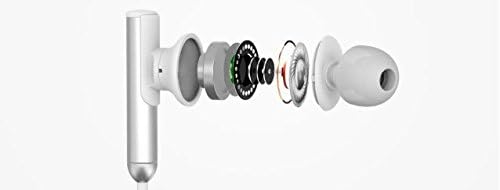
Image: An exploded diagram showing the internal components of an earbud, including the driver, housing, and eartip.
Setup
1. Charging the Earphones
- Connect the micro USB end of the charging cable to the charging port on the earphone's inline control panel.
- Connect the USB-A end of the charging cable to a USB power adapter (not included) or a computer's USB port.
- The LED indicator on the earphones will typically show a red light during charging and turn blue or off when fully charged.
- Allow approximately 1-2 hours for a full charge.
2. Bluetooth Pairing
- Power On: Press and hold the multi-function button (usually the center button on the inline control) for a few seconds until the LED indicator flashes blue and red alternately, indicating pairing mode.
- Activate Bluetooth: On your mobile phone or device, go to the Bluetooth settings and ensure Bluetooth is turned on.
- Search for Devices: Your device will scan for available Bluetooth devices. Look for "RB-S9" or "Remax S9" in the list.
- Connect: Select "RB-S9" from the list to connect. Once successfully paired, the LED indicator on the earphones will usually flash blue slowly or turn off, and you will hear an audible confirmation.
- If prompted for a password, enter "0000".
Note: The earphones will automatically attempt to reconnect to the last paired device when powered on, if the device's Bluetooth is active and within range.
Operating Instructions
Power On/Off
- Power On: Press and hold the multi-function button for approximately 3 seconds until the blue LED flashes and you hear a power-on prompt.
- Power Off: Press and hold the multi-function button for approximately 5 seconds until the red LED flashes and you hear a power-off prompt.
Music Playback
- Play/Pause: Press the multi-function button once.
- Next Track: Press and hold the "Volume +" button.
- Previous Track: Press and hold the "Volume -" button.
Call Management
- Answer/End Call: Press the multi-function button once.
- Reject Call: Press and hold the multi-function button for approximately 2 seconds.
- Redial Last Number: Double-press the multi-function button.
Volume Control
- Increase Volume: Press the "Volume +" button.
- Decrease Volume: Press the "Volume -" button.
Maintenance
Cleaning
- Wipe the earphones with a soft, dry, lint-free cloth.
- Do not use abrasive cleaners, alcohol, or chemical solvents.
- Remove ear tips and clean them separately with mild soap and water if necessary, ensuring they are completely dry before reattaching.
Storage
- Store the earphones in a cool, dry place away from direct sunlight and extreme temperatures.
- Avoid storing with sharp objects that could damage the cables or earbuds.
Troubleshooting
| Problem | Solution |
|---|---|
| Earphones do not power on. | Ensure the earphones are fully charged. Connect to a power source and check the charging indicator. |
| Cannot pair with device. |
|
| No sound or low volume. |
|
| Intermittent connection. |
|
Specifications
| Brand | Remax |
| Model Number | RB-S9 |
| Connectivity | Wireless (Bluetooth) |
| Type | In-Ear |
| Microphone | Included |
| Noise Control | Active Noise Cancellation |
| Material | Plastic, Rubber |
| Color | White |
Warranty and Support
Remax products are designed and manufactured to the highest quality standards. For information regarding warranty coverage, technical support, or service inquiries, please refer to the warranty card included with your purchase or visit the official Remax website.
Please retain your proof of purchase for warranty claims.
Related documentsRB-S9


Ask a question about this manual
Ask about setup, troubleshooting, compatibility, parts, safety, or missing instructions. Manuals+ will review the question and use this page’s manual context to help answer it.