
Fujifilm X-A5
Fujifilm X-A5 Mirrorless Digital Camera User Manual
Model: X-A5
1. Introduction
This manual provides essential instructions for the safe and effective use of your Fujifilm X-A5 Mirrorless Digital Camera. The Fujifilm X-A5 is a compact and stylish mirrorless camera featuring a 24.2MP APS-C sensor, a 180-degree tilting LCD screen, and Bluetooth connectivity, designed for high-quality photography and ease of use.

Image 1.1: Front view of the Fujifilm X-A5 camera with the XC15-45mm lens attached.
2. What's in the Box
Please ensure all the following items are present in your product package:
- Fujifilm X-A5 Camera Body
- XC15-45mmF3.5-5.6 OIS PZ Lens
- Li-Ion Battery (NP-W126)
- Wall Plug Adapter
- USB Cable
- Shoulder Strap
- Instruction Manual (this document)
- USA Warranty Card

Image 2.1: View of the Fujifilm X-A5 camera and lens inside the packaging box.
3. Initial Setup
3.1. Charging and Inserting the Battery
- Insert the supplied Li-Ion battery (NP-W126) into the battery charger.
- Connect the charger to a power outlet using the wall plug adapter. The charging indicator will illuminate.
- Once charging is complete, the indicator will turn off. Remove the battery.
- Open the battery compartment cover on the bottom of the camera.
- Insert the charged battery into the compartment, ensuring correct orientation. Close the cover securely.
3.2. Attaching the Lens
- Remove the body cap from the camera and the rear lens cap from the XC15-45mm lens.
- Align the white mounting mark on the lens with the white mounting mark on the camera body.
- Mount the lens onto the camera body and rotate it clockwise until it clicks into place.
3.3. Inserting a Memory Card
- Open the memory card slot cover, typically located on the side or bottom of the camera.
- Insert a compatible SD, SDHC, or SDXC memory card into the slot with the label facing the correct direction until it clicks.
- Close the memory card slot cover.
4. Operating Instructions
4.1. Power On/Off
To power on the camera, slide the ON/OFF switch located on the top plate. To power off, slide the switch back to the OFF position.
4.2. Basic Photography
- Turn the camera on. The lens will extend automatically.
- Select your desired shooting mode using the mode dial (e.g., SR+ AUTO for automatic settings, P for Program AE, A for Aperture Priority, S for Shutter Priority, M for Manual).
- Frame your shot using the 3-inch LCD monitor.
- Press the shutter button halfway down to focus. The focus frame will turn green when focus is achieved.
- Press the shutter button fully to take a picture.
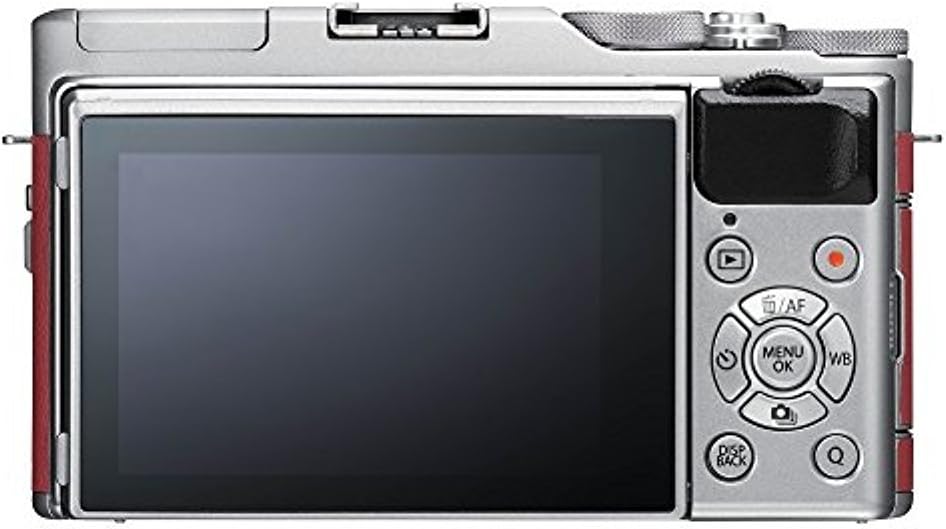
Image 4.1: Rear panel of the Fujifilm X-A5, highlighting the LCD screen and navigation controls.
4.3. Using the Tilting LCD Screen
The X-A5 features a 180-degree tilting LCD screen. Pull the screen outwards and tilt it up or down to compose shots from various angles, including selfies. When tilted 180 degrees upwards, the camera automatically activates Face/Eye Detection AF for self-portraits.

Image 4.2: Fujifilm X-A5 with the LCD screen tilted for high-angle or low-angle shooting.
4.4. Built-in Flash
To use the built-in flash, locate the flash pop-up lever or button (if available) and activate it. The flash will automatically pop up and fire when needed in appropriate modes, or can be manually controlled via the menu.

Image 4.3: Fujifilm X-A5 camera with the integrated flash unit extended.
4.5. Bluetooth Connectivity
The X-A5 supports Bluetooth for easy transfer of images and videos to a paired smartphone or tablet. Download the Fujifilm Camera Remote app to your smart device and follow the in-app instructions to pair with your camera.
5. Maintenance
5.1. Cleaning the Camera
- Camera Body: Use a soft, dry cloth to wipe the camera body. For stubborn dirt, lightly dampen the cloth with water. Avoid using organic solvents.
- Lens: Use a lens blower to remove dust, then gently wipe with a lens cleaning cloth. Avoid touching the lens surface with your fingers.
- LCD Monitor: Gently wipe with a soft, dry cloth.
5.2. Storage
- When not in use for extended periods, remove the battery and store it separately.
- Store the camera in a cool, dry, well-ventilated area, away from direct sunlight and high humidity.
- Use desiccant packets if storing in humid environments to prevent mold growth.
6. Troubleshooting
| Problem | Possible Cause / Solution |
|---|---|
| Camera does not power on. | Battery is depleted or incorrectly inserted. Ensure battery is charged and inserted correctly. |
| Cannot take pictures. | Memory card is full, locked, or not inserted. Check card status. Lens may not be properly attached. |
| Images are blurry. | Camera shake, incorrect focus, or dirty lens. Hold camera steady, ensure focus is achieved, clean lens. |
| Bluetooth connection fails. | Ensure Fujifilm Camera Remote app is installed and updated. Check Bluetooth settings on both devices. |
| Battery drains quickly. | Frequent use of LCD, flash, or Wi-Fi/Bluetooth. Reduce usage or carry spare batteries. |
7. Specifications
| Feature | Detail |
|---|---|
| Sensor | 24.2 MP APS-C CMOS |
| Lens Mount | Fujifilm X Mount |
| Included Lens | FUJINON XC15-45mmF3.5-5.6 OIS PZ |
| LCD Monitor | 3.0-inch, 1,040k-dot Tilting Touchscreen LCD |
| Video Recording | 4K UHD (3840 x 2160) at 15p, Full HD (1920 x 1080) at 59.94p/50p/24p |
| Connectivity | Bluetooth 4.1 LE, Wi-Fi (802.11b/g/n), USB 2.0, HDMI micro (Type D) |
| Battery | NP-W126S Li-Ion Battery (approx. 450 frames per charge) |
| Dimensions (W x H x D) | 116.9 x 67.7 x 40.4 mm (4.6 x 2.7 x 1.6 in.) |
| Weight | Approx. 361g (12.7 oz.) including battery and memory card |
| Storage Media | SD Card (-2GB) / SDHC Card (-32GB) / SDXC Card (-256GB) UHS-I |
8. Warranty and Support
8.1. Warranty Information
Your Fujifilm X-A5 camera comes with a USA Warranty. Please refer to the included warranty card for specific terms, conditions, and duration of coverage. Keep your proof of purchase for warranty claims.
8.2. Customer Support
For technical assistance, troubleshooting beyond this manual, or warranty service, please contact Fujifilm customer support. You can find contact information and additional resources on the official Fujifilm website:
Related documentsX-A5


Ask a question about this manual
Ask about setup, troubleshooting, compatibility, parts, safety, or missing instructions. Manuals+ will review the question and use this page’s manual context to help answer it.