
TEC TC-750LC_SVRprem
Technolink TC-750LC Audiophile RIAA Phono Preamp User Manual
Model: TC-750LC_SVRprem
1. Introduction
Thank you for choosing the Technolink TC-750LC Audiophile RIAA Phono Preamp. This device is designed to amplify the low-level signal from a turntable's magnetic cartridge to a line-level signal, suitable for input into an amplifier or receiver that lacks a dedicated phono input. The TC-750LC features accurate RIAA equalization and an output level control for optimal sound reproduction from your vinyl records.
This manual provides detailed instructions for setting up, operating, and maintaining your TC-750LC phono preamp. Please read it thoroughly before use to ensure proper functionality and longevity of your device.
2. Safety Information
- Always use the provided 12VDC 1000mA regulated SMPS AC adaptor. Using an incorrect power supply may damage the unit and void the warranty.
- Do not expose the unit to moisture, rain, or extreme temperatures.
- Do not open the casing. There are no user-serviceable parts inside. Refer all servicing to qualified personnel.
- Ensure proper ventilation around the unit to prevent overheating.
- Disconnect the power adapter from the wall outlet if the unit will not be used for an extended period.
3. Package Contents
Please check the package for the following items:
- Technolink TC-750LC Audiophile RIAA Phono Preamp
- 12VDC 1000mA Regulated SMPS AC Adaptor
- RCA Cable
- Miniplug Adaptor

Image: The TC-750LC phono preamp unit shown alongside its included 12VDC 1000mA regulated SMPS AC power adapter.
4. Product Overview
4.1 Front Panel

Image: Front panel of the TC-750LC phono preamp, showing the Power LED and Level control knob.
- POWER LED: Illuminates when the unit is powered on.
- LEVEL Control: An output attenuator knob (0-10) to adjust the output signal level.
4.2 Rear Panel

Image: Rear panel of the TC-750LC phono preamp, showing input, output, ground terminal, and power input.
- MM Input (R/L): RCA jacks for connecting your turntable's output. Impedance: 47kΩ/220pf.
- Ground Terminal: Screw terminal for connecting your turntable's ground wire.
- Output (R/L): RCA jacks for connecting to a line-level input on your amplifier or receiver.
- DC 12V Input: Power input jack for the included AC adaptor.
5. Setup and Connection
Follow these steps to connect your TC-750LC phono preamp to your audio system:
- Connect Turntable to Preamp: Connect the RCA output cables from your turntable to the MM Input (R/L) jacks on the rear of the TC-750LC. Ensure the right (red) and left (white) channels are matched.
- Connect Ground Wire: If your turntable has a separate ground wire, connect it to the Ground Terminal on the TC-750LC. This helps reduce hum and noise.
- Connect Preamp to Amplifier/Receiver: Using the included RCA cable, connect the Output (R/L) jacks of the TC-750LC to a line-level input on your amplifier or receiver. This can be an input labeled AUX, CD, TAPE, TUNER, or any other input that is NOT labeled "PHONO".
Important: NEVER connect the output of the TC-750LC to an amplifier's dedicated PHONO input. Doing so will result in distorted sound and potential damage to your equipment, as the PHONO input already has a built-in preamplifier.
- Connect Power: Insert the barrel connector of the 12VDC 1000mA regulated SMPS AC adaptor into the DC 12V Input jack on the rear of the TC-750LC. Then, plug the AC adaptor into a suitable wall outlet. The POWER LED on the front panel should illuminate.
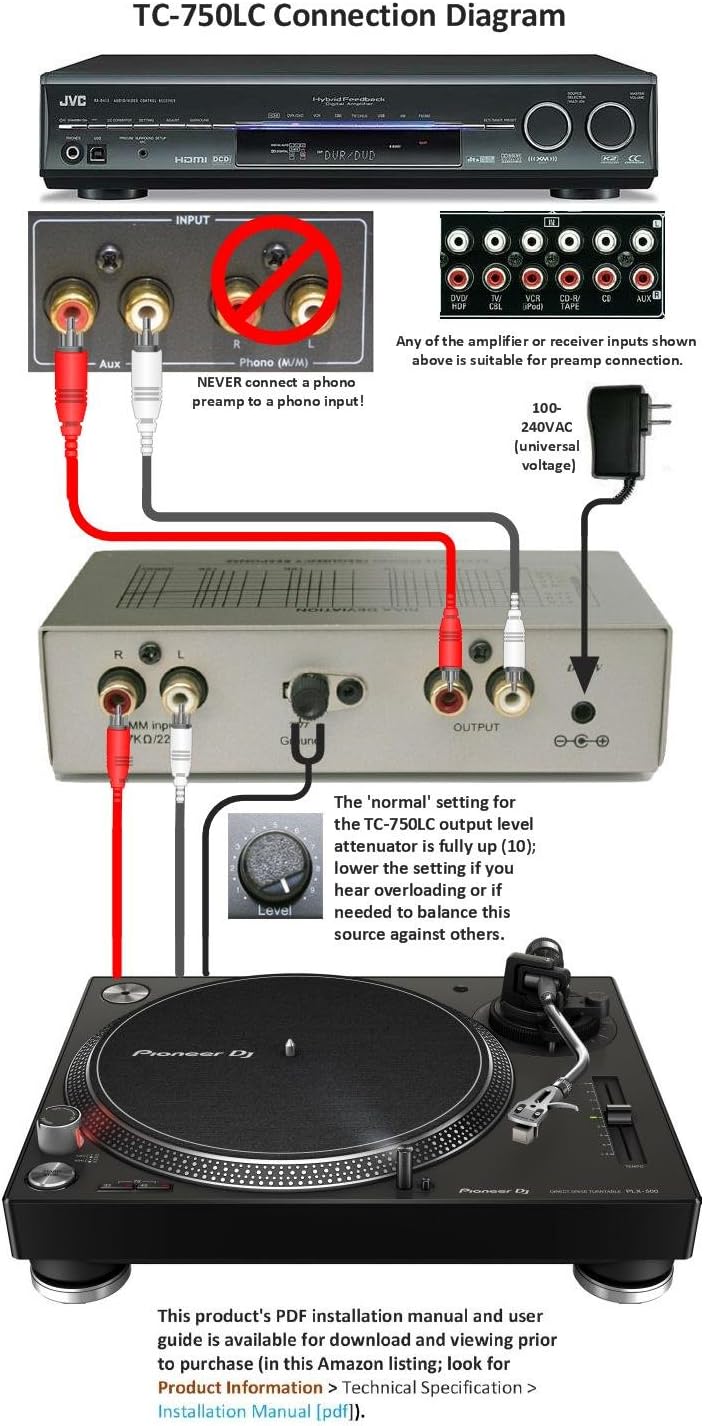
Image: A visual diagram illustrating the correct connection of the TC-750LC phono preamp between a turntable and an amplifier/receiver, highlighting the use of a line-level input.
6. Operating Instructions
Once all connections are made and the unit is powered on, you can begin playing your vinyl records.
- Output Level Control: The LEVEL knob on the front panel allows you to adjust the output signal strength of the preamp. The 'normal' setting for the TC-750LC output level attenuator is typically fully up (10).
- Adjusting Level: You may need to lower the setting if you hear overloading or if it's needed to balance this source against others in your audio system. Start with the knob at a lower setting and gradually increase it to a comfortable listening level, ensuring no distortion occurs.
- Playback: Select the corresponding input on your amplifier/receiver (e.g., AUX, CD) and start playing a record on your turntable.
7. Maintenance
The TC-750LC phono preamp requires minimal maintenance. Follow these guidelines to keep your unit in optimal condition:
- Cleaning: Use a soft, dry cloth to wipe the exterior of the unit. Do not use liquid cleaners or abrasive chemicals, as they may damage the finish.
- Storage: If storing the unit for an extended period, disconnect it from power and store it in a cool, dry place away from direct sunlight and extreme temperatures.
- Ventilation: Ensure the unit has adequate airflow around it. Do not block ventilation openings.
8. Troubleshooting
If you encounter issues with your TC-750LC, please refer to the following common problems and solutions:
| Problem | Possible Cause / Solution |
|---|---|
| No sound or very low sound. |
|
| Humming or buzzing noise. |
|
| Distorted sound. |
|
| Power LED does not light up. |
|
9. Specifications
- RIAA Frequency Response: 20Hz-20,000Hz +/- 0.5dB
- Signal-to-Noise Ratio (S/N): 85dB
- MM Gain: 40dB
- Input Impedance: 47kΩ/220pf
- Power Supply: 12VDC 1000mA Regulated SMPS AC Adaptor (included)
- Connectors: Gold plated RCA jacks for input and output, screw terminal for ground.
- Casing: Anodized metal casing for shielding.
- Dimensions (Approx.): 1.8 pounds (Item Weight)
- Model Number: TC-750LC_SVRprem
10. Warranty and Support
The Technolink TC-750LC comes with a Lifetime limited defective repair or exchange warranty. Please retain your proof of purchase for warranty claims.
For further assistance or detailed technical information, please refer to the official User Guide PDF available online. A link to the PDF installation manual and user guide is typically found under the "Product Information / Technical Specification" section on the product's listing page.
You can also visit the TEC Store for more information and support.
Related documentsTC-750LC_SVRprem


Ask a question about this manual
Ask about setup, troubleshooting, compatibility, parts, safety, or missing instructions. Manuals+ will review the question and use this page’s manual context to help answer it.