
1. Important Safety Information
This product requires assembly. Follow the instructions carefully and ensure proper use of the desk to avoid injury. Do not overload the desk beyond its maximum load capacity of 150 Kilograms. Keep children and pets away from the desk during operation to prevent accidents. Ensure all cables are properly managed to avoid tripping hazards.
2. Product Overview
The FlexiSpot EA2 is an electric height-adjustable standing desk frame designed to accommodate various desktop sizes. It features a robust alloy steel frame, a smart keypad with memory functions, and a soft start/stop mechanism for smooth height transitions. This frame promotes a healthier work environment by allowing seamless switching between sitting and standing positions.

An assembled FlexiSpot EA2 electric standing desk frame with a dark desktop, supporting a computer monitor and laptop, set in a modern office environment.
Key Features:
- Electric height adjustment for seamless transitions.
- Smart keypad with memory presets for preferred heights.
- Soft start/stop function for smooth and quiet operation.
- Durable alloy steel frame construction.
- Maximum weight recommendation: 150 Kilograms.

A certificate from the IGR Institute for Health and Ergonomics, confirming the FlexiSpot height-adjustable desk meets ergonomic standards.
3. Setup
Assembly of the FlexiSpot EA2 desk frame is required. Please ensure you have sufficient space and assistance if needed. Tools are not included with this product, so prepare the necessary tools before starting assembly.
General Assembly Steps:
- Unpack Components: Carefully remove all parts from the packaging and verify against the included parts list.
- Assemble Legs and Crossbar: Follow the detailed instructions in the separate assembly guide to connect the lifting columns to the feet and the crossbar.
- Attach Desktop: Secure your chosen desktop to the assembled frame using the provided screws. Ensure the desktop is centered and aligned.
- Connect Control Box and Keypad: Plug in the control box, motor cables, and keypad cable according to the assembly guide.
- Cable Management: Use cable ties or clips to organize and secure all cables, preventing them from interfering with the desk's movement.
- Initial Power-Up and Reset: Plug the desk into a power outlet. Perform the initial reset procedure as described in the assembly guide to synchronize the motors.

A diagram illustrating the adjustable dimensions of the FlexiSpot EA2 desk frame, including width (110-190cm), depth (58cm), and height (58-123cm).
4. Operating Instructions
The FlexiSpot EA2 desk frame is operated via a smart keypad, allowing for easy height adjustments and memory presets.
Basic Operation:
- Adjusting Height: Use the up and down arrow buttons on the keypad to raise or lower the desk to your desired height. The desk will move smoothly with its soft start/stop function.
- Saving Memory Presets: To save a specific height, adjust the desk to your preferred position. Press the 'M' button, then press one of the numbered preset buttons (e.g., '1', '2', '3') within a few seconds. The height is now saved to that preset.
- Recalling Memory Presets: Press a saved numbered preset button (e.g., '1') to automatically move the desk to the stored height.
- Anti-Collision System: The desk is equipped with a built-in anti-collision system. If the desk encounters an obstruction during movement, it will automatically stop and retract slightly to prevent damage.
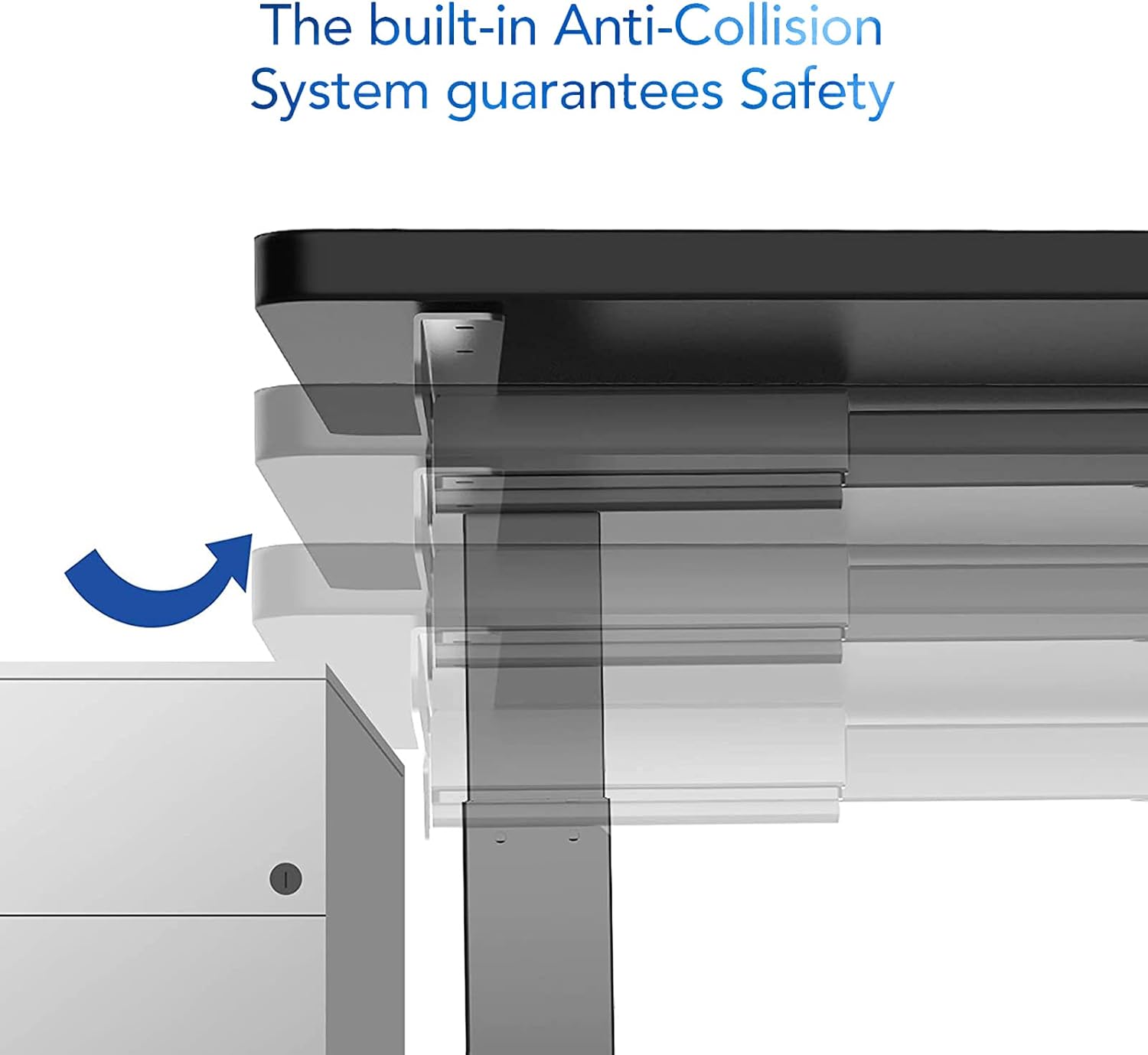
An image demonstrating the built-in anti-collision system of the FlexiSpot EA2 desk, showing the desk stopping and retracting slightly upon encountering an obstruction.
5. Maintenance
Regular maintenance ensures the longevity and optimal performance of your FlexiSpot EA2 desk frame.
- Cleaning: Wipe the desk frame with a soft, damp cloth. Avoid using abrasive cleaners or harsh chemicals, as these can damage the finish.
- Check Connections: Periodically check all screws and bolts to ensure they are tight. Retighten if necessary.
- Cable Management: Ensure cables remain tidy and are not pinched or tangled, which could affect desk operation or cause damage.
- Weight Distribution: Distribute weight evenly across the desktop to prevent undue stress on the frame and motors.

A close-up image of the FlexiSpot EA2 desk leg, highlighting the durable powder coating and the dimensions of the steel tube sections (60x60x2.0mm, 65x65x1.5mm, 70x70x1.5mm).
6. Troubleshooting
If you encounter issues with your FlexiSpot EA2 desk frame, try the following troubleshooting steps:
- Desk Not Moving:
- Check if the power cord is securely plugged into both the desk and the wall outlet.
- Ensure all cables connecting the keypad, control box, and motors are properly connected.
- Try unplugging the desk for 10-15 seconds and then plugging it back in to reset the system.
- Uneven Movement or Noise:
- Perform a reset procedure (refer to your assembly guide for specific steps, usually involves holding down a button until the desk reaches its lowest point and slightly rises).
- Ensure the desk is not overloaded beyond its maximum weight capacity.
- Check for any obstructions under or around the desk legs.
- Keypad Not Responding:
- Verify the keypad cable is firmly connected to the control box.
- If the issue persists after a power cycle, contact customer support.
For persistent issues or error codes displayed on the keypad, please refer to the detailed troubleshooting section in your full assembly manual or contact FlexiSpot customer support.
7. Specifications
| Feature | Detail |
|---|---|
| Brand | FLEXISPOT |
| Model Number | E6W-EU2+PR1808-Black-FR1 |
| Form | Rectangular |
| Color | Black |
| Frame Material | Alloy Steel |
| Special Feature | Adjustable Height |
| Item Weight | 20 Kilograms |
| Assembly Required | Yes |
| Max Weight Recommendation | 150 Kilograms |
| Maximum Height | 123 Centimeters |
| Minimum Height | 58 Centimeters |
| Item Dimensions (L x W x H) | 180 x 80 x 125 Centimeters (with typical desktop) |
| Frame Width Adjustment | 110-190 Centimeters |
| Frame Depth | 58 Centimeters |
8. Warranty and Support
FlexiSpot products are designed for durability and performance. For information regarding product warranty, please refer to the warranty card included with your purchase or visit the official FlexiSpot website.
For technical support, spare parts, or any inquiries not covered in this manual, please contact FlexiSpot customer service. You can find contact information and additional resources by visiting the official FlexiSpot store:


