
1. Product Overview
The IWISS IWS-2820M is a precision crimping tool designed for non-insulated open barrel, OEM-style terminals. It is suitable for a wide range of applications, including servo lead connectors, JST VH, XH, NH pins, Molex KK, and Picoblade series terminals. This tool features a double-hinge mechanism for parallel jaw engagement, ensuring accurate crimps.

Image 1.1: The IWISS IWS-2820M Mini Micro Open Barrel Crimping Tool. This image displays the tool's overall design, featuring orange and grey ergonomic handles and the black steel crimping jaws with various die sizes.
2. Setup
Before first use, inspect the crimping tool for any visible damage. The tool is ready for immediate use out of the packaging. Its ergonomic design with TPR+PP grips and spring-loaded handles ensures comfortable operation and reduces fatigue.
3. Operating Instructions
The IWS-2820M crimps terminals for wire sizes ranging from AWG 28-20 (0.08-0.5mm²). The crimping process involves two main steps: crimping the conductor and then crimping the insulation.
- Prepare the Terminal: If the terminal is part of a strip, carefully clip it off. It is often helpful to gently bend the small 'tails' of the terminal inward to ensure proper alignment and prevent slippage during crimping.
- Insert Terminal: Select the appropriate die size on the crimper for your terminal. Use the front of the jaw to parallel the pin barrels. Insert the terminal into the chosen jaw opening. Close the jaw slightly to hold the terminal in place.
- Insert Wire: Strip the wire insulation to the correct length, ensuring the conductor will sit fully within the conductor crimp section of the terminal and the insulation will sit within the insulation crimp section. Insert the stripped wire into the terminal.
- Crimp Conductor: With the wire correctly positioned, apply firm, steady pressure to crimp the conductor tab. Ensure the conductor is securely crimped.
- Crimp Insulation: Move the terminal and wire to the next larger opening on the jaw, if necessary, to crimp the insulation tab. Apply pressure to secure the insulation without crushing the wire. A slight downward pressure on the exposed end of the terminal can assist in preventing the crimp tails from pushing backward.

Image 3.1: Visual guide for the crimping process. Step 1 shows paralleling pin barrels, Step 2 shows inserting the terminal into the jaw, and Step 3 illustrates crimping conductor and insulation tabs separately.
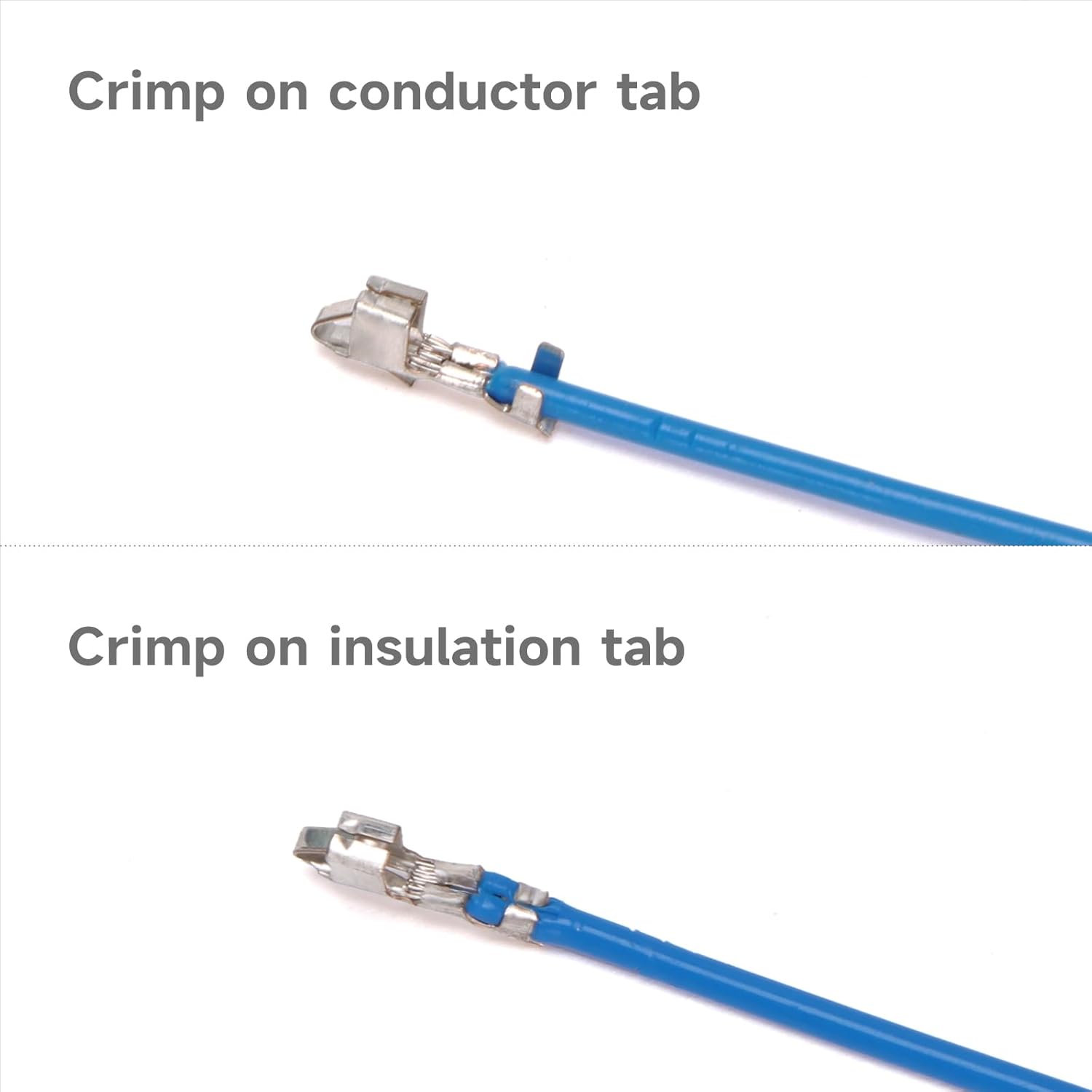
Image 3.2: Example of a correctly crimped terminal on a blue wire, showing distinct crimps for both the conductor and the insulation.

Image 3.3: Another example of a correctly crimped terminal on a grey wire, demonstrating the two-step crimping for conductor and insulation.

Image 3.4: A close-up sectional view illustrating the internal structure of a properly crimped wire, showing the conductor and insulation securely held.
The tool is compatible with various terminal types, including JST and Tyco connectors, as shown below:

Image 3.5: Examples of JST (LLF-01T-P1.3E, SVH-41T0P1.1, LLM-01T-P1.3E, BYM-001T-P0.6, SPH-002T-PO.5L) and Tyco (1318111) terminals compatible with the tool, along with a table detailing die width and thickness.
4. Maintenance
To ensure the longevity and optimal performance of your IWISS IWS-2820M crimping tool, follow these maintenance guidelines:
- Cleaning: After each use, wipe down the tool with a clean, dry cloth to remove any debris or residue.
- Lubrication: Periodically apply a light machine oil to the pivot points and moving parts to ensure smooth operation.
- Storage: Store the tool in a dry environment to prevent rust. The black oxide steel construction provides rust resistance, but proper storage further protects the tool.
- Inspection: Regularly inspect the jaws for wear or damage. Ensure the double-hinge mechanism operates smoothly and the jaws align correctly.
5. Troubleshooting
- Poor Crimp Quality:
- Incorrect Die Size: Ensure you are using the correct die opening for the specific terminal and wire gauge.
- Improper Wire Stripping: Verify that the wire is stripped to the correct length, allowing the conductor to be fully crimped and the insulation to be secured without being crushed.
- Terminal Alignment: Ensure the terminal is perfectly aligned within the jaws before crimping. Small terminals can be tricky; take extra time to position them correctly.
- Insufficient Pressure: Apply firm and consistent pressure throughout the crimping process.
- Terminal Slipping or Mangling:
- Bent Terminal Tails: As mentioned in the operating instructions, gently bending the terminal's 'tails' inward can help prevent slippage.
- Slow Crimping: For small terminals, a slow and controlled crimp, especially on the insulation, can prevent mangling.
6. Specifications
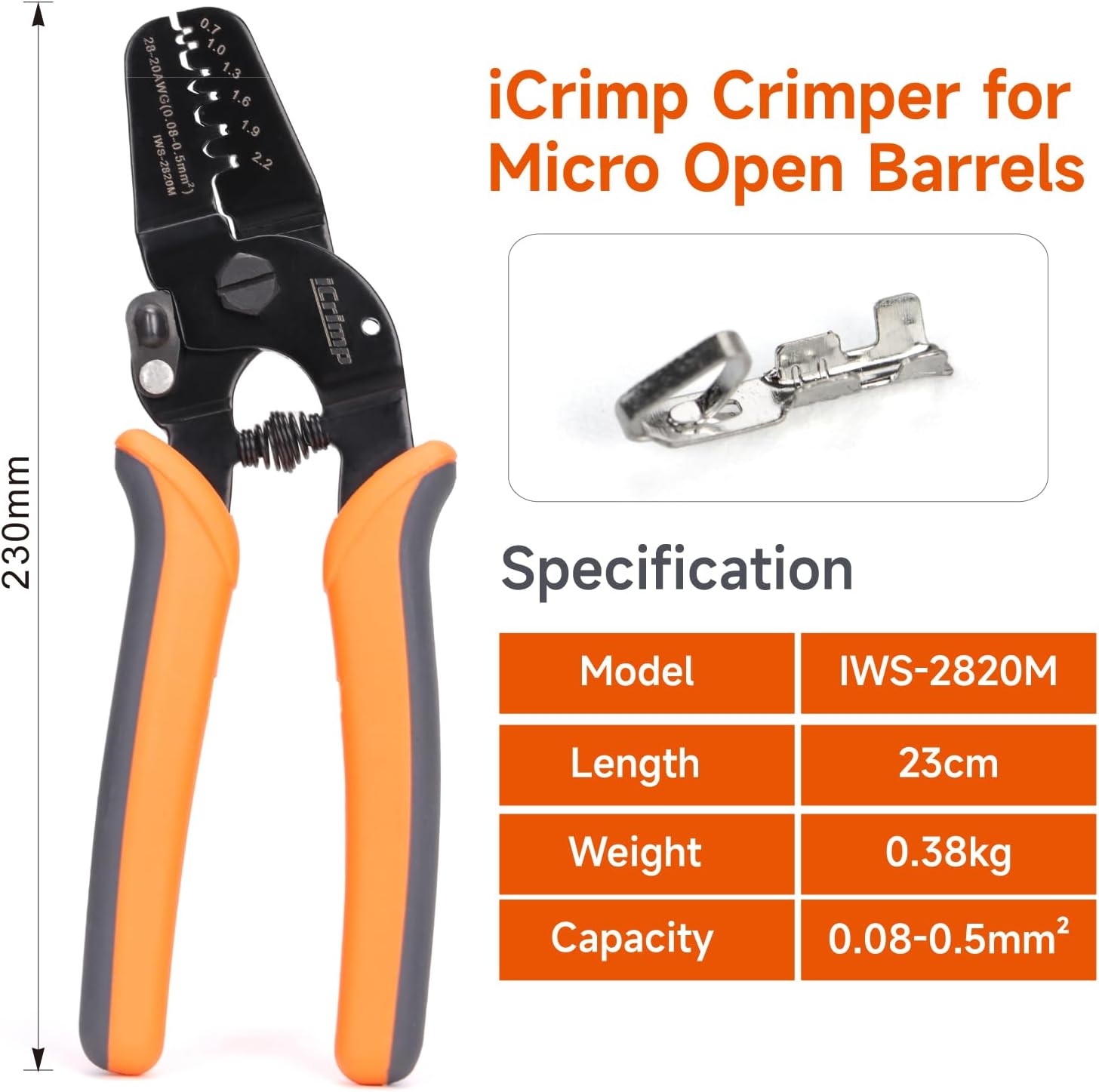
Image 6.1: A visual representation of the IWISS IWS-2820M crimper, highlighting its key specifications including model, length, weight, and crimping capacity.
| Feature | Specification |
|---|---|
| Model | IWS-2820M |
| Brand | IWISS |
| Crimping Capacity | 0.08-0.5mm² (AWG 28-20) |
| Material | Steel |
| Handle Material | Thermoplastic Rubber (TPR), Polypropylene (PP) |
| Grip Type | Ergonomic |
| Product Dimensions | 9.6"L x 4.3"W |
| Item Weight | 7 ounces (0.2 Kilograms) |
| Manufacturer | ZHEJIANG IWISS ELECTRIC CO.,LTD |
| UPC | 600685978160 |
7. Warranty and Support
For information regarding warranty coverage or technical support for your IWISS IWS-2820M crimping tool, please refer to the documentation provided at the time of purchase or contact the manufacturer directly. Manufacturer contact information can typically be found on the product packaging or the official IWISS website.


