Apple iPad Pro 12.9-inch (2nd Generation, Wi-Fi Only) User Manual
Introduction
This manual provides essential information for the Apple iPad Pro 12.9-inch (2nd Generation, Wi-Fi Only, 512GB, Model MPKY2LL/A). This device is a renewed product, meaning it has been inspected and tested to function like new. While the unit powers on with factory settings restored and includes original accessories, it may arrive in generic packaging.
The iPad Pro features a 12.9-inch Retina display, powered by the A10X Fusion chip, and runs on iOS 10. It offers 512GB of storage, a 12MP rear camera, and a 7MP front camera.
Setup
1. Unboxing and Initial Inspection
Carefully remove your iPad Pro from its packaging. Verify that the following items are included:
- Apple 12.9-inch iPad Pro (2nd Generation, Wi-Fi, 512GB, Space Gray, MPKY2LL/A)
- USB-C charge cable (1 meter)
- 20W USB-C power adapter
Note that the original box is not included with renewed units.
2. Charging the Device
Before first use, it is recommended to fully charge your iPad Pro. Connect the USB-C charge cable to the iPad's charging port and the 20W USB-C power adapter to a wall outlet. The battery icon on the screen will indicate charging status.

Image: Front view of the Apple iPad Pro 12.9-inch, showing the device's home screen with standard iOS app icons.
3. Powering On/Off
- To Power On: Press and hold the Power button (located on the top right edge) until the Apple logo appears.
- To Power Off: Press and hold the Power button until the 'Slide to Power Off' slider appears. Drag the slider to the right.
4. Initial Setup
Follow the on-screen instructions to set up your iPad Pro. This typically includes selecting your language and region, connecting to a Wi-Fi network, setting up Touch ID, creating a passcode, and signing in with your Apple ID or creating a new one.
Operating Instructions
1. Display Features
Your iPad Pro features a 12.9-inch Retina display with a resolution of 2732 x 2048 pixels. It supports ProMotion technology for a 120Hz refresh rate, providing fluid scrolling and responsiveness. True Tone technology automatically adjusts the display's white balance to match the light around you.
2. Basic Navigation and Multitasking
Navigate your iPad using touch gestures. The Home button allows you to return to the home screen, activate Siri, or use Touch ID. Multitasking features like Split View and Slide Over allow you to use multiple apps simultaneously.
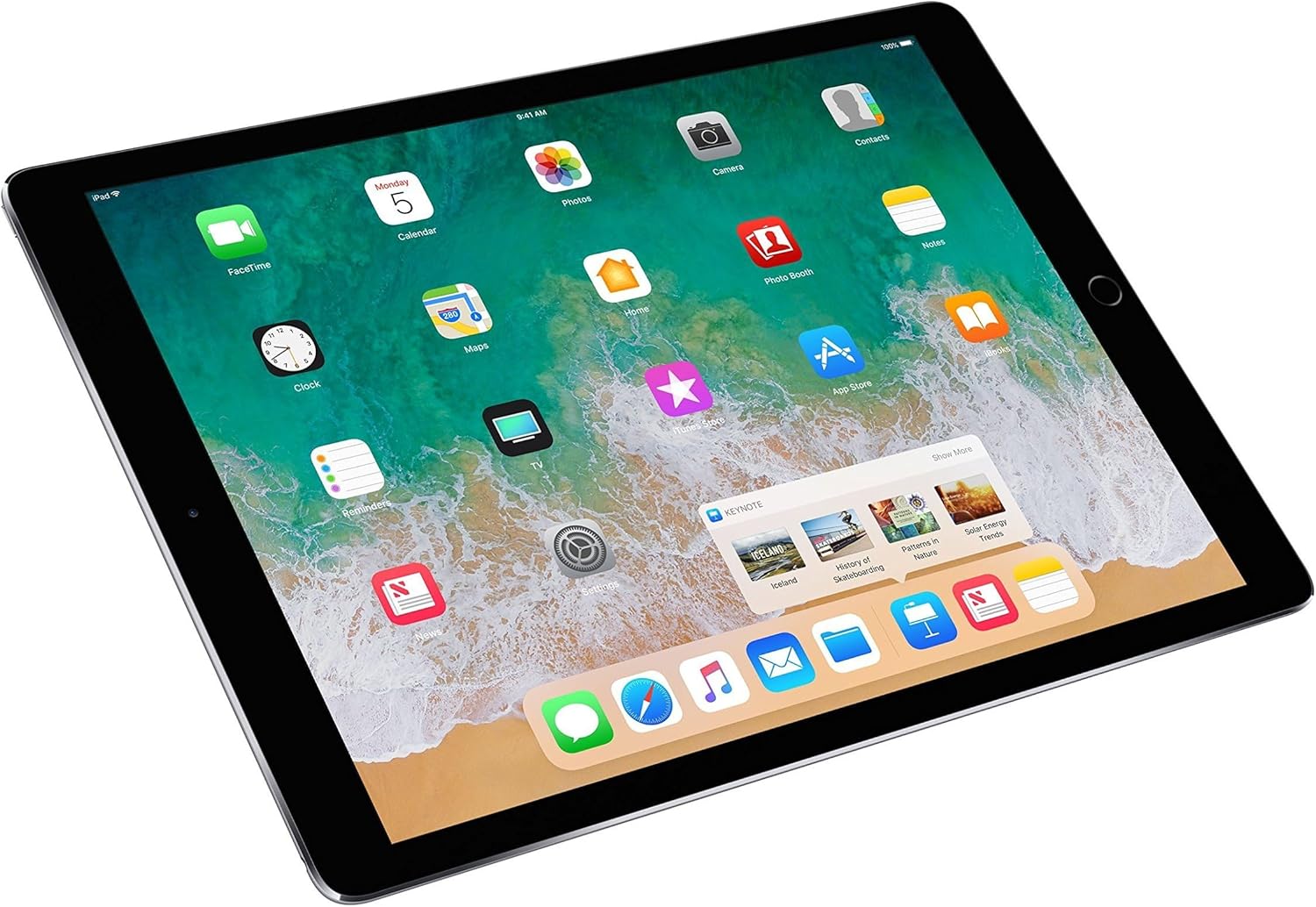
Image: The iPad Pro screen showing several applications open simultaneously in a multitasking layout, demonstrating its capability to run multiple apps side-by-side.

Image: The iPad Pro screen showing the Control Center overlay and the app switcher interface, allowing quick access to settings and recently used applications.
3. Camera Usage
The iPad Pro is equipped with a 12-megapixel iSight camera on the rear and a 7-megapixel FaceTime HD camera on the front. Open the Camera app to capture photos and videos.
4. Storage and Performance
With 512GB of internal storage, you have ample space for apps, documents, and media. The A10X Fusion chip ensures smooth performance for demanding applications and tasks.
5. Apple Pencil Compatibility
The iPad Pro (2nd Generation) supports the first-generation Apple Pencil (sold separately), allowing for precise drawing, writing, and annotation directly on the screen.

Image: A close-up of a hand using an Apple Pencil to draw intricate designs on the screen of an iPad Pro, highlighting the device's creative capabilities.
Maintenance
1. Cleaning Your iPad Pro
To clean your iPad Pro, use a soft, lint-free cloth. Avoid abrasive materials, aerosols, solvents, or ammonia-based cleaners. Do not spray cleaners directly onto the device.
2. Software Updates
Keep your iPad Pro's software up to date to ensure optimal performance and security. Go to Settings > General > Software Update to check for and install available updates.
3. Battery Care
The iPad Pro has an average battery life of up to 10 hours. To maximize battery longevity, avoid extreme temperatures, and consider enabling Low Power Mode when battery levels are low. For long-term storage, charge the device to about 50%.
Troubleshooting
Common Issues and Solutions
- Device Not Responding: If your iPad Pro is unresponsive, perform a force restart. Press and hold both the Home button and the Top (Power) button for at least ten seconds, until you see the Apple logo.
- Battery Draining Quickly: Check for background app activity in Settings > Battery. Reduce screen brightness, disable unnecessary notifications, and ensure software is up to date.
- Wi-Fi Connectivity Issues: Try restarting your Wi-Fi router and your iPad. Go to Settings > Wi-Fi and forget the network, then reconnect.
- Slow Performance: Close unused apps, clear browser cache, and ensure you have sufficient free storage space. Software updates can also improve performance.
Factory Reset
If issues persist, you may consider restoring your iPad Pro to factory settings. This will erase all data and settings. Go to Settings > General > Transfer or Reset iPad > Erase All Content and Settings. Ensure you have backed up important data before proceeding.
Specifications
| Feature | Detail |
|---|
| Brand | Apple |
| Model Name | iPad Pro (2nd generation) |
| Model Number | MPKY2LL/A |
| Memory Storage Capacity | 512 GB |
| Screen Size | 12.9 Inches |
| Display Resolution Maximum | 2732 x 2048 |
| Generation | 2nd Generation |
| Model Year | 2017 |
| Processor | Apple A10X Fusion (2.39 GHz) |
| Operating System | iOS 10 (upgradable) |
| Battery Average Life | 10 Hours |
| Rear Camera | 12 MP iSight Camera |
| Front Camera | 7 MP FaceTime HD Camera |
| Color | Space Gray |
| Item Weight | 1.49 Pounds |
| Connectivity Technology | Wi-Fi, Bluetooth, USB |

Image: Side profile of the Apple iPad Pro 12.9-inch, highlighting its thin design and physical buttons.
Warranty Information
This renewed Apple iPad Pro comes with a 90-day limited warranty. For specific terms and conditions, please refer to the warranty documentation provided with your purchase or contact the seller directly.
Support
For further assistance, technical support, or service inquiries, please visit the official Apple Support website or contact Apple customer service. You can find detailed guides, FAQs, and contact options on their website.
For issues related to your renewed product's condition or warranty, please contact the seller from whom you purchased the device.
