
MeterTo JZ-350
Professional Colorimeter JZ-350 User Manual
Model: JZ-350
Brand: MeterTo
1. Introduction
The MeterTo JZ-350 Professional Colorimeter is an economic and practical general colorimeter developed in accordance with international CIE1931 standards. It incorporates the latest imported LED light source and sensor technology, ensuring stable and durable performance.
This device is widely utilized by quality control departments for color difference testing, as well as in educational institutions for teaching, scientific research, and color design applications.

Figure 1.1: MeterTo JZ-350 Professional Colorimeter.
2. Product Features
- Multi-language Support: Three operating languages (English, Simplified Chinese, Traditional Chinese) with easy-to-control buttons and menu navigation.
- Versatile Measurement Modes: A variety of light and color space modes (L*a*b*, L*C*H*, XYZ, △E*ab, △(L*a*b*), △(L*C*H*), △XYZ) to meet specific measurement conditions.
- Accurate Calibration: Supports both white calibration and zero calibration for precise and stable measurement data.
- Extensive Data Storage: 1500 sets of data storage space, allowing for easy checking, recall, and uploading of data at any time.
- Professional Software: Includes dedicated software for comprehensive color analysis and quality control.

Figure 2.1: JZ-350 Colorimeter with accompanying manuals.
3. Package Contents
Verify that all standard accessories are included in the package:
- Main unit (JZ-350 Colorimeter) x 1
- Carrying Bag x 1
- Protection Cap x 1
- AC Adapter x 1
- Software CD/Download Link x 1
- USB Cable x 1
- Calibration Tile x 1
- Stainless Steel Box (for storage) x 1

Figure 3.1: JZ-350 Colorimeter demonstrating connectivity with an optional mini printer.
4. Setup
4.1 Powering the Device
- Battery Installation: Open the battery compartment on the back of the unit. Insert 4 AA-size batteries, ensuring correct polarity.
- AC Adapter Connection: Alternatively, connect the provided AC adapter to the power input port on the device and plug it into a standard electrical outlet.
- Power On: Locate the power switch (usually on the side or top) and slide it to the "ON" position. The display should illuminate.
4.2 Initial Calibration
Before first use or after prolonged storage, perform a calibration to ensure accuracy.
- Access Calibration Menu: From the main screen, navigate to the "Calibration" menu using the directional buttons and press "Enter".
- White Calibration: Select "White Calibration". Place the provided white calibration tile firmly over the measuring aperture. Press "Enter" to initiate the white calibration process. Wait for confirmation.
- Zero Calibration: Select "Zero Calibration". Ensure the measuring aperture is completely covered or placed in a dark environment (e.g., using the protection cap). Press "Enter" to initiate zero calibration. Wait for confirmation.
- Illuminant Selection: Navigate to "Illuminant Selection" and choose the desired illuminant (e.g., D65, D50, F11, C) based on your measurement requirements.

Figure 4.1: JZ-350 display showing calibration and illuminant selection menus.
5. Operating Instructions
5.1 Basic Measurement
- Prepare Sample: Ensure the sample surface is clean, flat, and representative of the color to be measured.
- Position Device: Place the measuring aperture (Ø8mm) firmly and flush against the sample surface. Ensure no ambient light interferes with the measurement.
- Initiate Measurement: Press the "Measure" or "Test" button on the device. The measurement will typically take about 2 seconds.
- View Results: The display will show the color difference data in selected display models (L*a*b*, L*C*H*, XYZ, etc.).

Figure 5.1: JZ-350 display showing measurement results and color difference.
5.2 Data Management and Software
- Saving Data: After a measurement, press the "Save" button to store the data. The device can store up to 50 sets of standard data, with 30 sets of color difference data under each standard.
- Recalling Data: Navigate to the "Storage" or "Data" menu to view and recall previously saved measurements.
- Connecting to PC: Use the provided USB cable to connect the colorimeter to a computer.
- Using Software: Install the professional software from the provided CD or download link. The software allows for:
- Analysis of color difference data between standard and sample.
- Color simulation, generation of color difference charts, and batch processing.
- Saving and recalling data from a database.
- Printing color quality charts.
- Downloading instrument data to the computer.
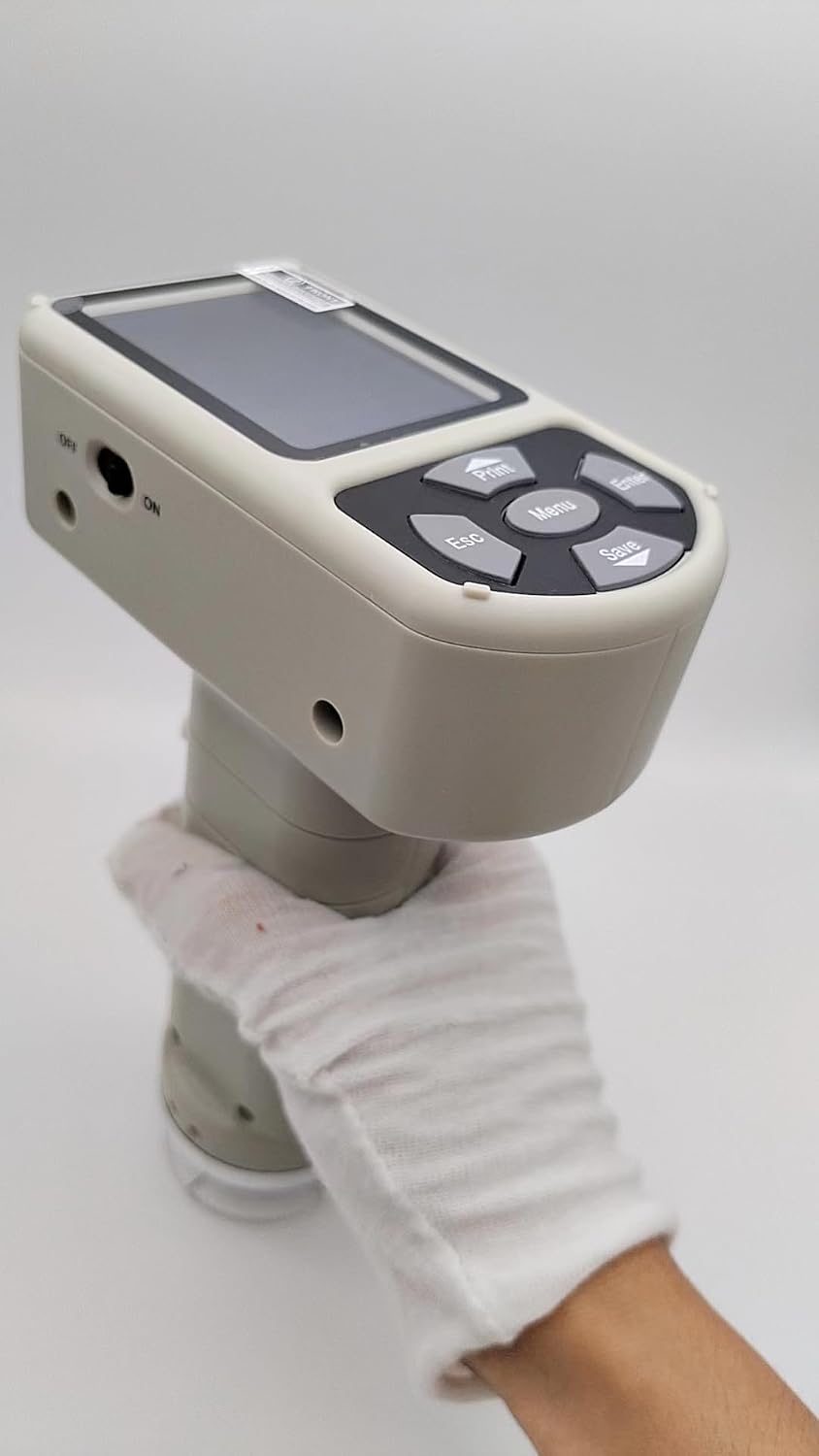
Figure 5.2: Screenshot of the JZ-350 professional software interface.

Figure 5.3: Side view of the JZ-350 Colorimeter, illustrating its ergonomic design and button layout.
6. Maintenance
- Cleaning: Use a soft, dry cloth to clean the exterior of the device. For the measuring aperture, use a lens cleaning cloth or a soft brush to gently remove dust or debris. Do not use abrasive cleaners or solvents.
- Storage: When not in use, always place the protection cap over the measuring aperture. Store the device in its stainless steel box in a cool, dry place, away from direct sunlight, extreme temperatures, and high humidity.
- Battery Replacement: If using batteries, replace all 4 AA batteries simultaneously when the low battery indicator appears. Remove batteries if the device will not be used for an extended period.
- Calibration Tile Care: Keep the white calibration tile clean and free from scratches or contamination. Store it in its protective casing.

Figure 6.1: JZ-350 Colorimeter with the protection cap removed, revealing the measuring aperture.
7. Troubleshooting
| Problem | Possible Cause | Solution |
|---|---|---|
| Device does not power on. | Low or dead batteries; AC adapter not connected properly; Power switch off. | Replace batteries; Ensure AC adapter is securely connected; Turn power switch to "ON". |
| Inaccurate measurements. | Needs calibration; Dirty measuring aperture; Sample not properly positioned; Incorrect illuminant selected. | Perform white and zero calibration; Clean aperture; Ensure firm contact with sample; Verify illuminant setting. |
| Cannot connect to PC. | USB cable faulty; Driver not installed; Software not running. | Try a different USB cable; Install software drivers from CD/website; Ensure software is open. |
| Display is blank or frozen. | Software error; Low battery. | Restart the device; Replace batteries. |
8. Specifications
| Parameter | Value |
|---|---|
| Lighting/Light System | 45/0 geometry |
| Measuring Aperture | Ø8mm |
| Display Models | L*a*b*, L*C*H*, XYZ, △E*ab, △(L*a*b*), △(L*C*H*), △XYZ |
| Operating Language | English, Simplified Chinese, Traditional Chinese |
| Storage Capacity | 50 sets (Standard), 30 sets (Color Difference per standard) |
| Calibration | White calibration, Zero calibration |
| Observe Illuminants | D65, D50, F11, C |
| Repeatability | △E*ab ≤ 0.08 (When white calibration plate measured 30 times, averaged) |
| Measurement Time | Approximately 2 seconds |
| Power Source | 4 AA-size batteries or AC adapter |
| Operating Temperature | 0-40℃ (32-104℉) |
| Relative Humidity | 85% or less (non-condensing) |
| Dimensions (WxHxD) | 110 × 60 × 190mm |
| Weight | 310g (Without batteries) |
9. Warranty and Support
For warranty information, technical support, or service inquiries, please refer to the warranty card included with your product or contact MeterTo customer service directly. Contact details can typically be found on the manufacturer's official website or in the product packaging.
Please retain your purchase receipt as proof of purchase for warranty claims.
Ask a question about this manual
Ask about setup, troubleshooting, compatibility, parts, safety, or missing instructions. Manuals+ will review the question and use this page’s manual context to help answer it.