
Ikan CVM-WS50B
Ikan CVM-WS50B Wireless Smartphone Microphone System User Manual
Model: CVM-WS50B | Brand: Ikan
Introduction
The Ikan CVM-WS50B is a UHF 6-channel wireless microphone system designed for smartphones. It features an integrated smartphone holder, real-time audio monitoring, and adjustable volume control, providing enhanced audio quality for video recording and other applications. This manual provides detailed instructions for the proper setup, operation, and maintenance of your device.

Image: The CVM-WS50B receiver unit mounted on a smartphone, which is attached to a handheld grip. A lavalier microphone is connected to the receiver, and an audio cable connects the receiver to the smartphone's audio jack.
What's in the Box
Verify that all items are present in the package:
- 3.5mm TRS (M) to 3.5mm TRRS (m) cable
- Belt clip
- Faux-fur wind muff
- Handle with 1/4-20 mount
- Lavalier microphone with foam wind screen and 45" cable (3.5mm)
- Receiver with integrated phone mount
- Soft travel/storage case
- Transmitter
- USB micro charging cable
- User manual

Image: All components of the CVM-WS50B system, including the receiver, transmitter, lavalier microphone, cables, and accessories, neatly arranged outside their soft travel case.
Product Features
- LCD Screen: Displays channels, audio status, and power consumption for real-time monitoring.
- Optional 6 Channels: Allows flexible channel matching to prevent interference.
- Real-time Audio Monitor: Built-in function to monitor audio during recording.
- Working Distance: Up to 197ft (60m) unobstructed, and 98ft (30m) obstructed, using UHF Ultra High-Frequency radio wave technology (520-526mhz).
- Adjustable Phone Clamp & Hand Grip: CNC processed metal shell with adjustable clamp width suitable for all smartphones. Equipped with a handle grip for steady video recording.
- 1/4" Interface: Extendable for connection with LED lights, tripods, cold-shoe mounts, etc.
Setup Instructions
- Charge Devices: Ensure both the transmitter and receiver units are fully charged using the provided USB micro charging cable.
- Attach Receiver to Phone:
- Extend the adjustable phone clamp on the receiver unit.
- Carefully insert your smartphone into the clamp, ensuring it is securely held by the rubber pads.
- If using the handle grip, attach the receiver unit to the 1/4-20 mount on the handle.

Image: The receiver unit with its adjustable phone clamp, ready to secure a smartphone.

Image: Detail of the protective rubber pads within the phone clamp, designed to secure the smartphone without damage.
- Connect Audio Cable:
- Connect one end of the 3.5mm TRS to TRRS cable to the "OUTPUT" port on the receiver.
- Connect the other end (TRRS) to your smartphone's 3.5mm audio jack. If your smartphone lacks a 3.5mm jack, use an appropriate adapter (not included).

Image: The CVM-WS50B receiver unit securely attached to a smartphone, with the audio output cable connected from the receiver to the phone's audio input.
- Connect Lavalier Microphone: Plug the lavalier microphone into the "MIC/LINE IN" port on the transmitter unit. For outdoor use, attach the faux-fur wind muff to the lavalier microphone to reduce wind noise.
- Power On: Press and hold the power button on both the transmitter and receiver units until their LCD screens illuminate.
- Channel Matching: The units should automatically pair. If not, use the "SET" button on both units to select the same channel (1-6) until the green indicator light on the receiver is solid, indicating a successful connection.
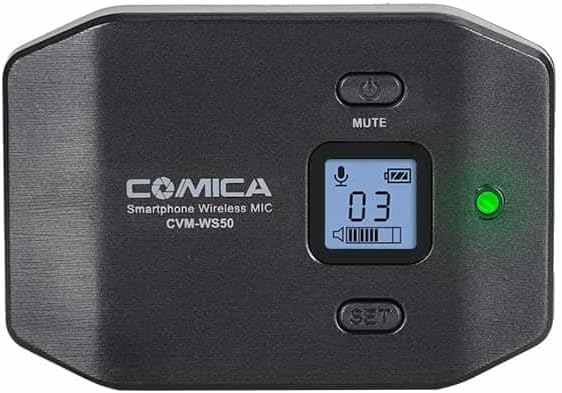
Image: A detailed view of the CVM-WS50B receiver's LCD screen, showing channel number, battery status, and audio levels, along with the power and set buttons.
Operating Instructions
- Volume Adjustment: Use the "VOL" wheel on the receiver unit to adjust the audio output level to your smartphone. Monitor the audio levels on your smartphone's recording app to prevent clipping or distortion.

Image: A close-up of the receiver's side, highlighting the volume control wheel and the audio output port.
- Real-time Monitoring: Plug headphones into the headphone jack on the receiver unit to monitor the audio in real-time during recording. This allows you to ensure clear audio capture.
- Mute Function: Briefly press the power button on the transmitter unit to mute the microphone. The LCD screen will indicate the mute status. Press again to unmute.
- Recording: Start recording on your smartphone's camera or audio recording application. The CVM-WS50B will provide the audio input.
Maintenance
- Cleaning: Use a soft, dry cloth to clean the units. Avoid using harsh chemicals or abrasive materials.
- Storage: Store the microphone system in its soft travel/storage case in a cool, dry place when not in use.
- Battery Care: Recharge the batteries regularly, even if the device is not used frequently, to maintain battery health. Avoid fully discharging the batteries for extended periods.
- Cable Care: Handle cables gently to prevent damage. Avoid sharp bends or excessive pulling.
Troubleshooting
| Problem | Possible Cause | Solution |
|---|---|---|
| No audio output |
|
|
| Poor audio quality / Interference |
|
|
| Smartphone not recognizing microphone |
|
|
Specifications
| Feature | Detail |
|---|---|
| Brand | Ikan |
| Model Name | CVM-S50B (Note: Product title indicates CVM-WS50B) |
| Item Model Number | CVM-WS50B |
| Connectivity Technology | Auxiliary |
| Connector Type | 3.5 mm Jack |
| Special Feature | Clip |
| Compatible Devices | Smartphone |
| Color | Black |
| Polar Pattern | Omnidirectional |
| Audio Sensitivity | 10 Decibels |
| Item Weight | 0.65 Kilograms (1.43 pounds) |
| Microphone Form Factor | Lavalier |
| Item Dimensions L x W x H | 10 x 4 x 10 inches |
| Power Source | Battery Powered |
| Number of Batteries | 1 Lithium Polymer batteries required. (included) |
| Material | Metal |
| Signal-to-Noise Ratio | 80 dB |
| Hardware Platform | Smartphone |
| Number of Channels | 6 |
| Recommended Uses For Product | Video Recording |
| Date First Available | December 20, 2017 |
Warranty and Support
For warranty information and technical support, please refer to the official Ikan website or contact their customer service directly. Details regarding specific warranty periods and support procedures are typically provided with your product documentation or on the manufacturer's website.
Related documentsCVM-WS50B

Ask a question about this manual
Ask about setup, troubleshooting, compatibility, parts, safety, or missing instructions. Manuals+ will review the question and use this page’s manual context to help answer it.