
1. Introduction
Thank you for purchasing the Nutek TS-90112BL 12-inch Trolley Speaker. This portable speaker system is designed to provide high-quality audio with versatile connectivity options. Please read this manual carefully before operating the device to ensure proper use and to maximize its performance.
Key Features:
- 12-inch (30.5 cm) Plastic Trolley Speaker
- Rechargeable Battery
- Bluetooth Connectivity
- FM Radio
- AUX Input
- Microphone Input with Karaoke Function
- SD Card Slot
- Multi-color Hemispherical LED Disco Lighting
2. Safety Instructions
To prevent fire, electric shock, or product damage, please observe the following safety guidelines:
- Do not expose this appliance to rain or moisture.
- Do not place objects filled with liquids, such as vases, on the appliance.
- Do not block any ventilation openings. Install in accordance with the manufacturer's instructions.
- Do not install near any heat sources such as radiators, heat registers, stoves, or other apparatus (including amplifiers) that produce heat.
- Protect the power cord from being walked on or pinched, particularly at plugs, convenience receptacles, and the point where they exit from the appliance.
- Only use attachments/accessories specified by the manufacturer.
- Unplug this appliance during lightning storms or when unused for long periods of time.
- Refer all servicing to qualified service personnel. Servicing is required when the apparatus has been damaged in any way.
3. Package Contents
Please check that all items are present and in good condition:
- Nutek TS-90112BL Trolley Speaker
- Wired Microphone
- Power Adapter/Charging Cable
- User Manual
4. Product Overview
Familiarize yourself with the speaker's components and controls.
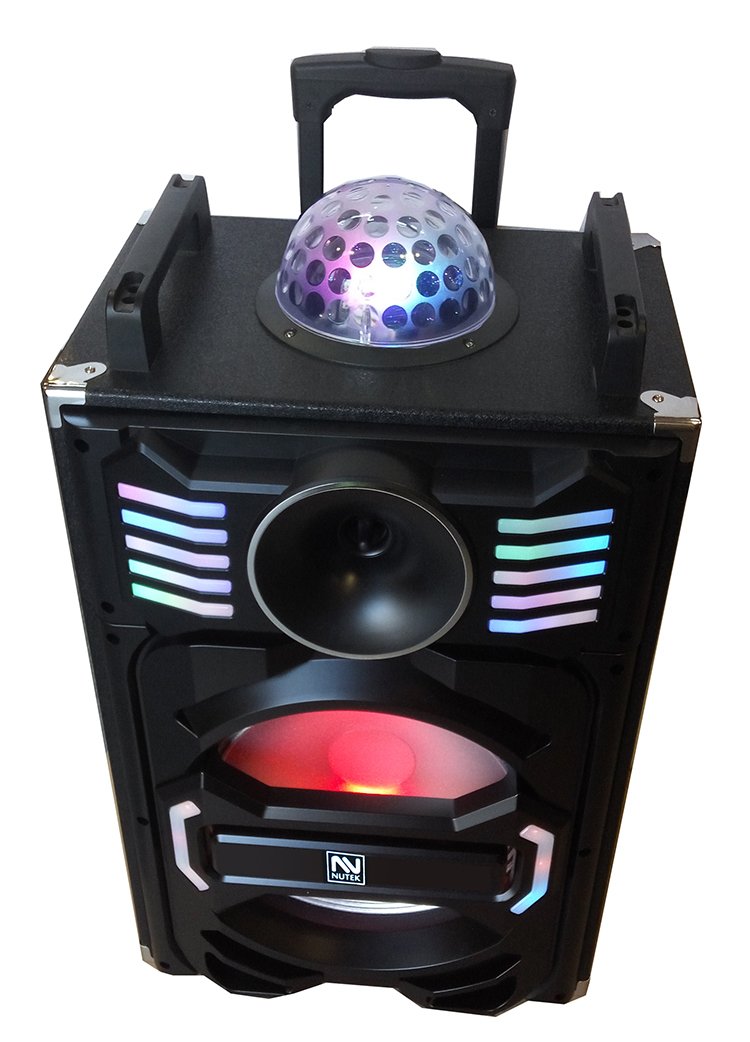
Figure 1: Front view of the Nutek TS-90112BL Trolley Speaker. This image displays the main speaker grille, control panel, and the hemispherical LED disco light on top. The trolley handle is visible at the top.
Control Panel (Example Layout)
- Power ON/OFF Switch: Turns the speaker on or off.
- Volume Control: Adjusts the master volume.
- Mode Button: Switches between Bluetooth, FM Radio, AUX, and SD Card modes.
- Play/Pause Button: Plays or pauses audio in Bluetooth/SD mode.
- Previous/Next Track Buttons: Skips to the previous or next track.
- Microphone Volume: Adjusts the volume of the connected microphone.
- Echo Control: Adjusts the echo effect for the microphone.
- AUX Input Jack: Connect external audio devices via a 3.5mm cable.
- Microphone Input Jack: Connect the wired microphone.
- SD Card Slot: Insert an SD card for audio playback.
- Charging Port: Connect the power adapter to charge the speaker.
- LED Display: Shows current mode, track number, or FM frequency.
5. Setup
5.1 Charging the Speaker
- Locate the charging port on the speaker.
- Connect the provided power adapter to the charging port.
- Plug the other end of the adapter into a suitable power outlet.
- The charging indicator light (if present) will illuminate, typically red, during charging.
- Once fully charged, the indicator light may change color (e.g., green) or turn off. Disconnect the charger.
Initial charge time may be longer. For optimal battery life, fully charge the speaker before first use.
5.2 Powering On/Off
- To turn on: Flip the Power ON/OFF switch to the "ON" position. The LED display will light up.
- To turn off: Flip the Power ON/OFF switch to the "OFF" position.
6. Operating Instructions
6.1 Bluetooth Mode
- Turn on the speaker. It will automatically enter Bluetooth pairing mode or you can press the "Mode" button until "BT" appears on the display.
- On your mobile device (smartphone, tablet, etc.), enable Bluetooth and search for available devices.
- Select "NUTEK TS-90112BL" (or similar name) from the list of devices.
- Once paired, the speaker will emit a confirmation sound, and you can start playing music from your device.
The speaker will automatically reconnect to the last paired device if it's within range and Bluetooth is enabled.
6.2 FM Radio Mode
- Press the "Mode" button until "FM" appears on the display.
- Press and hold the "Play/Pause" button to automatically scan and save available FM stations.
- Use the "Previous/Next Track" buttons to navigate between saved stations.
6.3 AUX Input Mode
- Connect one end of a 3.5mm audio cable (not included) to the AUX input jack on the speaker.
- Connect the other end of the cable to the audio output of your external device (e.g., MP3 player, laptop).
- Press the "Mode" button until "AUX" appears on the display.
- Play audio from your external device.
6.4 SD Card Playback
- Insert an SD card (with MP3 audio files) into the SD card slot.
- The speaker should automatically switch to SD card mode and begin playback. If not, press the "Mode" button until "SD" appears.
- Use the "Play/Pause" and "Previous/Next Track" buttons to control playback.
6.5 Microphone and Karaoke Function
- Connect the provided wired microphone to the Microphone Input Jack.
- Adjust the "Microphone Volume" knob to control the microphone's output level.
- Adjust the "Echo Control" knob to add an echo effect to your voice.
- Play music via Bluetooth, AUX, or SD card for karaoke.
6.6 LED Disco Lighting
The multi-color hemispherical LED disco lighting will automatically activate when the speaker is powered on. There may be a dedicated button to turn the lights on/off or change patterns, depending on the specific model variant. Refer to the physical controls on your speaker.
7. Maintenance
7.1 Cleaning
- Always unplug the speaker before cleaning.
- Use a soft, dry cloth to wipe the exterior surfaces.
- Do not use liquid cleaners, aerosols, or abrasive chemicals, as these may damage the finish or internal components.
7.2 Storage
- Store the speaker in a cool, dry place away from direct sunlight and extreme temperatures.
- If storing for an extended period, charge the battery periodically (e.g., every 3-6 months) to maintain battery health.
8. Troubleshooting
| Problem | Possible Cause | Solution |
|---|---|---|
| No power | Battery is depleted; Power switch is off. | Charge the speaker; Ensure the power switch is in the "ON" position. |
| No sound | Volume is too low; Incorrect mode selected; Device not connected properly. | Increase master volume; Press "Mode" button to select correct input; Reconnect Bluetooth/AUX cable. |
| Bluetooth not pairing | Speaker not in pairing mode; Device Bluetooth is off; Speaker too far from device. | Ensure speaker is in BT mode; Turn on device Bluetooth; Move device closer to speaker (within 10m). |
| FM radio static | Weak signal; No antenna. | Relocate the speaker for better reception; Ensure any external antenna (if applicable) is connected. |
| Microphone not working | Microphone not plugged in; Mic volume too low. | Ensure microphone is securely plugged into the Mic Input Jack; Increase Microphone Volume. |
9. Specifications
| Feature | Detail |
|---|---|
| Model | TS-90112BL |
| Speaker Size | 12 inches (30.5 cm) |
| Connectivity | Bluetooth, AUX, SD Card, FM Radio |
| Power Source | Rechargeable Battery |
| Compatible Devices | Laptop, Smartphone |
| Microphone Input | Yes (Wired Microphone included) |
| Karaoke Function | Yes |
| LED Lighting | Multi-color Hemispherical Disco Lighting |
| UPC | 790946521003 |
10. Warranty Information
Nutek products are designed and manufactured to the highest quality standards. For specific warranty terms and conditions, please refer to the warranty card included with your product or contact Nutek customer support. Keep your purchase receipt as proof of purchase.
11. Customer Support
If you have any questions or require assistance with your Nutek TS-90112BL speaker, please contact our customer support team. Contact details can typically be found on the Nutek official website or on the product packaging.
Please have your model number (TS-90112BL) and purchase information ready when contacting support.