
VTech DS6151-11
VTech DS6151-11 DECT 6.0 2-Line Expandable Cordless Phone System User Manual
Model: DS6151-11, DS6101-11
Introduction
This manual provides comprehensive instructions for the setup, operation, and maintenance of your VTech DS6151-11 DECT 6.0 2-Line Expandable Cordless Phone System, including the DS6101-11 accessory handsets. This system is designed for efficient communication with its two-line operation and integrated digital answering system.

Image: The complete VTech DS6151-11 system, showing the main base unit with one cordless handset and three additional accessory handsets in their charging cradles.
Setup Guide
Follow these steps to set up your VTech cordless phone system.
1. Package Contents
Ensure all components are present:
- Main base unit (DS6151-11)
- Cordless handset(s) (DS6151-11 and DS6101-11 accessory handsets)
- Handset charger(s)
- Power adapter(s)
- Telephone line cord(s)
- Rechargeable battery pack(s)
2. Battery Installation
Install the battery pack into each cordless handset:
- Locate the battery compartment cover on the back of the handset.
- Slide the cover off.
- Connect the battery pack connector securely into the jack inside the compartment.
- Place the battery pack into the compartment.
- Slide the battery compartment cover back into place until it clicks.
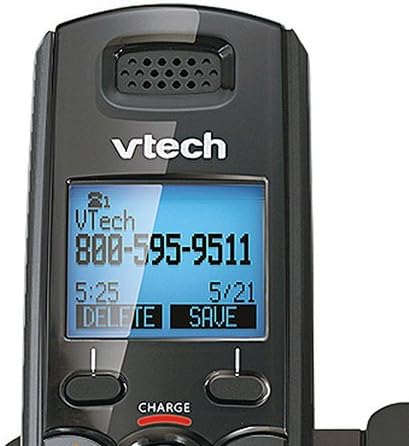
Image: A close-up view of the VTech cordless handset's backlit LCD display, showing call information and menu options.
3. Base Unit and Charger Connection
Connect the base unit and accessory chargers:
- Plug one end of the telephone line cord into the TEL LINE jack on the back of the base unit.
- Plug the other end of the telephone line cord into a telephone wall jack.
- Plug the small end of the power adapter into the POWER jack on the back of the base unit.
- Plug the large end of the power adapter into an electrical outlet not controlled by a wall switch.
- For each accessory charger, plug the power adapter into the charger and then into an electrical outlet.

Image: The VTech DS6151-11 base unit with a cordless handset docked in its charging cradle, illustrating the main components.
4. Initial Charging
Place each handset in its respective base or charger. Allow at least 16 hours for the batteries to fully charge before initial use. The CHARGE light on the handset will illuminate during charging.
Operating Instructions
This section covers the basic operation of your VTech cordless phone system.
Making and Receiving Calls
- To make a call: Press TALK/FLASH or SPEAKER, then dial the number.
- To answer a call: Press any dialing key (0-9, *, #), TALK/FLASH, or SPEAKER.
- To end a call: Press OFF/CLEAR or place the handset in the charger.
Two-Line Operation
The system supports two separate telephone lines. Use the LINE 1 and LINE 2 buttons on the base unit or handset to select the desired line for calls.
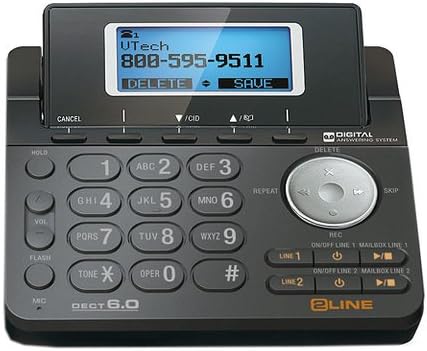
Image: A detailed view of the VTech DS6151-11 base unit's keypad, navigation buttons, and digital answering system controls, including the LINE 1 and LINE 2 buttons.
Digital Answering System
The integrated digital answering system has a dedicated mailbox for each line, offering approximately 13 minutes of recording time.
- To play messages: Press PLAY/STOP on the base unit or access the Answering System menu on the handset.
- To record an outgoing announcement: Follow the instructions in the handset menu under Answering System settings.
Phonebook and Caller ID
- Phonebook: Store up to 50 names and numbers. Access via the DIRECTORY button on the handset.
- Caller ID: The system stores up to 50 caller ID entries. Press CID on the handset to review.
Expandability
The system is expandable up to 12 handsets (DS6101-11 accessory handsets). Refer to the accessory handset manual for pairing instructions.

Image: A single VTech DS6101-11 accessory cordless handset shown in its compact charging cradle.
Maintenance
Proper care ensures the longevity of your phone system.
Cleaning
Wipe the phone and base unit with a soft, damp cloth. Do not use cleaning sprays or liquid cleaners as they may damage the finish or electrical components.
Battery Care
- Only use the supplied rechargeable battery packs or equivalent replacements.
- Do not dispose of batteries in a fire. They may explode.
- Do not open or mutilate the batteries. Released electrolyte is corrosive and may cause burns or injury to the eyes or skin.
- Charge batteries for at least 16 hours before first use.
- If the phone will not be used for an extended period, remove the batteries to prevent leakage.
Troubleshooting
This section addresses common issues you might encounter.
| Problem | Solution |
|---|---|
| No dial tone. |
|
| Handset displays "Out of range" or "No power at base". |
|
| Cannot hear messages on answering system. |
|
| Caller ID does not display. |
|
Specifications
Key technical specifications for the VTech DS6151-11 system:
- Technology: DECT 6.0 (1.9GHz)
- Lines Supported: 2-Line Operation
- Expandability: Up to 12 Handsets (DS6101-11 accessory handsets)
- Answering System: Digital, 13 minutes recording time, dedicated mailbox per line
- Phonebook Capacity: 50 names and numbers
- Caller ID Memory: 50 entries
- Display: Large Backlit LCD Display
- Keypad: Backlit Keypad
- Speakerphone: Dual Speakerphone (Base & Handset)
- Batteries: 7 AAA batteries required.
- Material: Plastic
- Color: Black
- Dimensions (Package): 15.12 x 12.01 x 5.31 inches
- Weight (Item): 4.69 pounds
- Compatible Devices: PSTN, VoIP services
Warranty and Support
For detailed warranty information and technical support, please refer to the official VTech website or the warranty card included with your product. VTech provides customer service to assist with any product-related inquiries or issues.
Online Support: Visit www.vtechphones.com for FAQs, product registration, and support resources.
Related documentsDS6151-11


Ask a question about this manual
Ask about setup, troubleshooting, compatibility, parts, safety, or missing instructions. Manuals+ will review the question and use this page’s manual context to help answer it.