
Introduction
The Pyle PPHP1235WMU is a versatile and powerful 1000 Watt 12-inch Portable Bluetooth PA Speaker System designed for both indoor and outdoor use. This active 2-way full-range stereo sound system features built-in Bluetooth for wireless music streaming, a rechargeable battery for portability, and comprehensive audio input options. It includes two UHF wireless microphones, MP3/USB/SD readers, and an FM radio, making it suitable for public gatherings, karaoke, and on-stage performances.

Image: Front view of the Pyle PPHP1235WMU Portable Bluetooth PA Speaker System.

Image: The Pyle PPHP1235WMU speaker being transported using its extendable handle and convenient rolling wheels, highlighting its portability.
What's in the Box
- Bluetooth PA Speaker
- (2) Wireless UHF Handheld Microphones
- Detachable Mic Holders
- Detachable Rolling Wheels
- Remote Control
- Power/Charging Cable
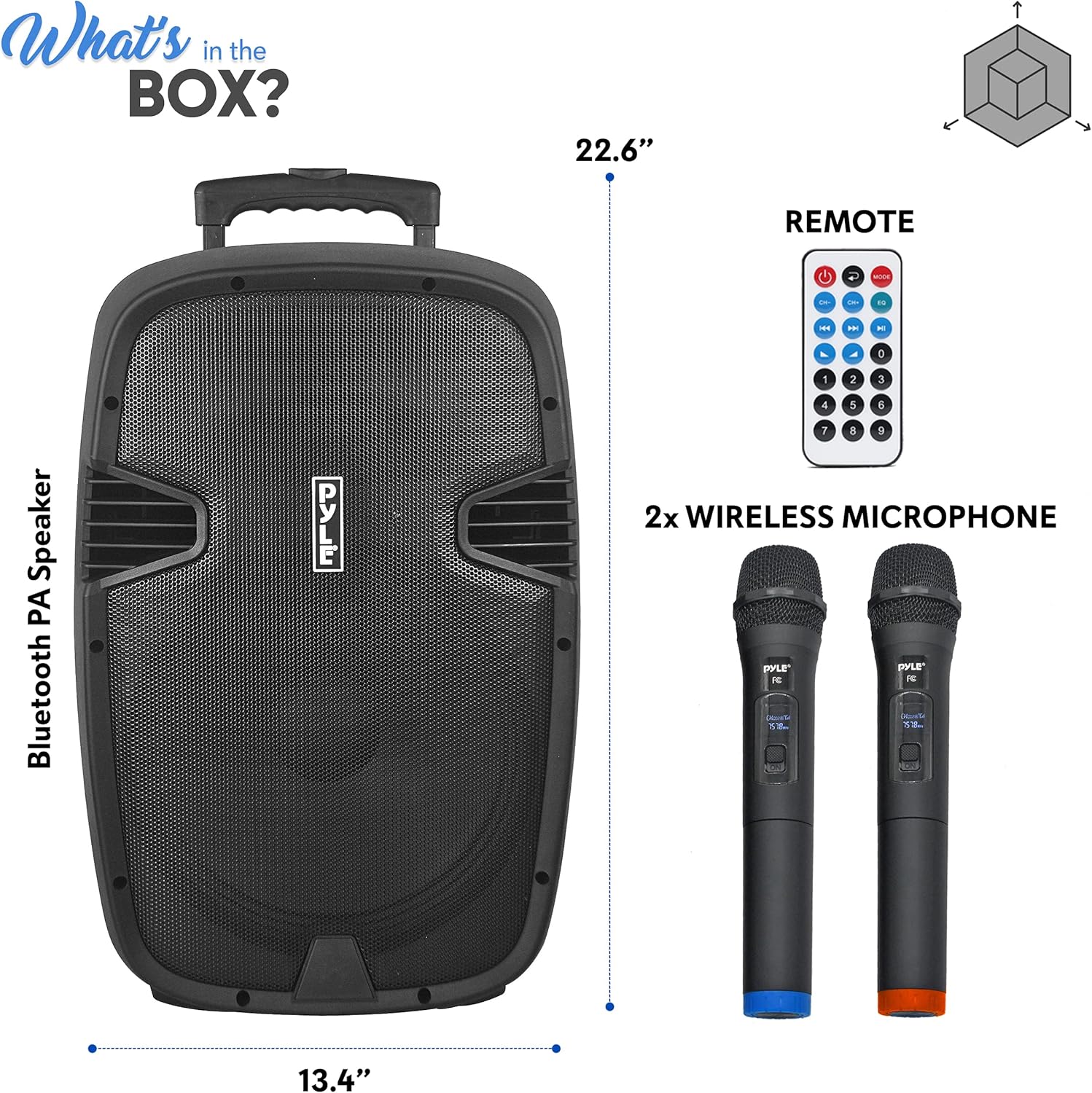
Image: An illustration showing the Pyle PPHP1235WMU Bluetooth PA Speaker, two wireless UHF microphones, and a remote control, representing the items included in the product packaging.
Controls and Connections
The rear panel of the PPHP1235WMU speaker provides all the necessary controls and connection ports for versatile audio management.

Image: A detailed diagram of the Pyle PPHP1235WMU rear control panel, labeling all inputs, outputs, and adjustment knobs.
MP3 Control Digital Display Section
- Digital Display Screen: Shows current mode, track information, and volume level.
- IR Mode: Infrared receiver for remote control.
- USB Input: For connecting USB flash drives to play MP3/WMA audio files.
- SD Card Input: For connecting SD memory cards to play MP3/WMA audio files.
- Control Buttons: Mode, Play/Pause, Next/Previous Track, Repeat, Scan, Volume +/-.
Audio Input/Output & Mixer Controls
- MIC 1/4'' Inputs (2): For connecting wired microphones.
- Guitar 1/4'' Input: For connecting a guitar or other instrument.
- RCA (L/R) Line Input: For connecting external audio devices (e.g., CD player, mixer).
- RCA (L/R) Line Output: For connecting to another PA system or recording device.
- MIC Level Control: Adjusts the volume of connected microphones.
- Guitar Level Control: Adjusts the volume of the connected guitar.
- MP3 Level Control: Adjusts the volume of audio played from USB/SD/Bluetooth/FM.
- Master Volume Control: Overall volume adjustment for the entire system.
- Echo Control: Adjusts the echo effect for microphones.
- Bass Control: Adjusts the low-frequency output.
- Treble Control: Adjusts the high-frequency output.
- Mic Priority Button: When pressed, it lowers the music volume when a microphone is in use.
Wireless Microphone Section
- MIC A/B Level Controls: Individual volume adjustments for wireless microphones A and B.
- Power Switch (Wireless Mics): Turns the wireless microphone receiver on/off.
- Wireless Mic Power Indicator: Lights up when wireless mics are active.
- FM Antenna: Extendable antenna for FM radio reception.
Power & Battery Section
- Power Switch: Main power switch for the speaker system.
- Battery Charge Indicator Lights: Shows charge level (Charge, Low, Full).
- 12 Volt Power Inlet: For external 12V DC power source (e.g., car/RV).
- AC Power Input: For connecting the power/charging cable to a wall outlet.
- Voltage Selector: Switch between 110V and 220V.
- Fuse Socket: Contains the system's fuse.
Setup
- Initial Charging: Before first use, fully charge the speaker's built-in rechargeable battery. Connect the power/charging cable to the AC Power Input on the rear panel and plug it into a suitable wall outlet. Ensure the Voltage Selector is set correctly (110V/220V). The 'Charge' indicator light will illuminate. Charging typically takes approximately 8 hours.
- Microphone Battery Installation: For the wireless UHF handheld microphones, unscrew the bottom part of each microphone and insert (2) 'AA' batteries into each.
- Powering On: Flip the main Power Switch on the rear panel to the 'ON' position. The Digital Display Screen will light up.
- Wireless Microphone Activation: Turn on the Power Switch for the Wireless Microphones section on the rear panel. Then, switch on each handheld wireless microphone.
Operating Instructions
Bluetooth Wireless Streaming
Stream music wirelessly from your Bluetooth-enabled devices (smartphones, tablets, PCs).
- Ensure the speaker is powered on.
- Press the 'MODE' button on the MP3 Control Digital Display until 'Bluetooth' mode is selected. The display will show 'Pyle Speaker'.
- On your device, search for Bluetooth devices and select 'Pyle Speaker' to pair.
- Once connected, you can play audio from your device through the speaker. Adjust volume using your device or the MP3 Level/Master Volume controls on the speaker.

Image: A visual representation of the Pyle PPHP1235WMU speaker connected via Bluetooth to a smartphone, illustrating wireless music streaming capabilities.
USB/SD Playback
Play MP3/WMA audio files directly from a USB flash drive or SD memory card.
- Insert a USB flash drive into the USB Input or an SD card into the SD Card Input.
- The speaker should automatically switch to USB/SD mode. If not, press the 'MODE' button.
- Use the control buttons (Play/Pause, Next/Previous, Volume +/-) on the display or remote to manage playback.

Image: A close-up of the Pyle PPHP1235WMU control panel showing the USB and SD card slots, with hands inserting a USB drive and an SD card.
FM Radio
Listen to your favorite FM radio stations.
- Extend the FM Antenna for better reception.
- Press the 'MODE' button until 'FM Radio' mode is selected.
- Use the 'SCAN' button for automatic station recognition. Use Next/Previous buttons to navigate stations.
Microphone Usage
Connect and use wired or wireless microphones for vocals or announcements.
- Wired Microphones: Plug into the MIC 1/4'' Inputs. Adjust volume with the MIC Level control.
- Wireless Microphones: Ensure wireless mic power is on. Adjust individual mic volumes with MIC A/B Level controls.
- Mic Priority: Press the 'Mic Priority' button to automatically lower background music when speaking into a microphone.
Audio Recording
Record audio directly to a connected USB flash drive or SD memory card.
- Ensure a USB drive or SD card is inserted.
- Press the 'MODE' button to select the desired input source (e.g., Microphone, Line In).
- Press the 'REC' button to start recording. The system will record audio from the active input source (e.g., microphone input, streamed music).
- Press 'REC' again to stop recording. Audio files are saved in .mp3 format.

Image: A person playing a guitar and singing into a microphone, with the Pyle PPHP1235WMU speaker in the foreground, illustrating its audio recording capabilities from external microphones.
Adjusting Sound
Fine-tune your audio output using the various controls:
- Master Volume: Controls the overall output level of the speaker.
- Bass/Treble: Adjust these knobs to enhance low or high frequencies for desired sound quality.
- Echo: Add an echo effect to microphone inputs for vocal enhancement.
Maintenance
- Battery Care: To prolong battery life, avoid completely draining the battery frequently. Recharge the unit after each use. If storing for extended periods, charge the battery every 3-6 months. The battery is a 4.5A Lead Acid, 12V type and is replaceable.
- Cleaning: Use a soft, dry cloth to clean the exterior of the speaker. Avoid using harsh chemicals or abrasive cleaners.
- Storage: Store the speaker in a cool, dry place away from direct sunlight and extreme temperatures.
Troubleshooting
| Problem | Possible Cause | Solution |
|---|---|---|
| No power | Power cable not connected; Battery drained; Power switch off | Check power cable connection; Charge battery; Turn on power switch |
| No sound output | Volume too low; Incorrect input mode; Device not connected properly | Increase Master Volume; Select correct MODE; Reconnect device/microphone |
| Microphone not working | Mic switch off; Low mic volume; Wireless mic batteries low/off | Turn on mic; Increase MIC Level/A/B Level; Replace mic batteries/Turn on wireless mic |
| Bluetooth not connecting | Not in Bluetooth mode; Device too far; Already connected to another device | Select Bluetooth MODE; Move device closer; Disconnect from other devices and try again |
Specifications
| Feature | Specification |
|---|---|
| Max Power Output | 1000 Watt |
| RMS Power Output | 500 Watt |
| Subwoofer Size | 12'' -inch |
| Tweeter Size | 1.34'' -inch |
| Impedance | 4 Ohm |
| Frequency Response | 80-18kHz (-10dB) |
| Sensitivity | 95dB (+/-2dB) |
| Connectivity Technology | Wired, USB, Wireless, Bluetooth |
| Bluetooth Wireless Range | 30'+ Feet |
| Battery Type | 4.5A Lead Acid, 12V |
| Battery Life | Up to 4 Hours |
| Battery Charge Time | Approx. 8 Hours |
| Digital Audio File Support | MP3, WMA |
| Maximum USB/SD Card Support | 16GB |
| Dimensions (L x W x H) | 13.4'' x 12.2'' x 22.6'' -inches |
| Item Weight | 26.5 Pounds |
Warranty and Support
For warranty information, please refer to the documentation included with your product packaging or visit the official Pyle website. For technical support or customer service, please contact Pyle customer support directly.
Official Product Video
Video: An overview of the Pyle Portable Bluetooth PA Speaker System, highlighting its features and benefits. This video demonstrates the speaker's functionality and various uses.


