
1. Introduction
Thank you for choosing the COSMO COS-DIS6502 24-inch Built-In Dishwasher. This manual provides essential information for the safe and efficient operation, installation, and maintenance of your new appliance. Please read this manual thoroughly before using the dishwasher and keep it for future reference.
The COS-DIS6502 is designed for efficiency and convenience, featuring a stainless steel interior and exterior, multiple wash cycles, and a quiet operation. Its Smart Wash System automatically adjusts to load size, ensuring optimal cleaning performance.
2. Important Safety Information
WARNING: To reduce the risk of fire, electric shock, or injury, follow these basic precautions:
- Read all instructions before using the appliance.
- This appliance must be properly grounded. Connect to properly grounded outlets only.
- Do not operate a damaged appliance. Contact customer support for assistance.
- Keep children away from the dishwasher, especially when the door is open.
- Use only detergents and rinse aids recommended for dishwashers.
- Do not touch the heating element during or immediately after use.
- Load sharp items so they are not likely to damage the door seal or tub.
- The dishwasher is UL Listed and ENERGY STAR certified for safety and efficiency.
3. Setup and Installation
Proper installation is crucial for the performance and longevity of your dishwasher. It is recommended that installation be performed by a qualified technician.
3.1 Unpacking
Carefully remove all packaging materials. Ensure all components listed in the 'What's in the Box' section are present.
- Included Components: Installation Kit, Install & User Guides.
3.2 Electrical and Plumbing Requirements
Ensure your installation site meets the following requirements:
- Electrical: 120V / 60Hz. A 3-Prong Plug is NOT INCLUDED and must be purchased separately.
- Plumbing: A 3/8 inch pipe fitting is necessary for installation and is sold separately.
3.3 Dimensions
Refer to the diagram below for precise product dimensions to ensure proper fit within your cabinetry.

Figure 3.3.1: COSMO COS-DIS6502 Dishwasher Dimensions. Width: 23.75 inches, Depth: 22.25 inches, Height: 33.75 inches.

Figure 3.3.2: The COSMO COS-DIS6502 dishwasher seamlessly integrated into a kitchen setting.
4. Operating Instructions
4.1 Control Panel
The dishwasher features a touch-enabled control panel located at the top of the door. Controls are hidden when the door is closed for a clean aesthetic.
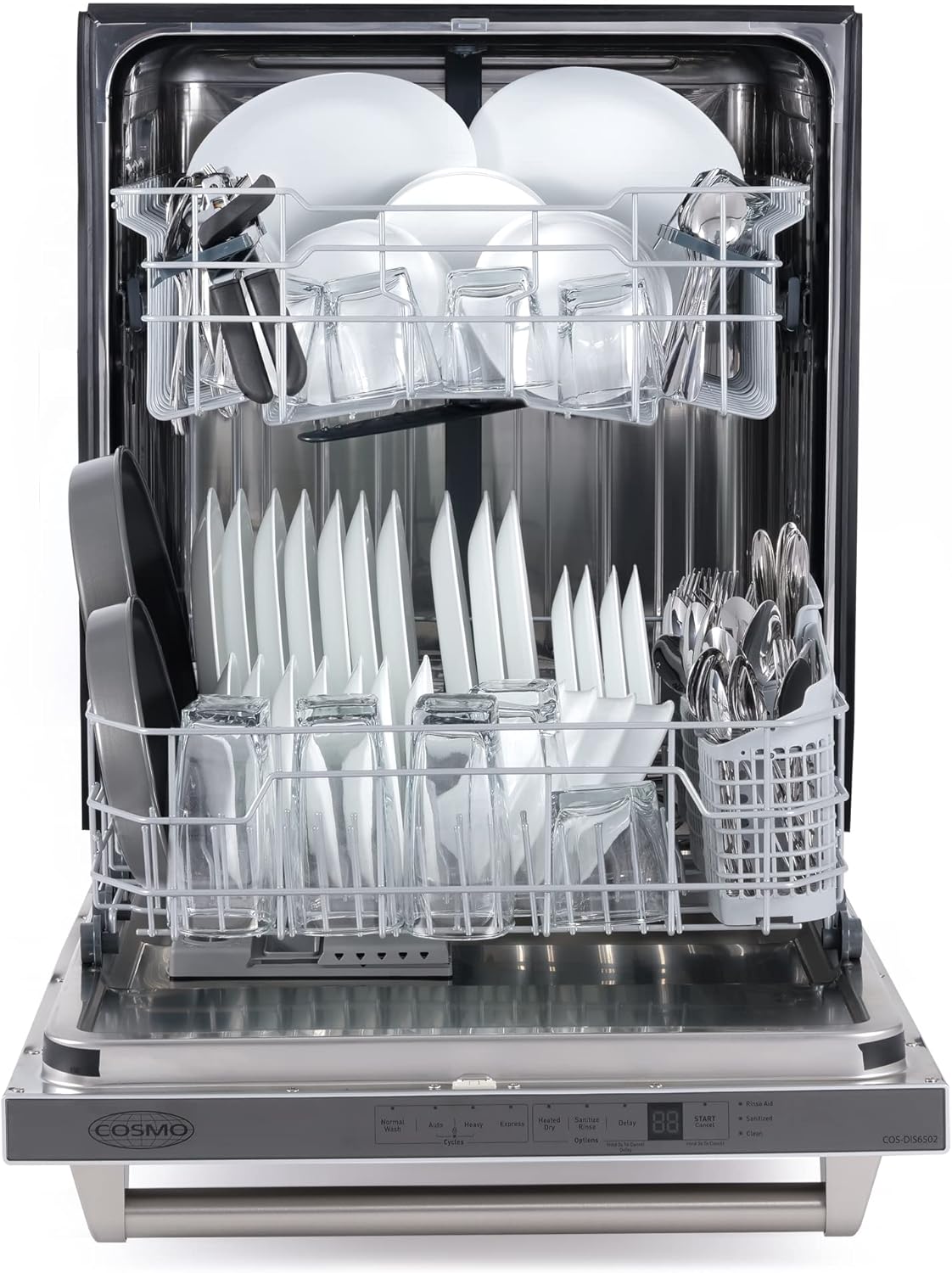
Figure 4.1.1: Detailed view of the touch-enabled control panel on the COSMO COS-DIS6502 dishwasher.
4.2 Loading the Dishwasher
The COS-DIS6502 can accommodate up to 12 place settings. For optimal cleaning, ensure dishes are loaded correctly, allowing water and detergent to reach all surfaces.
- Upper Rack: Adjustable by 2 inches to accommodate larger or irregular-sized dishes.
- Lower Rack: Designed for plates, bowls, and cookware.
- Silverware Basket: Use for forks, spoons, and knives.

Figure 4.2.1: Interior view of the dishwasher with dishes loaded, demonstrating capacity.

Figure 4.2.2: Empty dishwasher racks, showing the adjustable upper rack and silverware basket.
4.3 Wash Cycles and Options
The dishwasher offers 4 wash cycles and additional options to suit various cleaning needs:
- Wash Cycles: Pots & Pans, Normal Wash, China Crystal, Quick Wash, Rinse Only, Air Exchange, Steam Wash, Vortex Wash.
- Options: Heated Dry, Sanitize, Hi Temp Wash.
- Smart Wash System: Automatically detects partial or full loads and selects the appropriate wash cycle for efficiency.
5. Maintenance and Care
Regular maintenance ensures optimal performance and extends the life of your dishwasher.
5.1 Cleaning the Exterior
The stainless steel exterior is fingerprint resistant. Clean with a soft, damp cloth and mild detergent. Avoid abrasive cleaners or scouring pads.
5.2 Filter System
The multiple filter system helps save water and energy by separating soiled and clean water. Regularly inspect and clean the filters as per the detailed instructions in the included 'Install & User Guides' to prevent blockages and maintain wash performance.
6. Troubleshooting
Before contacting customer support, try these common troubleshooting steps:
- Dishwasher not starting: Ensure the door is fully closed and latched. Check if the power cord is securely plugged in and the circuit breaker has not tripped.
- Dishes not clean: Verify proper loading, ensure spray arms are not blocked, and check detergent dispenser for clogs. Clean the filter system.
- Unusual noises: Check for foreign objects in the pump area or spray arms. Ensure dishes are not interfering with the spray arms.
- Control panel unresponsive or blinking: If the control panel becomes unresponsive or exhibits unusual blinking, try unplugging the dishwasher from the power outlet for a few minutes, then plugging it back in to reset the system.
For more detailed troubleshooting, refer to the comprehensive 'Install & User Guides' provided with your appliance.
Video: A user review discussing the COSMO Dishwasher. This video provides a general overview and user perspective on the appliance's performance and features.
7. Specifications
| Brand | COSMO |
| Model Name | COS-DIS6502 |
| Installation Type | Built-In (Slide-in) |
| Product Dimensions (D x W x H) | 22.25" x 23.75" x 33.75" |
| Capacity | 12 Place Settings / 94 Pounds |
| Color | Stainless Steel |
| Controls Type | Fully Integrated, Touch-enabled |
| Material | Stainless Steel |
| Noise Level | 45 dB (as low as) / 51 Decibels |
| Voltage | 120 Volts |
| Operating Frequency | 60 Hz |
| Wash Cycles | Pots & Pans, Normal Wash, China Crystal, Quick Wash, Rinse Only, Air Exchange, Steam Wash, Vortex Wash |
| Options | Heated Dry, Sanitize, Hi Temp Wash |
| Special Features | Smart Wash System, Adjustable Upper Rack, Fingerprint Resistant Finish |
| Certifications | UL Listed, ENERGY STAR certified |
| Item Weight | 105 Pounds |
| UPC | 854115007399 |
8. Warranty and Support
Your COSMO COS-DIS6502 Dishwasher comes with a 1 Year Limited Parts & Labor Warranty. This warranty covers defects in materials and workmanship under normal use.
For warranty claims, technical assistance, or general inquiries, please contact our customer support team. Our support team is proudly based in the USA and is ready to assist you.
Please refer to the 'Install & User Guides' for complete warranty terms and conditions, and contact information.


