
Important Safety Instructions
Please read these instructions carefully before using the WMF KULT X Hand Mixer Edition. Keep this manual for future reference.
- Always unplug the appliance from the power supply before assembly, disassembly, or cleaning.
- Do not immerse the motor unit in water or any other liquid. Clean with a damp cloth only.
- Keep hands, hair, clothing, as well as spatulas and other utensils away from beaters during operation to prevent injury and damage to the appliance.
- This appliance is not intended for use by persons (including children) with reduced physical, sensory or mental capabilities, or lack of experience and knowledge, unless they have been given supervision or instruction concerning use of the appliance by a person responsible for their safety.
- Children should be supervised to ensure that they do not play with the appliance.
- Do not operate any appliance with a damaged cord or plug, or after the appliance malfunctions or has been dropped or damaged in any manner.
- Use only WMF recommended attachments.
- Avoid contact with moving parts.
Product Overview
The WMF KULT X Hand Mixer Edition is designed for efficient mixing, whisking, and kneading. Familiarize yourself with its components before use.

Image: WMF KULT X Hand Mixer with accessories and ingredients, illustrating its use in a kitchen setting.
Components:
- Motor Unit: The main body containing the motor and controls.
- Speed Selector: Slider to adjust mixing speed (0-5).
- Turbo Button: Provides maximum power for short bursts.
- Eject Button: Releases the beaters or dough hooks.
- Beaters: For whisking and mixing lighter ingredients.
- Dough Hooks: For kneading heavier doughs.
- Power Cord: For connecting to an electrical outlet.

Image: Top view of the hand mixer, highlighting the speed control slider, turbo button, and eject button for easy identification.
Setup
- Unpacking: Carefully remove all components from the packaging. Retain packaging for storage or future transport.
- Initial Cleaning: Before first use, wash the beaters and dough hooks in warm soapy water, rinse thoroughly, and dry. Wipe the motor unit with a damp cloth.
- Attaching Beaters/Dough Hooks:
- Ensure the mixer is unplugged and the speed selector is set to "0".
- Insert the beaters or dough hooks into the openings on the front of the motor unit. Push firmly until they click into place. The beaters are identical and can be inserted into either opening. For dough hooks, ensure the hook with the collar is inserted into the larger opening.

Image: Close-up of the two whisk beaters, ready for insertion into the hand mixer.
- Power Connection: Plug the power cord into a suitable electrical outlet (240V).
Operating Instructions
- Preparation: Place ingredients in a mixing bowl. Ensure the bowl is stable on a flat surface.
- Selecting Attachments:
- Use beaters for whipping cream, egg whites, mixing cake batter, and light mixtures.
- Use dough hooks for kneading yeast dough, bread dough, and other heavy mixtures.
- Starting the Mixer:
- With the appropriate attachments securely inserted, immerse them into the ingredients.
- Slide the speed selector from "0" to the desired speed setting (1-5). Start with a lower speed to prevent splashing and gradually increase as needed.
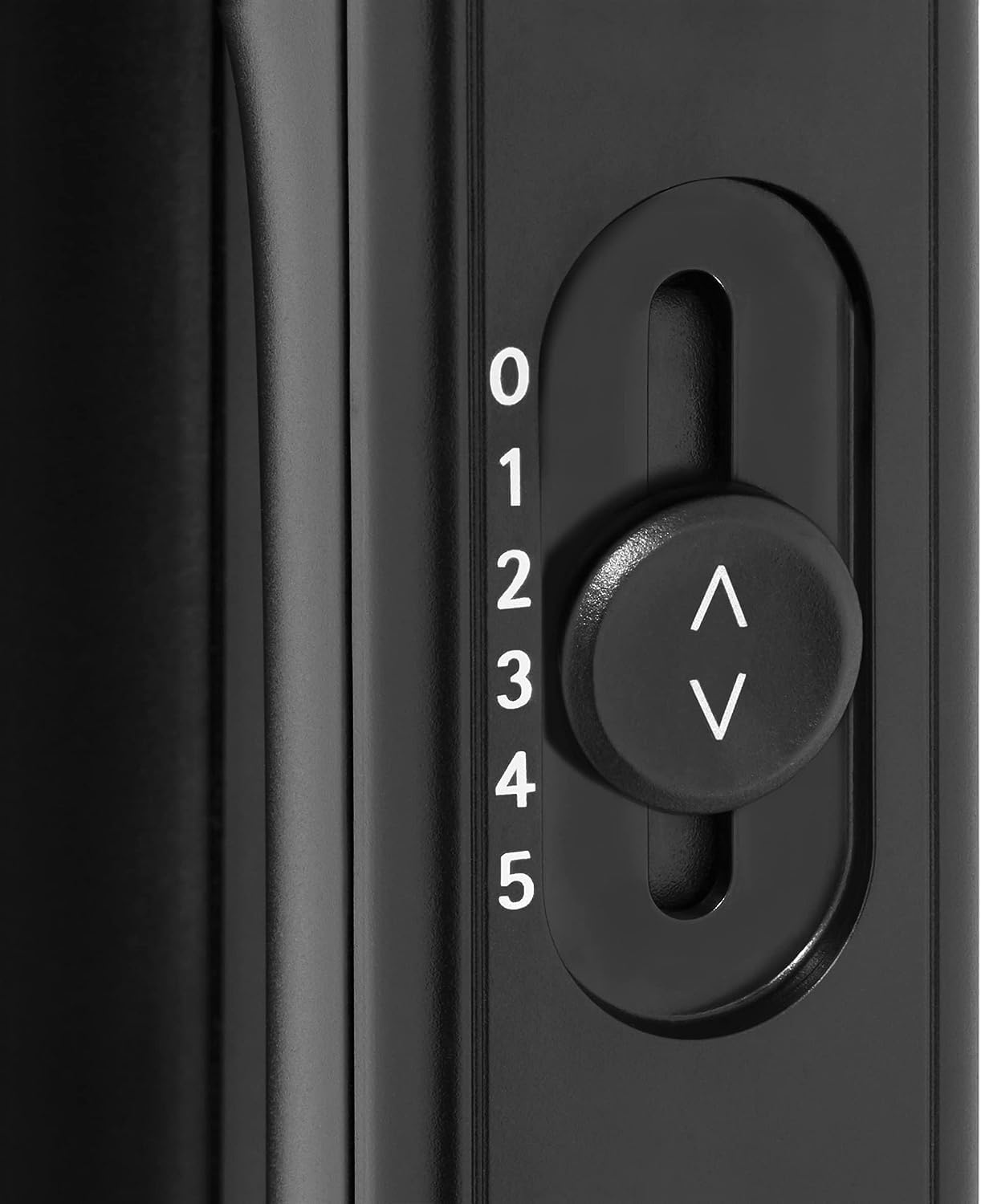
Image: Detailed view of the speed control slider, numbered 0 to 5, indicating different power levels.
- Using the Turbo Function: For short bursts of maximum power, press and hold the "turbo" button. Release to return to the selected speed.
- Stopping the Mixer: Slide the speed selector back to "0". Unplug the mixer from the power outlet.
- Ejecting Attachments: Once the mixer is unplugged, press the "eject" button to release the beaters or dough hooks.

Image: Close-up of the 'eject' and 'turbo' buttons, located on the top of the mixer handle for easy access.
Maintenance and Cleaning
Proper cleaning and maintenance will ensure the longevity and optimal performance of your hand mixer.
- Always Unplug: Before cleaning, ensure the mixer is unplugged from the power outlet and attachments are removed.
- Cleaning Attachments: The beaters and dough hooks are dishwasher safe. Alternatively, wash them by hand in warm soapy water, rinse, and dry thoroughly.
- Cleaning Motor Unit: Wipe the exterior of the motor unit with a soft, damp cloth. Do not use abrasive cleaners or immerse the motor unit in water.
- Storage: Store the mixer and its attachments in a dry place, away from direct sunlight and moisture.
Troubleshooting
| Problem | Possible Cause | Solution |
|---|---|---|
| Mixer does not turn on. | Not plugged in; power outlet not working; speed selector not at "0" before starting. | Ensure the mixer is securely plugged into a working outlet. Check if the speed selector is at "0" before moving to a desired speed. |
| Attachments are difficult to insert or eject. | Attachments not aligned correctly; eject button not fully pressed. | Ensure attachments are aligned with the openings and pushed firmly until they click. For ejection, press the eject button completely. Ensure the mixer is unplugged before ejecting. |
| Motor sounds strained or slows down. | Mixture is too thick or heavy; operating at too low a speed. | Increase the speed setting. If the mixture is very thick, consider adding a small amount of liquid or processing in smaller batches. Use the turbo function for short bursts if needed. |
| Attachments wobble during operation. | Attachments not fully inserted. | Ensure attachments are pushed firmly into the openings until they click into place. |
If the problem persists after trying these solutions, please contact WMF customer support.
Specifications
- Model Name: WMF KULT X Hand Mixer Edition
- Model Number: 416560011
- Brand: WMF
- Product Dimensions: 7.01 x 3.54 x 6.5 inches
- Item Weight: 2.74 pounds (1.24 Kilograms)
- Material: Stainless Steel
- Voltage: 240.0 V
- Wattage: 400 watts
- Controls Type: Push Button, Slider
- Dishwasher Safe: Yes (attachments only)
- First Available: April 28, 2019
Warranty and Support
WMF products are manufactured with quality and durability in mind. For specific warranty information, please refer to the warranty card included with your purchase or visit the official WMF website.
For technical support, spare parts, or service inquiries, please contact WMF customer service through their official website or the contact details provided in your product packaging.
WMF Official Website: www.wmf.com


