
Introduction
This manual provides instructions for the Smartby XRT135 Remote Control. This remote is designed as a replacement for various Vizio HDTV models, offering direct functionality without the need for programming.

Image: Smartby XRT135 Remote Control.
Compatible Vizio HDTV Models: P55-E1, P60-E1, P65-E1, M70-E3, P75-E1, M55E1, M55E0, M65E0, D32HN-E1.
Setup
1. Battery Installation
The Smartby XRT135 remote control requires two AAA batteries (not included). Follow these steps to install them:
- Locate the battery compartment on the back of the remote control.
- Slide the battery compartment cover downwards to open it.
- Insert two AAA batteries, ensuring the positive (+) and negative (-) terminals align correctly with the markings inside the compartment.
- Slide the battery compartment cover back into place until it clicks securely.
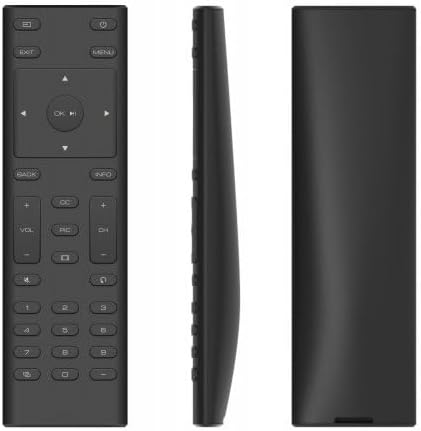
Image: Side view of the remote, indicating the battery compartment location.
2. Initial Use
This remote control is designed to work immediately with compatible Vizio HDTV models without any programming. Once batteries are installed, point the remote at your Vizio TV and begin operation.
Operating Instructions
The Smartby XRT135 remote control features a standard layout for Vizio HDTVs. Refer to the diagram below for button identification and their functions.

Image: Labeled diagram of the XRT135 remote control buttons.
- Power Button: Turns the TV on or off.
- Input Button: Cycles through available input sources (HDMI, AV, etc.).
- Menu Button: Accesses the TV's main menu.
- Exit Button: Exits current menu or on-screen display.
- Arrow Buttons (Up, Down, Left, Right): Navigate through menus and options.
- OK / Play/Pause Button: Confirms selections or controls media playback.
- Back Button: Returns to the previous screen or menu.
- Info Button: Displays information about the current program or input.
- Volume Up/Down (VOL +/-): Adjusts the audio volume.
- Channel Up/Down (CH +/-): Changes TV channels.
- Mute Button: Toggles audio mute on or off.
- CC (Closed Captions) Button: Activates or deactivates closed captions.
- PIC (Picture Modes) Button: Cycles through various picture modes.
- Aspect Ratio Button: Adjusts the screen aspect ratio.
- Last Button: Returns to the previously viewed channel.
- Number Pad (0-9): Directly enters channel numbers.
- Dash (-) Button: Used for entering sub-channels (e.g., 7-1).
- Pairing Link Button: (If applicable for specific Vizio models) Initiates pairing.
Maintenance
Battery Replacement
Replace batteries when the remote's response becomes inconsistent or stops working. Always replace both batteries at the same time with new AAA batteries. Do not mix old and new batteries, or different types of batteries.
Cleaning
To clean the remote control, gently wipe it with a soft, dry cloth. Do not use liquid cleaners, sprays, or abrasive materials, as these can damage the remote's surface or internal components.
Troubleshooting
- Remote not responding:
- Ensure batteries are correctly installed with proper polarity.
- Replace old batteries with new AAA batteries.
- Check for any obstructions between the remote and the TV's infrared sensor.
- Ensure you are within the effective range of the TV's sensor.
- Buttons not working:
- If only specific buttons are not working, try cleaning the remote as described in the Maintenance section.
- If multiple buttons are unresponsive, replace the batteries.
- Remote works intermittently:
- This often indicates low battery power. Replace batteries.
- Ensure a clear line of sight to the TV.
Specifications
| Feature | Detail |
|---|---|
| Model Number | XRT135 |
| Brand | Smartby |
| Compatible Devices | Vizio HDTVs (P55-E1, P60-E1, P65-E1, M70-E3, P75-E1, M55E1, M55E0, M65E0, D32HN-E1) |
| Power Source | 2 x AAA Batteries (not included) |
| Item Weight | 2.04 ounces |
| Package Dimensions | 6.18 x 2.2 x 0.75 inches |
| Color | Black |
| Special Feature | Ergonomic design |
Warranty Information
Specific warranty details for the Smartby XRT135 Remote Control are not provided within this manual. For information regarding warranty coverage, please refer to the product packaging or contact Smartby customer support directly.
Support
For further assistance or inquiries about your Smartby XRT135 Remote Control, please contact Smartby customer support. You may also visit the official Smartby store on Amazon for additional product information: