
Introduction
This manual provides detailed instructions for the setup, operation, and maintenance of your KICKER Bullfrog BF100 Bluetooth Portable Outdoor Speaker. Please read this manual thoroughly to ensure proper use and to maximize the performance of your device. The Bullfrog BF100 is designed for robust outdoor use, featuring 360-degree sound, Bluetooth connectivity, and a durable waterproof and dustproof casing.
Product Overview
The KICKER Bullfrog BF100 delivers a 360-degree sound field through its unique driver design. It features two 1-5/8 inch full-range drivers and two 2-5/8 inch passive bass radiators, powered by a built-in 16-watt amplifier. The speaker is equipped with Bluetooth for wireless audio streaming and includes a built-in speakerphone for calls.
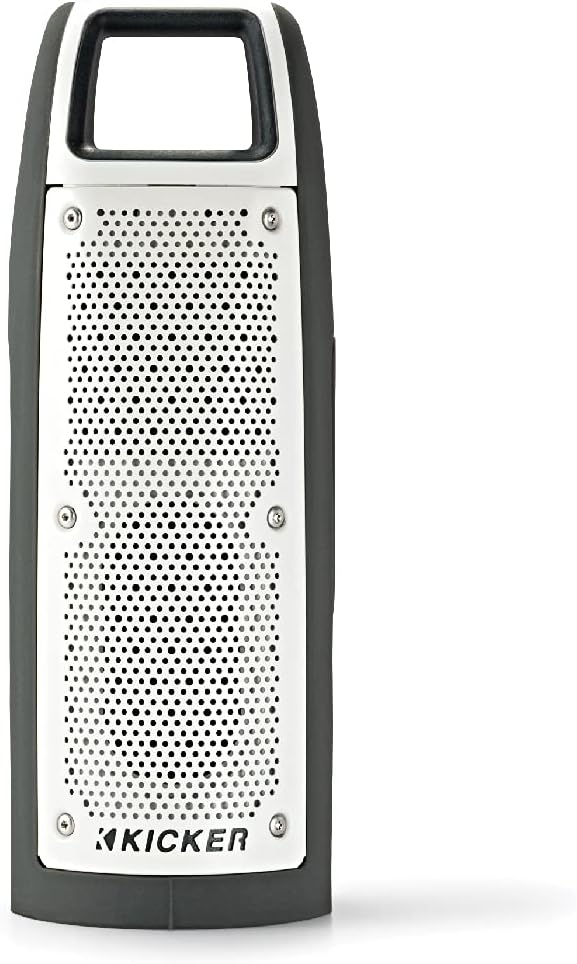
Figure 1: Front view of the KICKER Bullfrog BF100 speaker, showcasing its compact and rugged design.
Key Features:
- 360-Degree Sound: Drivers on both sides provide immersive audio.
- Bluetooth Connectivity: Stream music wirelessly from compatible devices.
- Waterproof & Dustproof (IP66 Rated): Designed for outdoor environments, resistant to dust and water spray.
- Built-in Speakerphone: Answer calls directly from the speaker.
- KICKER Connect App: Customize sound with EQ presets, control volume, and check battery level.
- Stereo Pairing: Wirelessly connect two BF100 speakers for enhanced stereo sound.
- Long Battery Life: Up to 12 hours of portable operation.
Component Identification:

Figure 2: Side view of the Bullfrog BF100, showing the power, volume, and track control buttons.

Figure 3: Back view of the Bullfrog BF100, highlighting the AUX IN, CHARGE OUT, and CHARGE IN ports, along with the Reset button.
- Power Button: Turns the speaker on or off.
- Volume Up/Down Buttons: Adjusts the speaker's output volume.
- Track Skip Buttons: Skips to the next or previous track during playback.
- Play/Pause Button: Controls music playback and answers/ends phone calls.
- Pair Button: Initiates Bluetooth pairing mode.
- Reset Button: Resets the speaker to factory settings (located near ports).
- AUX IN Port: For wired audio connection using a 3.5mm cable.
- CHARGE OUT Port: USB port for charging external devices.
- CHARGE IN Port: Micro-USB port for charging the speaker's internal battery.
Setup
Initial Charging:
Before first use, fully charge your Bullfrog BF100 speaker. Connect the supplied USB charging cable to the CHARGE IN port on the speaker and to a USB power source (e.g., computer USB port or a USB wall adapter). The charging indicator light will show the charging status.
Figure 4: Detail of the charging port on the Bullfrog BF100.
Bluetooth Pairing:
- Ensure the Bullfrog BF100 is powered on.
- Press and hold the Pair button on the speaker until the Bluetooth indicator light begins to flash, indicating it is in pairing mode.
- On your smartphone, tablet, or other Bluetooth-enabled device, navigate to the Bluetooth settings.
- Select "KICKER Bullfrog BF100" from the list of available devices.
- Once connected, the Bluetooth indicator light on the speaker will become solid.
KICKER Connect App Installation:
For enhanced control and customization, download the KICKER Connect App from your device's app store (iOS App Store or Google Play Store). The app allows you to adjust EQ settings, manage FM presets, control volume, and monitor battery life.

Figure 5: The KICKER Connect App provides advanced control over your speaker settings.
Stereo Pairing (Two BF100 Speakers):
To create a two-channel stereo system, you can wirelessly connect two Bullfrog BF100 speakers. Refer to the KICKER Connect App for specific instructions on initiating stereo pairing mode between two units.
Operating Instructions
Power On/Off:
- Press and hold the Power button for approximately 2 seconds to turn the speaker on or off.
- An audible tone will confirm the power status change.
Volume Control:
- Press the Volume Up (+) button to increase the volume.
- Press the Volume Down (-) button to decrease the volume.
Music Playback:
- Press the Play/Pause button to play or pause audio.
- Press the Next Track (>) button to skip to the next song.
- Press the Previous Track (<) button to go back to the beginning of the current song or to the previous song.
Phone Calls:
- When a call comes in, the music will pause. Press the Play/Pause button to answer the call.
- To end a call, press the Play/Pause button again.
- To reject an incoming call, press and hold the Play/Pause button.
Using the KICKER Connect App:
Once connected via Bluetooth, open the KICKER Connect App on your device to access additional features:
- EQ Presets: Select from 5 predefined equalizer settings (Kicker / Outdoor / Voice / Treble / Flat) to optimize sound for different environments or preferences.
- FM Presets: Create and select your favorite FM radio stations (if FM feature is active).
- Volume Control: Adjust the speaker volume directly from the app.
- Battery Level: Monitor the current battery charge level of your speaker.
Charging and Battery
The Bullfrog BF100 is equipped with a rechargeable lithium polymer battery, providing up to 12 hours of playback on a single charge. To charge the speaker:
- Connect the small end of the supplied USB cable to the CHARGE IN port on the speaker.
- Connect the large end of the USB cable to a standard USB power source (e.g., computer, USB wall adapter, or power bank).
- The charging indicator lights will illuminate to show the charging progress.
- The speaker can be used while charging.
The CHARGE OUT port can be used to provide power to other USB-powered devices, effectively turning your Bullfrog BF100 into a portable power bank.
Maintenance and Care
Waterproof and Dustproof Features:
The Bullfrog BF100 has an IP66 rating, meaning it is protected against dust ingress and powerful water jets from any direction. This makes it suitable for use in various outdoor conditions, including near pools, at the beach, or during camping trips.

Figure 6: The Bullfrog BF100 is built to withstand outdoor elements.
Cleaning Instructions:
- If the speaker gets dirty, it can be rinsed off with water. Ensure all port covers are securely closed before rinsing.
- Do not use harsh chemicals or abrasive cleaners, as these may damage the speaker's finish or seals.
- Wipe the speaker dry with a soft cloth after cleaning.
General Care:
- Avoid exposing the speaker to extreme temperatures for prolonged periods.
- Store the speaker in a cool, dry place when not in use.
- Do not attempt to disassemble or repair the speaker yourself, as this will void the warranty.
Troubleshooting
| Problem | Possible Cause | Solution |
|---|---|---|
| No power | Battery is depleted. | Charge the speaker using the supplied USB cable. |
| Cannot pair via Bluetooth | Speaker not in pairing mode; device too far; interference. | Ensure speaker is in pairing mode (flashing light). Move device closer. Turn off other Bluetooth devices. Try resetting the speaker. |
| No sound | Volume too low; device not connected; audio source issue. | Increase speaker and device volume. Re-establish Bluetooth connection. Check audio source playback. |
| Poor sound quality | Low battery; device too far; audio file quality. | Charge the speaker. Move device closer. Use high-quality audio files. Adjust EQ settings via KICKER Connect App. |
| Speaker unresponsive | Software glitch. | Locate the Reset button (refer to Figure 3) and use a small pointed object (like a paperclip) to press it. This will restart the speaker. |
If you encounter issues not listed here or if the suggested solutions do not resolve the problem, please contact KICKER customer support for further assistance.
Specifications
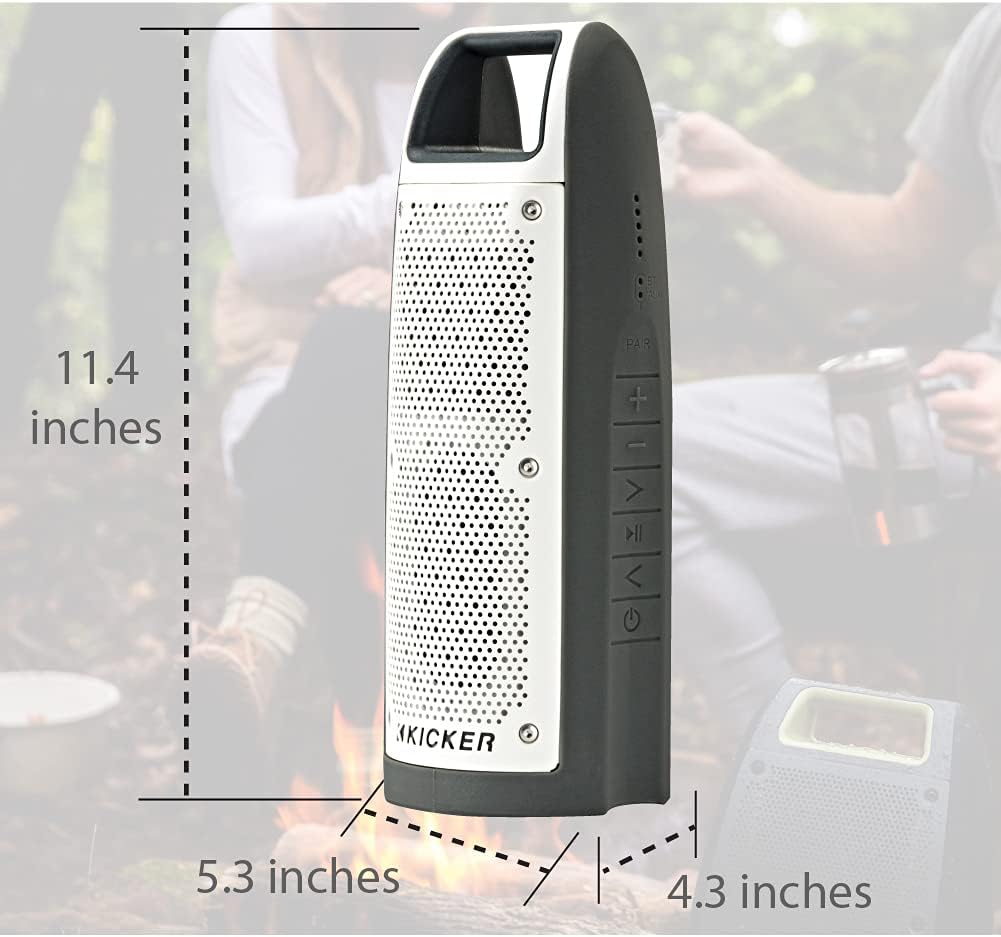
Figure 7: Dimensions of the KICKER Bullfrog BF100 speaker.
| Feature | Detail |
|---|---|
| Model Name | Bullfrog BF100 |
| Item Model Number | 44BF100GY |
| Dimensions (H x W x D) | 11.4 x 5.3 x 4.3 inches |
| Item Weight | 1.81 pounds |
| Speaker Type | Outdoor, Portable Bluetooth Speaker |
| Audio Output Mode | Stereo |
| Speaker Maximum Output Power | 16 Watts |
| Wireless Communication Technology | Bluetooth |
| Bluetooth Range | 100 Feet |
| Connectivity Technology | Bluetooth, Auxiliary (3.5mm) |
| Water Resistance Level | IP66 (Waterproof and Dustproof) |
| Power Source | Battery Powered (1 Lithium Polymer battery included) |
| Battery Life | Up to 12 hours |
| Control Method | Buttons, App (KICKER Connect) |
| Material | Plastic or Metal |
Warranty and Support
Warranty Information:
The KICKER Bullfrog BF100 comes with a Limited Warranty. Please refer to the official KICKER website or your purchase documentation for specific terms and conditions regarding warranty coverage, duration, and claims procedures.
Customer Support:
For technical assistance, troubleshooting, or warranty inquiries, please contact KICKER customer support. You can find contact information on the official KICKER website: www.kicker.com


