
1. Introduction
This manual provides essential information for the safe and effective use of your Fitkit FT062 7-in-1 Motorized Multi-Functional Treadmill. Please read all instructions carefully before assembly and operation to ensure proper function and user safety. Retain this manual for future reference.
2. Important Safety Information
- Always consult a physician before starting any new exercise program.
- Ensure the treadmill is placed on a flat, stable surface with adequate clearance around it.
- Keep children and pets away from the treadmill during operation.
- Always attach the safety key clip to your clothing before starting the treadmill. The safety key will immediately stop the treadmill if dislodged.
- Wear appropriate athletic footwear.
- Do not operate the treadmill if you feel faint, dizzy, or short of breath. Stop immediately.
- Hold the handrails when starting or stopping the treadmill, and if you feel unsteady.
- Keep clothing, fingers, and hair clear of all moving parts.
- Use a voltage stabilizer with the treadmill for optimal performance and longevity.
- Maximum user weight: 120 kg.
3. Setup and Installation
Follow these steps to assemble your Fitkit FT062 treadmill:
- Unboxing: Carefully open the package and remove all components. Ensure all nuts, screws, and tools are present.
- Lowering the Treadmill: Use the kick-drop mechanism to gently lower the treadmill deck from its folded position.
- Lifting the Handles: Lift the main console handles into their upright position.
- Securing the Handles: Tighten the screws on the main frame to secure the handles firmly.
- Connecting the Display: Fix the display console to the main frame using the provided nuts and bolts.
- Connecting LAN Wire: Connect the LAN wire properly to ensure communication between the console and the treadmill motor.
- Attaching Sit-up Bar: Assemble and attach the sit-up bar to the designated slots on the treadmill frame.
- Attaching Massager: Secure the massager unit to its attachment point on the treadmill frame using the provided fasteners.
- Placing Dumbbells: Place the included dumbbells on their designated holders.
Video: Step-by-step guide for installation and usage of the Fitkit FT062 treadmill. This video demonstrates unboxing, assembly of the main frame, console, sit-up bar, and massager, as well as initial setup procedures.
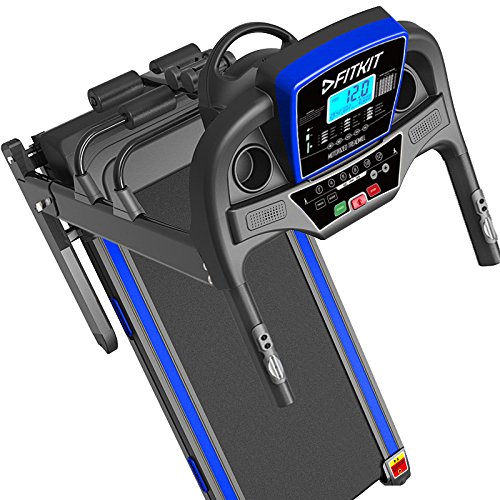
Image: The Fitkit FT062 treadmill in its folded position, with various accessories like dumbbells, twister, and sit-up bar laid out for assembly. This image illustrates the compact storage capability and the included multi-functional components.
4. Operating Instructions
Familiarize yourself with the treadmill's functions for an effective workout.
- Power On: Connect the power cable to a suitable outlet (preferably with a voltage stabilizer) and switch on the main power button located at the base of the treadmill.
- Attach Safety Key: Place the safety key into its designated slot on the console. The display will activate.
- Starting a Workout:
- Step onto the side rails of the treadmill.
- Press the 'Start' button on the console. A countdown will begin, and the running belt will start moving at a low speed.
- Gradually increase speed using the '+' button on the console or the speed control buttons on the handrails. Shortcut keys (e.g., 2, 4, 6, 8, 10, 12) are available for quick speed adjustments.
- Adjusting Speed: Use the 'Speed +' and 'Speed -' buttons on the console or the handrail controls to adjust your running or walking speed between 1-16 km/hr.
- Music Playback: Connect your device via the AUX cable or insert a USB drive into the MP3 port on the console to play music through the integrated speakers. Use the volume and track control buttons on the console.
- Using the Massager: Attach the massage belt around your waist or desired area. Switch on the massager button located on the unit.
- Using the Sit-up Bar: Utilize the sit-up bar for abdominal exercises.
- Using the Twister: The included twister can be used for core exercises.
- Using Dumbbells: The provided dumbbells can be used for strength training exercises.
- Bluetooth App Control (iFitShow): Download the iFitShow app (available on Android and iOS) to connect your smartphone via Bluetooth. The app allows you to control the treadmill, track workouts, and access training plans.
- Stopping a Workout: Press the 'Stop' button on the console or pull the safety key to immediately stop the treadmill.
Video: Demonstration of the Fitkit FT062 treadmill's functions and usage, including powering on, starting a workout, adjusting speed, using music features, and operating the massager.
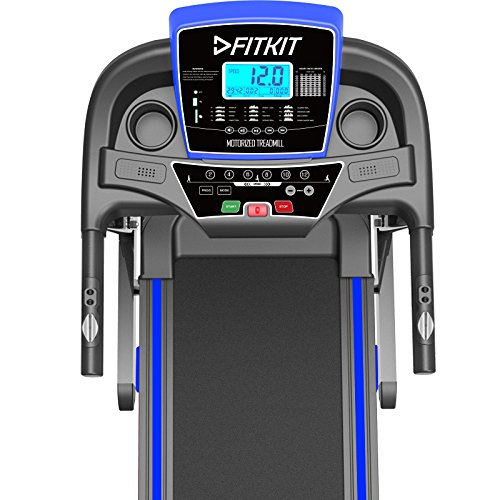
Image: A close-up view of the Fitkit FT062 treadmill's control console, showing the LCD display, speed adjustment buttons, program selection, and media controls. This console is the primary interface for operating the treadmill.

Image: The Fitkit FT062 treadmill console displaying Bluetooth and Wi-Fi symbols, with a smartphone connected, illustrating the iFitShow app functionality for workout control and tracking.
5. Maintenance
Regular maintenance ensures the longevity and optimal performance of your treadmill.
- Lubrication: Apply silicone oil lubricant under the running belt periodically as instructed in the manual or when the treadmill indicates. This reduces friction and wear.
- Cleaning: Keep the treadmill clean by wiping it with a damp cloth after each use. Avoid using abrasive cleaners.
- Belt Adjustment: Periodically check the running belt for proper tension and alignment. Adjust if necessary to prevent slipping or excessive wear.

Image: An annotated view of the Fitkit FT062 treadmill, highlighting key components such as the speaker, pulse sensors, massager motor, sit-up bar, and the location for applying silicone oil for lubrication.
6. Specifications
| Feature | Detail |
|---|---|
| Brand | Fitkit |
| Model | FT062 |
| Motor | 1.5 HP Continuous (up to 2 HP Peak) |
| Running Surface | 1200 X 420 mm |
| Speed Range | 1-16 km/hr |
| Maximum User Weight | 120 Kilograms |
| Special Features | Pulse Rate Monitor, Intelligent Automatic Lubrication, Home Gym (Twister, Massager, Dumbbells, Sit-up), Bluetooth App Control (iFitShow), Speakers, Jump Wheels |
| Display Type | LCD |
| Material | Alloy Steel |
| Item Weight | 120 kg |
| Color | Blue/Black |
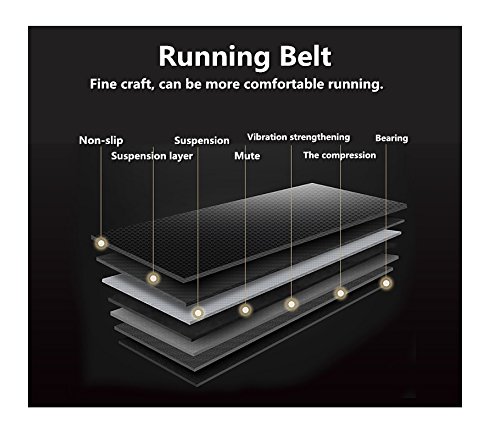
Image: A diagram illustrating the multi-layered construction of the treadmill's running belt, designed for non-slip performance, suspension, vibration strengthening, and durability.

Image: An exploded view diagram of the 1.5 HP high-quality motor, highlighting its components designed for powerful, effective, and quiet operation.
7. Warranty and Support
The Fitkit FT062 treadmill comes with a 3-year frame warranty and a 1-year parts and motor warranty.
For customer support, please use the following contact information:
- Email: info@fitkitsports.in, support@fitkitsports.in
- Website: www.fitkitsports.in
- Contact Numbers: 7987252732 / 9516000837 / 7799221100
- Customer Support Hours: Monday to Saturday, From 10 AM - 7 PM

