1. Introduction
The Stabila LAR350 is a fully self-leveling rotary laser designed for precise horizontal and vertical leveling, as well as plumb line applications. This advanced instrument features innovative technologies such as MOTION CONTROL for intuitive operation, DUAL SLOPE for controlled inclination settings, and a robust PROTECTOR system for enhanced durability. This manual provides essential information for the safe and effective use, setup, operation, and maintenance of your Stabila LAR350 rotary laser.
Safety Information: Always read and understand all safety warnings and instructions before operating the device. Wear appropriate personal protective equipment, such as laser safety goggles, when operating the laser. Do not stare directly into the laser beam. Keep the device out of reach of children.
2. Package Contents
Verify that all items listed below are present in your package:
- Stabila LAR 350 Rotation Laser
- Stabila REC 300 Digital Receiver
- Stabila RC-LAR350 Remote Control
- 90-degree Angle Rail
- Laser Goggles
- Target Plate
- Carrying Case
- 2 x D 1.5 V Batteries (for laser)
- 4 x AA 1.5 V Batteries (for receiver/remote)
- Stabila 07498 Fixed Head Tripod (39" - 65.5")
- Stabila 07469 Aluminium Two-Piece Elevation Rod

Image: Complete Stabila LAR350 Rotary Laser 9-piece kit, including the laser unit, digital receiver, remote control, tripod, and elevation rod.
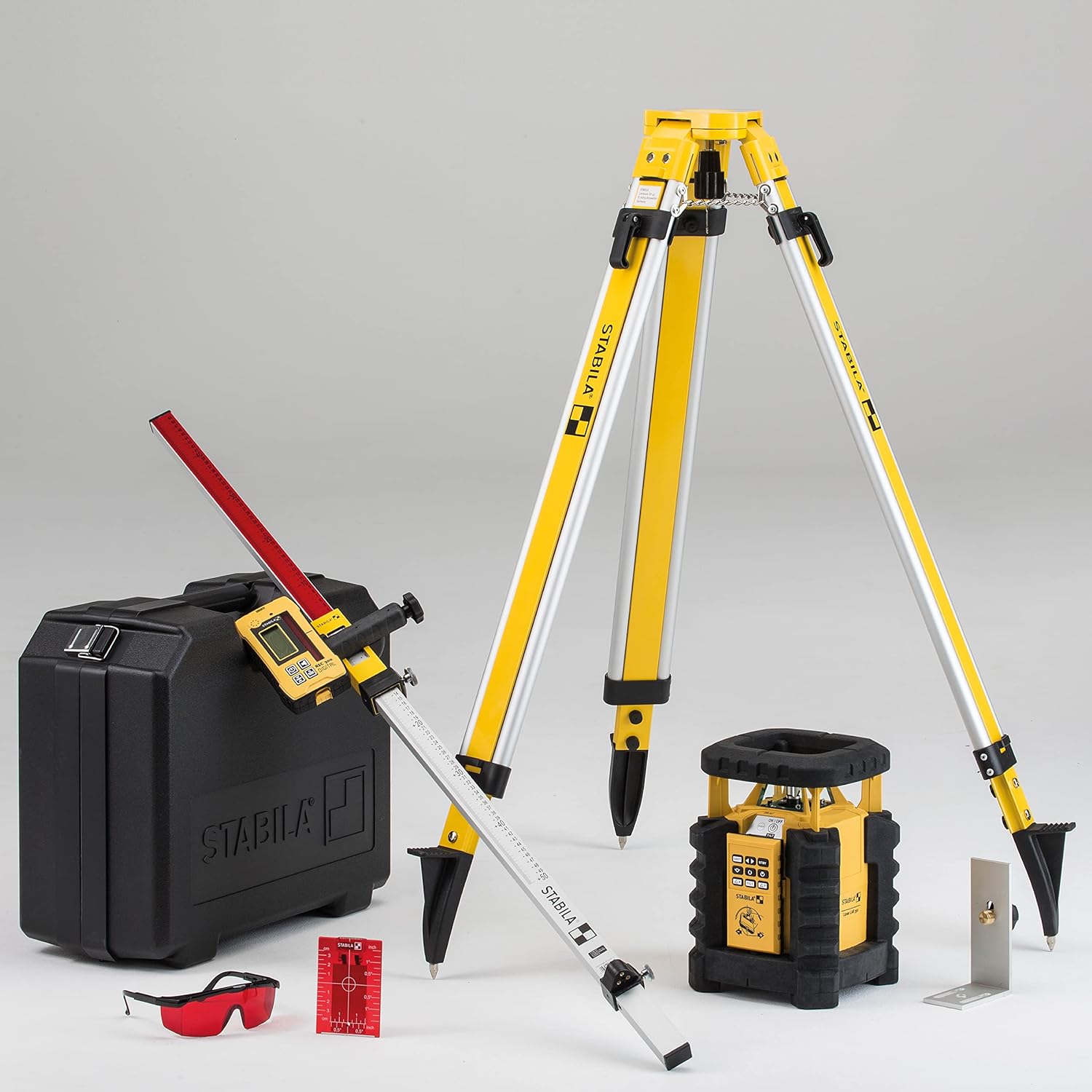
Image: All components of the Stabila LAR350 kit laid out, showing the laser, receiver, remote, tripod, elevation rod, laser goggles, and carrying case.
3. Product Overview
Familiarize yourself with the main components and features of the Stabila LAR350 system.
3.1. LAR350 Rotary Laser Unit

Image: Close-up of the Stabila LAR350 rotary laser unit, highlighting its control panel with buttons for power, shift, standby, axis tilt, and motion control.
- Control Panel: Features intuitive buttons for power, mode selection, and axis adjustments.
- Laser Head: Emits the rotating laser beam for leveling and alignment.
- Protector System: Integrated robust housing designed to protect the laser from impacts and falls, ensuring durability on job sites. The unit is waterproof and dustproof in accordance with IP 65.
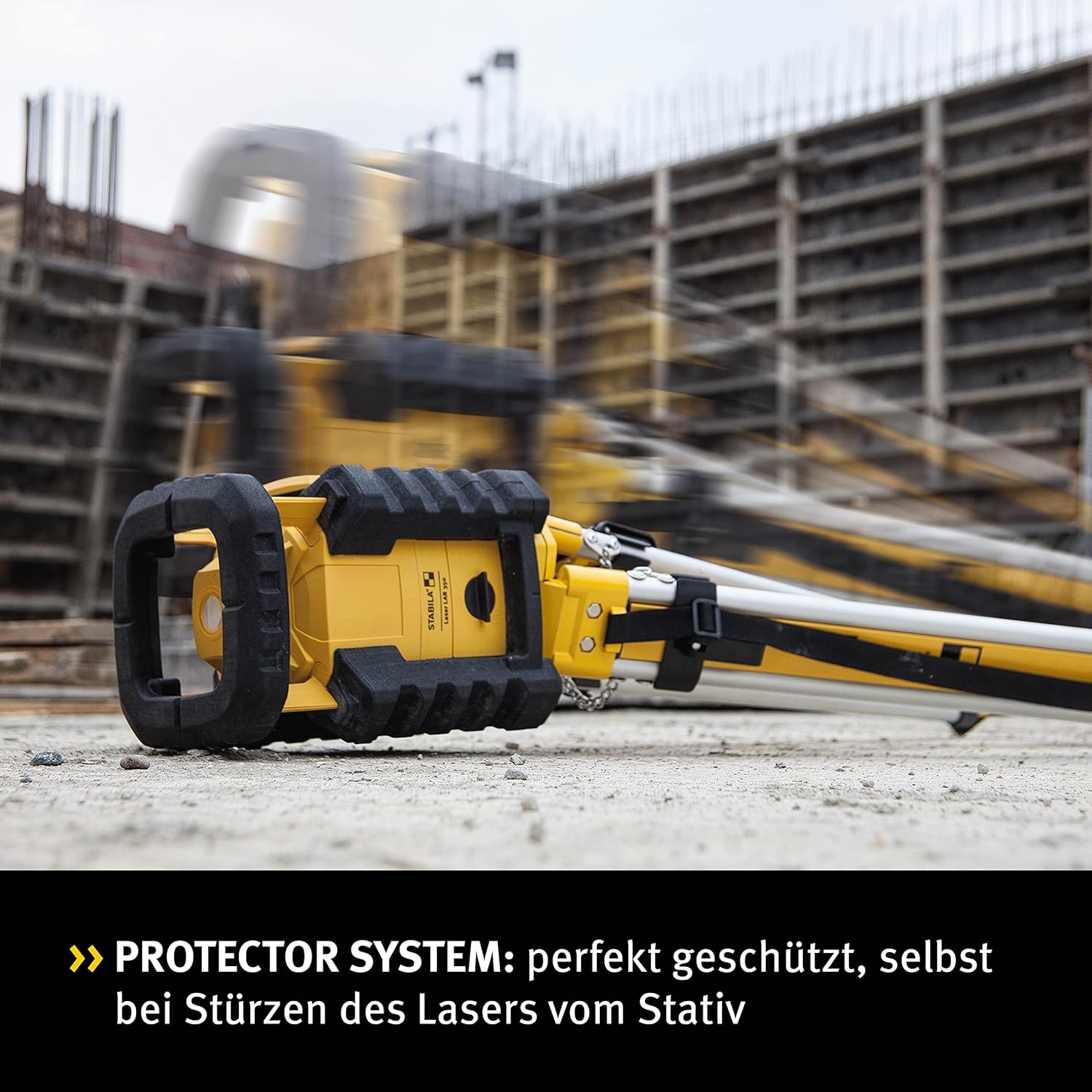
Image: The Stabila LAR350 laser unit shown on its side, demonstrating the robust Protector System designed to withstand drops and harsh conditions.
3.2. RC-LAR350 Remote Control
The remote control features revolutionary MOTION CONTROL technology, allowing you to control the laser's functions by hand movements.
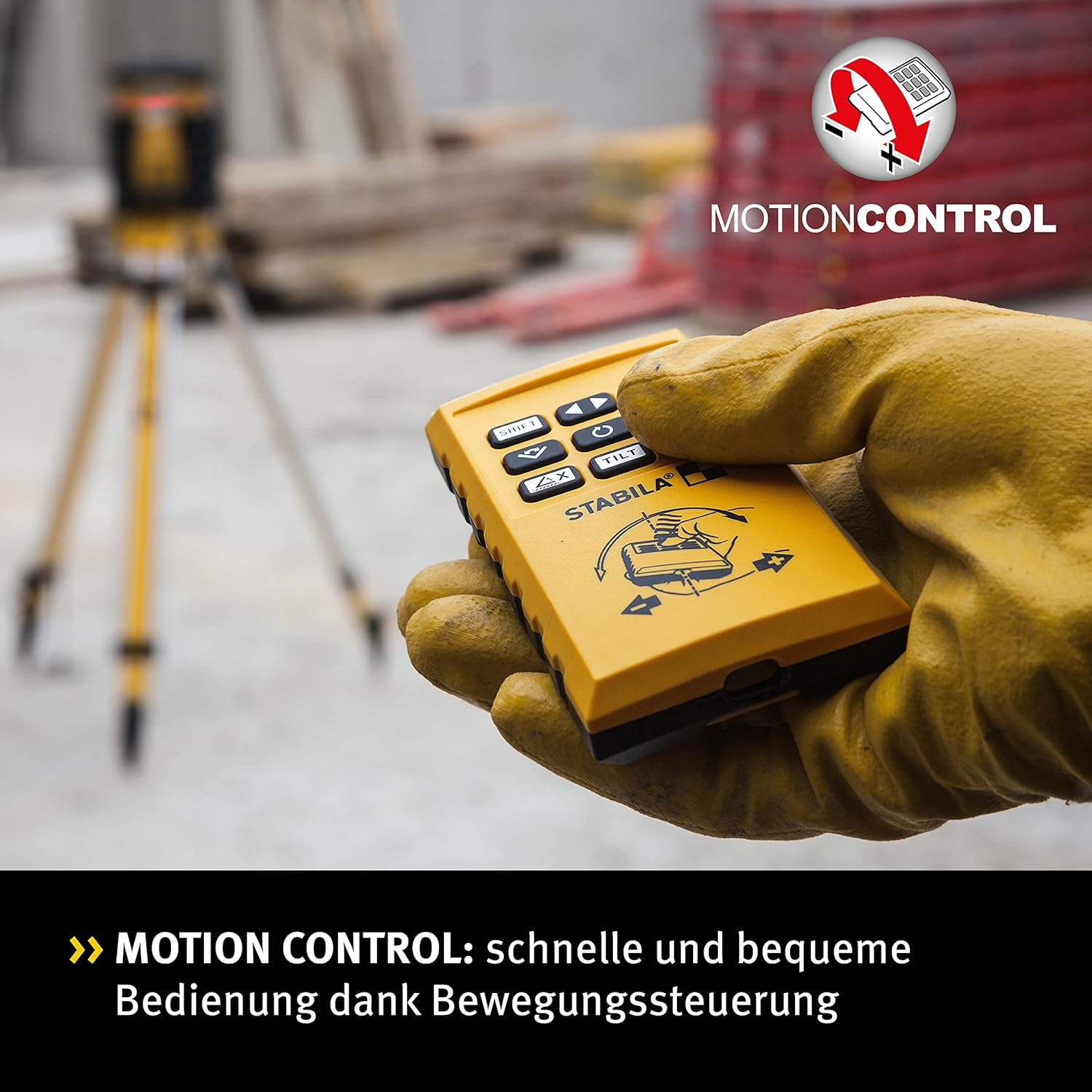
Image: A hand holding the Stabila RC-LAR350 remote control, illustrating its compact design and control buttons for the laser unit.
3.3. REC 300 Digital Receiver
The REC 300 Digital Receiver extends the working range of the laser up to 2624.67 feet (800m) in diameter, providing precise digital readouts for accurate height determination.
4. Setup
4.1. Battery Installation
The LAR350 laser unit requires 2 x D 1.5 V batteries. The REC 300 receiver and RC-LAR350 remote control require 4 x AA 1.5 V batteries. Ensure correct polarity when inserting batteries.
4.2. Mounting the Laser
Mount the LAR350 laser unit securely onto the provided Stabila 07498 Fixed Head Tripod using the 5/8" - 1 tripod thread. Ensure the tripod is stable on a firm, level surface.
4.3. Power On and Self-Leveling
Press the power button on the LAR350 unit. The laser will automatically begin its self-leveling process. The unit can self-level on surfaces up to +/-5 degrees out of level. LED indicators will assist in confirming the leveling status. Wait for the laser to stabilize before beginning operations.
5. Operating Instructions
5.1. Horizontal Leveling
For horizontal leveling, place the LAR350 unit on a stable surface or tripod. Power on the unit. Once self-leveled, the rotating laser beam will provide a precise horizontal reference plane.
5.2. Vertical Leveling and Plumb Lines
To achieve vertical leveling or plumb lines, position the laser unit on its side or use the vertical mounting accessory (if applicable). The laser will project a vertical plane and/or plumb points.
5.3. DUAL SLOPE Function
The DUAL SLOPE function allows for controlled inclination settings of up to 5 degrees on two axes. This is ideal for applications requiring a specific grade, such as driveways or drainage lines.

Image: Diagram illustrating the dual slope capability of the Stabila LAR350, showing how the laser plane can be tilted along two axes for precise grading.
5.4. SECTION MODE
SECTION MODE allows you to limit the working area in rotation mode. The laser beam will only be emitted in a defined area, preventing interference with other equipment or personnel.
5.5. MOTION CONTROL
The innovative MOTION CONTROL feature enables intuitive control of the laser's functions by rotating the RC-LAR350 remote control. The built-in sensor detects your hand movements and transmits them to the laser, simplifying adjustments and alignment.
5.6. Using the REC 300 Digital Receiver
For extended range and precise height readings, use the REC 300 Digital Receiver. Hold the receiver in the path of the laser beam. The digital display will indicate the exact position relative to the laser plane, and audible signals will guide you to the desired level.
5.7. MANUAL ALIGNMENT
The MANUAL ALIGNMENT function allows you to pivot an axis in vertical operation, providing flexibility for specific alignment tasks.
6. Maintenance
Proper maintenance ensures the longevity and accuracy of your Stabila LAR350.
- Cleaning: Clean the laser unit, receiver, and remote control with a soft, damp cloth. Do not use abrasive cleaners or solvents. Ensure the laser exit window is clean for optimal beam clarity.
- Battery Replacement: Replace batteries promptly when the low battery indicator appears. Always use fresh, high-quality batteries of the specified type. Remove batteries if the device will not be used for an extended period.
- Storage: Store the LAR350 and its accessories in the provided carrying case in a dry, cool place, away from direct sunlight and extreme temperatures.
- Protection: The integrated PROTECTOR system provides excellent protection against dust and water (IP65 rating). However, avoid unnecessary exposure to harsh conditions.
7. Troubleshooting
| Problem | Possible Cause | Solution |
|---|---|---|
| Laser not powering on. | Dead or incorrectly installed batteries. | Check battery polarity and replace batteries if necessary. |
| Laser not self-leveling. | Unit is outside its self-leveling range (+/-5 degrees). | Place the unit on a more level surface. |
| Laser beam is weak or intermittent. | Low batteries; dirty laser exit window. | Replace batteries; clean the laser exit window. |
| Remote control not responding. | Remote batteries are low or dead; obstruction between remote and laser. | Replace remote batteries; ensure clear line of sight. |
| Inaccurate measurements. | Unit not properly leveled; environmental factors (vibration, extreme temperature changes). | Ensure unit is stable and self-leveled; avoid strong vibrations or rapid temperature changes. If issues persist, contact Stabila service. |
8. Specifications
| Feature | Detail |
|---|---|
| Model Number | Stabila - 05700 TR |
| Accuracy | +/-3mm @ 98.4 feet (30 metres) |
| Laser Class | 2 |
| Laser Output | 635nM, 1mW |
| Self-Leveling Range | +/-5 degrees |
| Rotating Speed | 0 - 600rpm |
| Detector Range (Diameter) | 2624.67 feet (800m) with REC 300 Digital Receiver |
| Visible Range | 65.6 feet (20m) |
| Tripod Thread | 5/8" - 1 |
| Battery Life | 80 hours continuous (with 2 x D 1.5 V alkalines) |
| Operating Temperature Range | -10 to +60 degrees C |
| Protection Class | IP 65 (Waterproof and Dustproof) |
| Power Source | 2 x D 1.5 V batteries (included); optional rechargeable batteries (not included) |
9. Warranty and Support
Warranty Information: Specific warranty terms and conditions for the Stabila LAR350 are typically provided with the product packaging or can be found on the official Stabila website. Please refer to these resources for detailed warranty coverage.
Customer Support: For technical assistance, service, or inquiries regarding your Stabila LAR350 rotary laser, please contact Stabila customer service. Contact information can usually be found on the Stabila website or in the product documentation included with your purchase.
You can visit the official Stabila website for more information: www.stabila.com


