1. Introduction
Thank you for purchasing the BLACK+DECKER DVA315J Cordless Handheld Vacuum Cleaner. This manual provides important information regarding the safe operation, maintenance, and troubleshooting of your new appliance. Please read this manual thoroughly before use and keep it for future reference.
This 10.8V (1.5Ah) Dustbuster with Cyclone Action is designed for quick and efficient cleaning tasks around your home or in your vehicle. Its lithium battery ensures consistent power and faster charging.
2. Important Safety Information
WARNING: Read all safety warnings and all instructions. Failure to follow the warnings and instructions may result in electric shock, fire and/or serious injury.
- Do not use the appliance without the dust bowl and filter in place.
- Do not use the appliance to pick up liquids or flammable/combustible materials.
- Do not pick up anything that is burning or smoking, such as cigarettes, matches, or hot ashes.
- Do not immerse the appliance in water or other liquids.
- Keep hair, loose clothing, fingers, and all parts of body away from openings and moving parts.
- Use only with the charger supplied with the appliance.
- Do not operate the appliance if any part is damaged.
- This appliance is for household use only.
- Children should be supervised to ensure that they do not play with the appliance.
3. Package Contents
Ensure all items listed below are present in your package:
- BLACK+DECKER DVA315J Cordless Handheld Vacuum Cleaner
- Integrated Crevice Tool
- Flip-out Brush Tool
- Jack-type Charger
- Instruction Manual (this document)
4. Product Overview
Familiarize yourself with the components of your DVA315J Dustbuster.

Figure 4.1: Side view of the DVA315J Cordless Handheld Vacuum Cleaner, showing the main body, handle, and nozzle.

Figure 4.2: Top view of the DVA315J, highlighting the power button and dust release button.
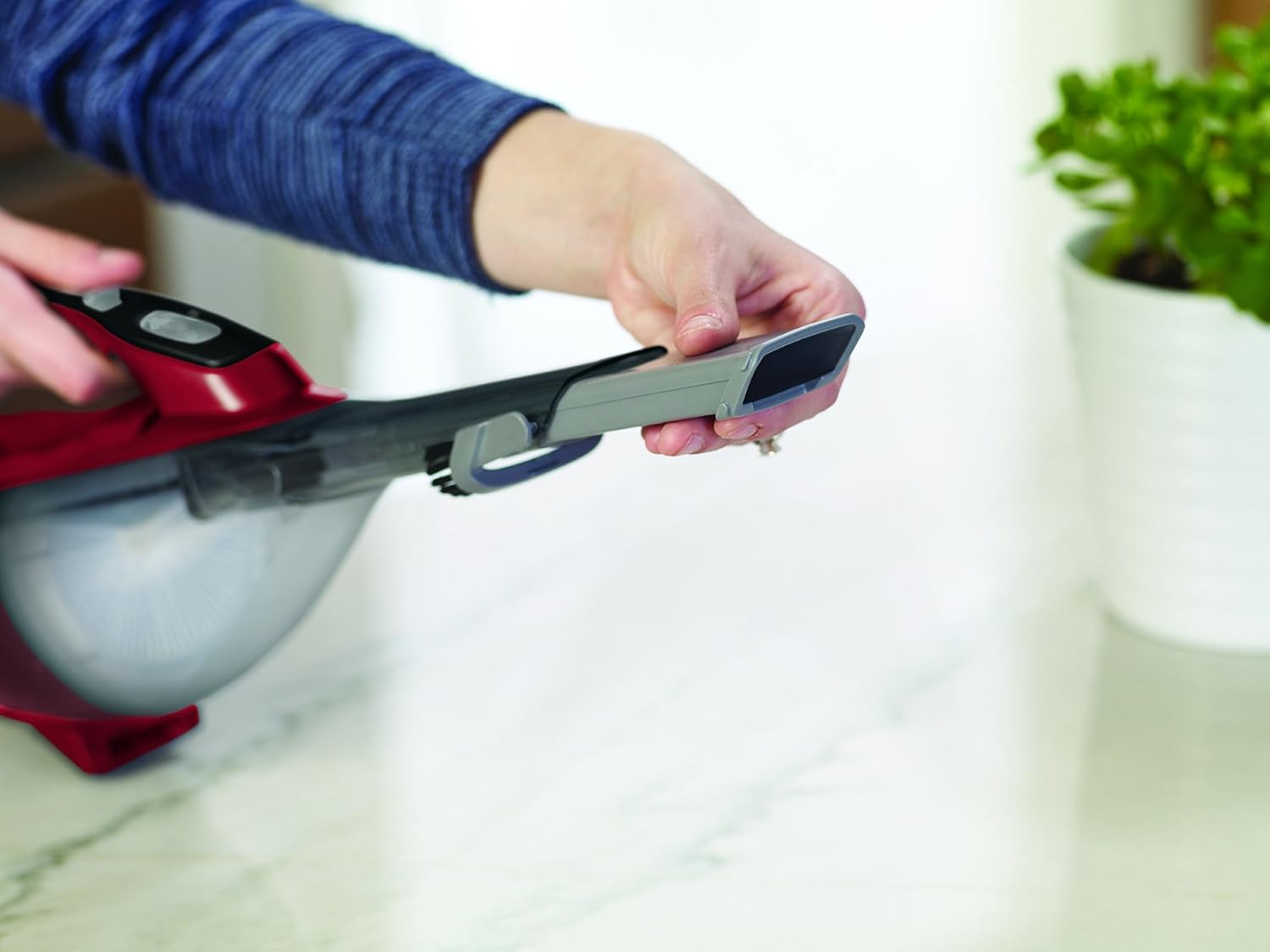
Figure 4.3: The integrated crevice tool can be extended for reaching tight spaces.
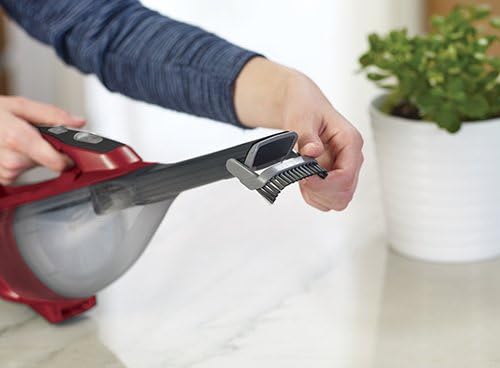
Figure 4.4: The flip-out brush tool is useful for delicate surfaces or stubborn debris.

Figure 4.5: The compact design allows the vacuum to stand upright for convenient storage.
5. Setup and Charging
5.1 Initial Charge
Before first use, fully charge the appliance. The battery is not fully charged at the time of purchase.
- Ensure the appliance is switched off.
- Connect the charger plug into the charging port on the appliance.
- Plug the charger into a standard wall outlet.
- The charging indicator light will illuminate.
- A full charge takes approximately 10 hours. The indicator light will remain on when fully charged.
Note: Do not store the appliance with the charger plugged in for extended periods after it is fully charged, as this can reduce battery life.
6. Operating Instructions
6.1 Switching On/Off
- To switch on, slide the power switch forward.
- To switch off, slide the power switch backward.
6.2 Using the Integrated Tools
Your DVA315J comes with two integrated tools for versatile cleaning:
- Crevice Tool: Slide the nozzle forward to extend the crevice tool. This is ideal for reaching narrow spaces, corners, and between cushions.
- Flip-out Brush Tool: Flip the brush tool down from the nozzle. This is suitable for dusting delicate surfaces, upholstery, or for dislodging stubborn dirt before vacuuming.

Figure 6.1: The vacuum is effective for quick clean-ups on kitchen counters.

Figure 6.2: Easily clean upholstery and hard-to-reach areas on furniture.

Figure 6.3: Ideal for picking up small spills and debris from hard floors.

Figure 6.4: The compact size makes it perfect for cleaning car interiors.
7. Maintenance
Regular maintenance ensures optimal performance of your vacuum cleaner.
7.1 Emptying the Dust Bowl
Empty the dust bowl regularly to maintain suction power. It is recommended to empty it after each use.
- Ensure the appliance is switched off.
- Press the dust bowl release button (usually located near the handle).
- Carefully remove the dust bowl from the main unit.
- Hold the dust bowl over a waste bin and press the dust release button to open the flap and empty the contents.

Figure 7.1: The dust bowl is designed for easy and hygienic emptying.
7.2 Cleaning the Filter
The filter should be cleaned regularly to prevent loss of suction. It is washable.
- After emptying the dust bowl, separate the filter assembly from the dust bowl.
- Tap the filter gently over a bin to remove loose dust.
- For a more thorough clean, rinse the filter under warm, soapy water.
- Allow the filter to air dry completely (for at least 24 hours) before reassembling. Do not use a dryer or other heating methods.
- Once dry, reassemble the filter into the dust bowl and attach the dust bowl back to the vacuum cleaner.

Figure 7.2: The filter can be easily removed and washed for thorough cleaning.
7.3 General Cleaning
- Wipe the exterior of the appliance with a damp cloth. Do not use abrasive cleaners or solvents.
- Ensure all parts are dry before storing or using the appliance.
8. Troubleshooting
If you encounter issues with your DVA315J, refer to the table below for common problems and solutions.
| Problem | Possible Cause | Solution |
|---|---|---|
| Appliance does not switch on. | Battery is discharged. | Charge the battery for 10 hours. |
| Reduced suction power. | Dust bowl is full. | Empty the dust bowl. |
| Reduced suction power. | Filter is clogged. | Clean or wash the filter. Ensure it is completely dry before reinserting. |
| Reduced suction power. | Nozzle or hose is blocked. | Remove any blockages from the nozzle or hose. |
| Charger gets warm during charging. | Normal operation. | This is normal. The charger is designed to dissipate heat. |
If the problem persists after trying these solutions, please contact customer support.
9. Specifications
| Feature | Detail |
|---|---|
| Model Number | DVA-315-J |
| Voltage | 10.8V |
| Battery Type | Lithium-Ion (1.5Ah / 16.2Wh) |
| Charging Time | Approx. 10 hours |
| Dust Bowl Capacity | 0.5 Liters |
| Air Flow | 893.4 Liters/minute |
| Wattage | 15 watts |
| Noise Level | 78 dB |
| Dimensions (L x W x H) | 3.94 x 3.94 x 3.94 inches (Product Dimensions) |
| Item Weight | 2.64 pounds |
| Color | Grey/Red |
10. Warranty and Support
10.1 Warranty Information
BLACK+DECKER products are manufactured to high quality standards. This product is covered by a limited warranty against defects in materials and workmanship. Please refer to the warranty card included in your original packaging for specific terms and conditions, including warranty period and coverage details.
Keep your proof of purchase (receipt) as it will be required for any warranty claims.
10.2 Customer Support
For technical assistance, troubleshooting beyond this manual, or to inquire about replacement parts, please contact BLACK+DECKER customer support.
You can find contact information on the official BLACK+DECKER website or on your product's packaging. Please have your model number (DVA-315-J) and serial number (if applicable) ready when contacting support.
Visit the official BLACK+DECKER website for more information: www.blackanddecker.com


