
1. Product Overview
The SARMOCARE B1001 Toothbrush Holder Cleaner is designed to provide a hygienic storage solution for your toothbrushes. It features a 6-minute UV cleaning cycle, fan drying, and accommodates up to 5 toothbrushes. This rechargeable, wall-mounted device is suitable for both sonic and manual toothbrushes, helping to keep your bathroom organized and your toothbrushes clean.

Image 1: The SARMOCARE Toothbrush Holder Cleaner mounted on a bathroom wall, providing organized storage for multiple toothbrushes.
Key Features:
- Efficient Cleaning Function: Features a 6-minute UV cleaning cycle to sanitize toothbrushes.
- Fan Drying: Built-in fan for drying toothbrushes after use, helping to eliminate odors.
- Universal Compatibility: Suitable for most regular and electric toothbrushes (adults/kids).
- 5 Toothbrush Slots: Provides organized storage for up to five toothbrushes.
- Rechargeable: Equipped with a built-in battery for cordless operation.
- No Drilling Installation: Easy wall-mounted installation without damaging surfaces.
- Toothpaste Dispenser: Integrated slot for a toothpaste tube.
2. Setup and Installation
Follow these steps for proper installation of your SARMOCARE B1001 Toothbrush Holder Cleaner:
- Clean and Dry the Wall: Wipe the smooth wall surface with a wet cloth and ensure it is thoroughly dry. The product must be installed on a flat and smooth wall (e.g., ceramic, metal, or mirror) where the adhesive pads can dry completely.
- Apply Adhesive Hooks: Stick the two adhesive hooks included in the package onto the cleaned wall surface.
- Prepare the Holder: Uncover the protective film from the back of the toothbrush holder.
- Attach to Wall: Stick the adhesive pads on the holder to the wall, compacting it firmly.
- Wait 24 Hours: Allow 24 hours for the adhesive to set before hanging the toothbrush holder on the hooks.
- Place Toothbrushes and Toothpaste: Once securely mounted, place your toothbrushes and toothpaste into the designated slots.

Image 2: Visual guide for the six-step installation process of the toothbrush holder.

Image 3: The toothbrush holder helps organize toothbrushes, moving them from a countertop cup to a wall-mounted unit.
3. Operating Instructions
3.1. Placing Toothbrushes
The holder is designed to accommodate up to 5 toothbrushes. It is compatible with most types of toothbrushes, including both electric and manual models for adults and children. Ensure the toothbrush heads are positioned correctly within the slots for effective cleaning.
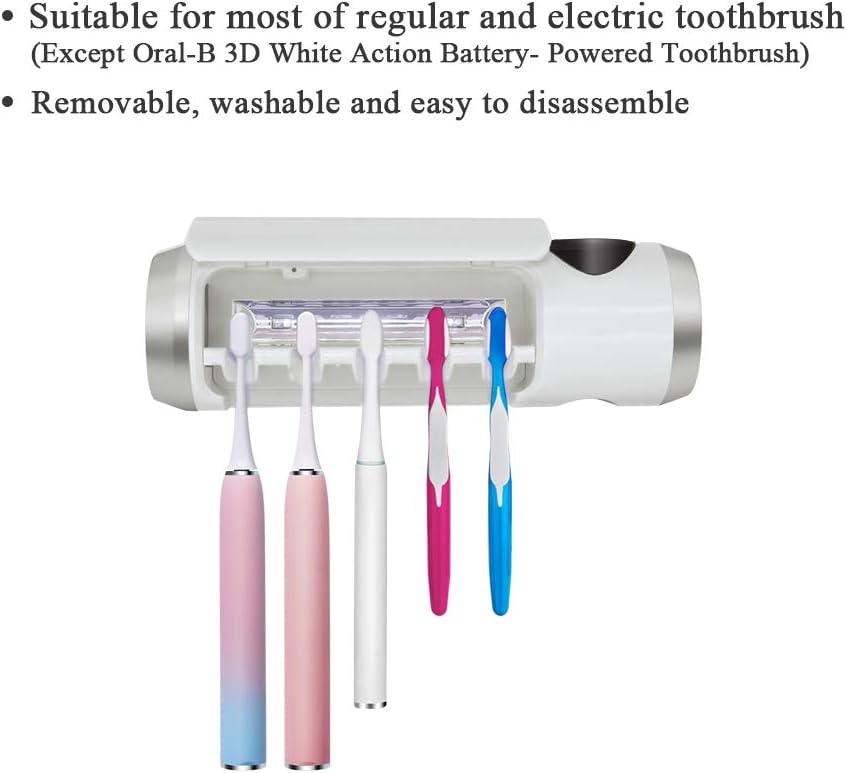
Image 4: The toothbrush holder provides five slots for various toothbrush types.

Image 5: Compatibility details for sonic and manual toothbrushes, indicating maximum dimensions for proper fit.
3.2. UV Cleaning and Fan Drying
The device features a 6-minute cleaning cycle that utilizes UV light to sanitize your toothbrushes. After the cleaning cycle, a built-in fan activates to dry the toothbrushes, preventing moisture buildup and odors. The unit will automatically stop after the 6-minute work cycle is complete.

Image 6: The toothbrush holder actively sanitizes brushes using UV light.

Image 7: The built-in fan helps dry toothbrushes and eliminate odors.
3.3. Toothpaste Dispenser
The unit includes a convenient slot for a toothpaste tube. This feature helps keep your countertop clear and provides easy access to toothpaste.

Image 8: The integrated toothpaste tube squeezer for convenient dispensing.
4. Maintenance
The toothbrush holder is designed for easy maintenance. The toothbrush slots are removable, washable, and easy to disassemble for thorough cleaning. Regularly clean these components to maintain hygiene.

Image 9: The detachable toothbrush slot design allows for quick and easy cleaning.
5. Troubleshooting
If you encounter any issues with your SARMOCARE B1001 Toothbrush Holder Cleaner, please refer to the following common problems and solutions:
- Unit Doesn't Charge/Stopped Working: Ensure the charging cable is securely connected and the power source is active. If the issue persists, contact customer service.
- Unit Doesn't Work: Verify that the unit is fully charged. If the problem continues, contact customer service for assistance.
- Unit Does Not Stick to Wall: Ensure the wall surface is smooth, clean, and thoroughly dry before applying the adhesive hooks. Allow the adhesive to set for 24 hours without weight before mounting the holder. If the adhesive fails, contact customer service for replacement hooks.
6. Specifications
| Feature | Detail |
|---|---|
| Brand | SARMOCARE |
| Model Number | B1001 |
| Material | Plastic (ABS Finish) |
| Color | White |
| Product Dimensions | 8.4"L x 0.31"W x 2.5"H |
| Mounting Type | Wall Mount |
| Number of Toothbrush Slots | 5 |
| Item Weight | 5.3 ounces |
| Battery | 1 Lithium Polymer battery (included) |
| Cleaning Function | UV light with 6-minute timer |
| Drying Function | Built-in fan |
7. Customer Support and Warranty
SARMOCARE is committed to providing satisfying customer service. If you experience any problems with your toothbrush holder, such as issues with charging, functionality, or adhesion, please do not hesitate to contact us. We are dedicated to providing a satisfactory solution to ensure your positive experience with our product.