1. Introduction
Thank you for choosing the Orient Sun&Moon Automatic Mechanical Watch, Model RN-AK0001S. This timepiece combines classic design with reliable automatic mechanical movement, featuring a unique Sun&Moon indicator, day of the week, and date complications. This manual provides essential information for the proper setup, operation, and maintenance of your watch to ensure its longevity and accurate performance.
2. Key Features
- Automatic Mechanical Movement: Self-winding movement powered by the motion of your wrist, with manual winding capability.
- Sun&Moon Indicator: Displays a visual representation of day (sun) and night (moon) cycles, functioning as an AM/PM indicator.
- Day of the Week Sub-dial: Indicates the current day of the week.
- Date of the Month Sub-dial: Displays the current date.
- Rose Gold-tone Case: Elegant rose gold-plated stainless steel case.
- White Dial: Features a refined white dial with Roman numeral hour markers.
- Leather Strap: High-quality brown leather strap with a deployant clasp for secure and comfortable wear.
- Exhibition Case Back: A transparent case back allows viewing of the intricate mechanical movement.
- Water Resistance: Water resistant up to 30 meters (3 ATM), suitable for splashes or brief immersion, but not for swimming or diving.
- Mineral Glass Crystal: Durable mineral glass protects the dial.

Figure 2.1: Front view of the Orient Sun&Moon Automatic Mechanical Watch.

Figure 2.2: Detailed view of the watch dial with complications.
3. Setup
3.1 Initial Winding
As an automatic mechanical watch, it is powered by the movement of your wrist. If the watch has stopped or is low on power, it can be manually wound.
- Ensure the crown is in the normal (pushed-in) position.
- Rotate the crown clockwise approximately 30-40 times. This will provide enough power reserve to start the watch and allow the automatic winding mechanism to take over with wear.
3.2 Setting the Time
- Pull the crown out to the second click position (farthest out). The second hand will stop.
- Rotate the crown to set the hour and minute hands. Pay attention to the Sun&Moon indicator to ensure you set the correct AM/PM.
- Once the desired time is set, push the crown back into the normal position. The second hand will resume movement.
3.3 Setting the Date and Day of the Week
The date and day of the week can be set independently.
- Pull the crown out to the first click position.
- Rotate the crown counter-clockwise to adjust the date.
- Use the recessed pusher on the side of the case (typically at the 2 o'clock position) to advance the day of the week. Use a small, non-sharp tool (like a toothpick) to press the pusher.
- Avoid setting the date and day between 9 PM and 3 AM, as this is when the watch's internal mechanisms are engaged in changing the date, and manual adjustment can cause damage.
- Once the date and day are set, push the crown back into the normal position.

Figure 3.1: Side view illustrating the crown and day pusher.
4. Operating Your Watch
4.1 Automatic Winding
Your Orient watch is equipped with an automatic mechanical movement. This means it winds itself through the natural motion of your arm while wearing it. For optimal performance, wear the watch for at least 8-10 hours daily. If the watch is not worn for an extended period, it will stop. Simply manually wind it as described in Section 3.1 or wear it to restart.
4.2 Sun&Moon Indicator
The Sun&Moon indicator at the 6 o'clock position visually transitions between a sun icon during daylight hours and a moon and stars icon during nighttime hours. This is an AM/PM indicator and does not track lunar phases.

Figure 4.1: Sun&Moon indicator displaying the sun (daytime).

Figure 4.2: Sun&Moon indicator displaying the moon and stars (nighttime).
5. Maintenance and Care
5.1 Water Resistance
Your watch has a water resistance rating of 30 meters (3 ATM). This means it is protected against splashes, rain, or brief immersion in water. It is not suitable for swimming, showering, diving, or any water sports. Always ensure the crown is fully pushed in before any contact with water.
5.2 Cleaning
To maintain the appearance of your watch, wipe the case and crystal with a soft, dry cloth. For the leather strap, avoid prolonged exposure to water, direct sunlight, and harsh chemicals to prevent damage and discoloration.
5.3 Storage
When not wearing your watch, store it in a cool, dry place away from direct sunlight and strong magnetic fields, which can affect the accuracy of mechanical movements.
6. Troubleshooting
- Watch has stopped: This is normal for an automatic watch when not worn. Manually wind the watch (Section 3.1) or wear it for several hours to build up power reserve.
- Time is inaccurate: Ensure the watch is fully wound. If accuracy issues persist, it may require servicing by a qualified watchmaker.
- Date/Day not changing: Check if the time is set correctly for AM/PM. If the watch is set to PM during the day, the date/day will change at noon instead of midnight. Adjust the time accordingly.
- Crown is difficult to pull out: This can sometimes occur. Gently but firmly pull the crown. Do not force it.
7. Specifications
| Feature | Detail |
|---|---|
| Model Number | RN-AK0001S |
| Movement Type | Mechanical (Automatic) |
| Case Material | Stainless Steel (Rose Gold-tone) |
| Case Diameter | 42.5 mm |
| Case Thickness | 14 mm |
| Crystal | Mineral Glass |
| Band Material | Leather |
| Band Color | Brown |
| Clasp Type | Tang Buckle (Deployant style shown in video) |
| Water Resistance Depth | 30 Meters (3 ATM) |
| Item Weight | 94 Grams |
| Included Components | Watch, box, warranty card, leather strap, and transparent case back |
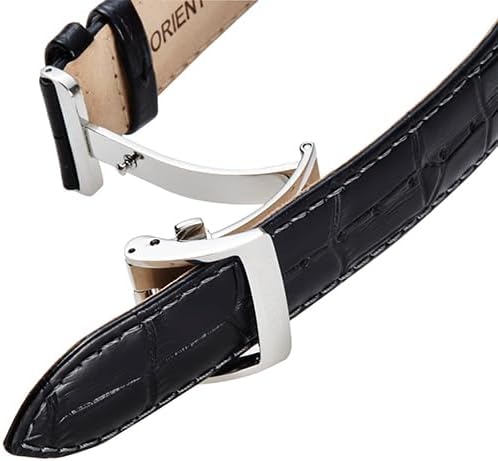
Figure 7.1: Exhibition case back revealing the automatic movement.
8. Warranty and Support
8.1 Warranty Information
Please note that the product specifications indicate "No Warranty" for this item. For specific warranty details or any potential coverage, please refer to the documentation included with your purchase or contact the retailer directly.
8.2 Customer Support
For further assistance, technical support, or service inquiries, please contact your point of purchase or visit the official Orient website for authorized service centers.


