
1. Introduction and Overview
This manual provides comprehensive instructions for the proper use, care, and maintenance of your Citizen Eco-Drive Chronograph Watch, model AT2403-15E. Designed for reliability and precision, this timepiece utilizes Citizen's innovative Eco-Drive technology, powered by light, eliminating the need for battery replacement.
Please read this manual thoroughly to ensure optimal performance and longevity of your watch.
2. Product Features
The Citizen AT2403-15E watch boasts the following key features:
- Eco-Drive Movement: Powered by any light source, eliminating the need for battery replacement.
- Chronograph Function: Allows for precise timing of events.
- Black Dial: Enhanced with elegant gold-tone skeleton hands and markers.
- Gold-tone Stainless Steel Case: Durable and stylish casing.
- Black Rubber Strap: Comfortable and robust for daily wear.
- Water Resistance: Rated for 100 meters (330 feet), suitable for swimming and snorkeling.
- Sapphire Crystal: Highly scratch-resistant for enhanced durability.
- Fixed Bezel: A stationary ring around the watch face.
- Solid Case Back: Provides protection for the internal movement.
- Tang Clasp: Secure and easy-to-use buckle.
- Case Dimensions: Approximately 41mm diameter x 10.1mm thickness.
- Strap Width: 20mm.
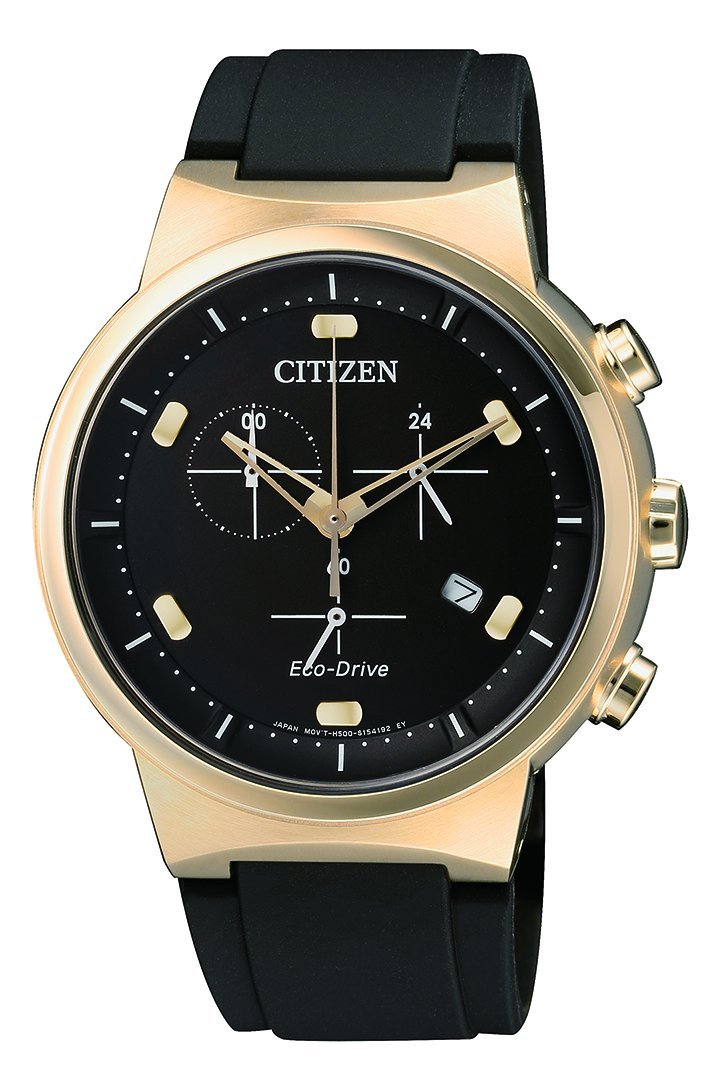
This image displays the Citizen Eco-Drive Chronograph Watch, model AT2403-15E. It features a round gold-tone stainless steel case, a black dial with gold-tone hands and markers, three subdials for chronograph functions, and a date window. The watch is fitted with a black rubber strap.
3. Setup
3.1 Initial Charging
Your Eco-Drive watch is powered by light. Before first use, or if the watch has stopped, ensure it is fully charged. Expose the watch dial to bright light (natural sunlight is ideal) for several hours. The watch will begin operating once sufficient charge is accumulated.
3.2 Setting the Time and Date
- Pull the crown out to the second click position. The second hand will stop.
- Rotate the crown to set the hour and minute hands. Ensure the AM/PM is correctly set if your watch has a 24-hour indicator or if setting the date.
- Push the crown back to the normal position. The second hand will resume movement.
- To set the date, pull the crown out to the first click position. Rotate the crown to adjust the date.
- Push the crown back to the normal position.
3.3 Chronograph Zero Position Adjustment
If the chronograph hands do not return to the zero position when reset, they may need adjustment:
- Pull the crown out to the second click position.
- Press Button A (top pusher) to advance the chronograph second hand.
- Press Button B (bottom pusher) to advance the chronograph minute hand.
- Adjust until all chronograph hands are aligned to the 12 o'clock (zero) position.
- Push the crown back to the normal position to complete the adjustment.
4. Operating Instructions
4.1 Basic Timekeeping
Once set, your watch will accurately display the current time (hours, minutes, seconds) and date.
4.2 Using the Chronograph
The chronograph function allows you to measure elapsed time.
- Start/Stop: Press Button A (top pusher) to start the chronograph. Press Button A again to stop it.
- Reset: While the chronograph is stopped, press Button B (bottom pusher) to reset all chronograph hands to the zero position.
5. Maintenance
5.1 Cleaning Your Watch
Wipe the watch regularly with a soft, dry cloth to remove dust and smudges. For more thorough cleaning, especially after exposure to saltwater, rinse the watch with fresh water and dry it completely with a soft cloth. Do not use harsh chemicals or abrasive materials.
5.2 Water Resistance
Your watch is water resistant to 100 meters (330 feet). This rating means it is suitable for swimming, showering, and snorkeling. However, it is not designed for scuba diving. Always ensure the crown is pushed in completely before exposing the watch to water. Avoid operating the crown or pushers while the watch is wet.
5.3 Charging and Storage
To maintain optimal performance, ensure your Eco-Drive watch receives regular exposure to light. When storing the watch for extended periods, place it in an area where it can receive light, such as near a window, to prevent it from running out of charge. Avoid storing it in dark places like drawers for long durations.
6. Troubleshooting
- Watch has stopped: The watch may be insufficiently charged. Expose it to bright light for several hours.
- Time/Date is incorrect: Refer to section 3.2 "Setting the Time and Date" to reset.
- Chronograph hands do not reset to zero: Refer to section 3.3 "Chronograph Zero Position Adjustment" to calibrate the hands.
- Watch runs intermittently: Ensure consistent exposure to light. If the issue persists, professional inspection may be required.
7. Specifications
| Model Number | AT2403-15E |
| Movement | Eco-Drive (Light-Powered) |
| Case Material | Gold-tone Stainless Steel |
| Strap Material | Black Rubber |
| Crystal | Sapphire |
| Water Resistance | 100 meters (330 feet) |
| Case Dimensions | 41mm (diameter) x 10.1mm (thickness) |
| Strap Width | 20mm |
8. Warranty and Support
For detailed warranty information, service centers, and customer support, please refer to the official Citizen website or contact your authorized Citizen dealer. Keep your proof of purchase for warranty claims.


