
Introduction
Thank you for choosing the Premier Decorations 1000 LED Multi-Action Christmas Tree Lights. This set features 1000 multicolour LED cluster lights on a 25-meter green cable, designed for both indoor and outdoor use. It includes multiple lighting functions and a convenient timer for automated operation. Please read this manual carefully before installation and use to ensure safe and optimal performance.

Image: A Christmas tree fully decorated with the 1000 multicolour LED cluster lights, showcasing their vibrant display.
Safety Information
- Always ensure the product is unplugged from the mains power supply before installation, maintenance, or when not in use.
- Do not connect the light set to the power supply while it is still in the packaging.
- Ensure all connections are secure and protected from moisture, especially when used outdoors.
- Do not attempt to replace individual LEDs. The lights are non-replaceable.
- Keep the power cable away from heat sources, sharp objects, and heavy traffic areas.
- This product is suitable for both indoor and outdoor use. When used outdoors, ensure the power plug and controller are housed in a weatherproof enclosure.
- Do not overload electrical outlets.
Package Contents
- 1 x Premier Decorations 1000 LED Multi-Action Christmas Tree Lights (Model: JNS_447210)
- 1 x Integrated Controller with Timer Function
- 1 x Mains Power Plug (230V)
Setup
1. Unpacking
Carefully remove the light set from its packaging. Untangle the cluster lights and the green cable, ensuring no damage occurs to the wiring or LED bulbs.
2. Placement
These lights are suitable for both indoor and outdoor Christmas trees or other decorative displays. The 25-meter length with 2.5cm bulb spacing is ideal for trees up to 2.1 meters (7 feet) for a dense, professional look. For larger trees, consider additional sets.

Image: A guide illustrating the minimum recommended LED count for different Christmas tree heights (e.g., 2.1m tree needs 1000 LEDs).
3. Installation on Tree
Begin by placing the plug and controller near the base of your tree or desired power source. The lead length from the plug to the first bulb is 5 meters, providing flexibility for placement. Wrap the cluster lights evenly around your tree, starting from the top or bottom, ensuring the green cable blends with the foliage.
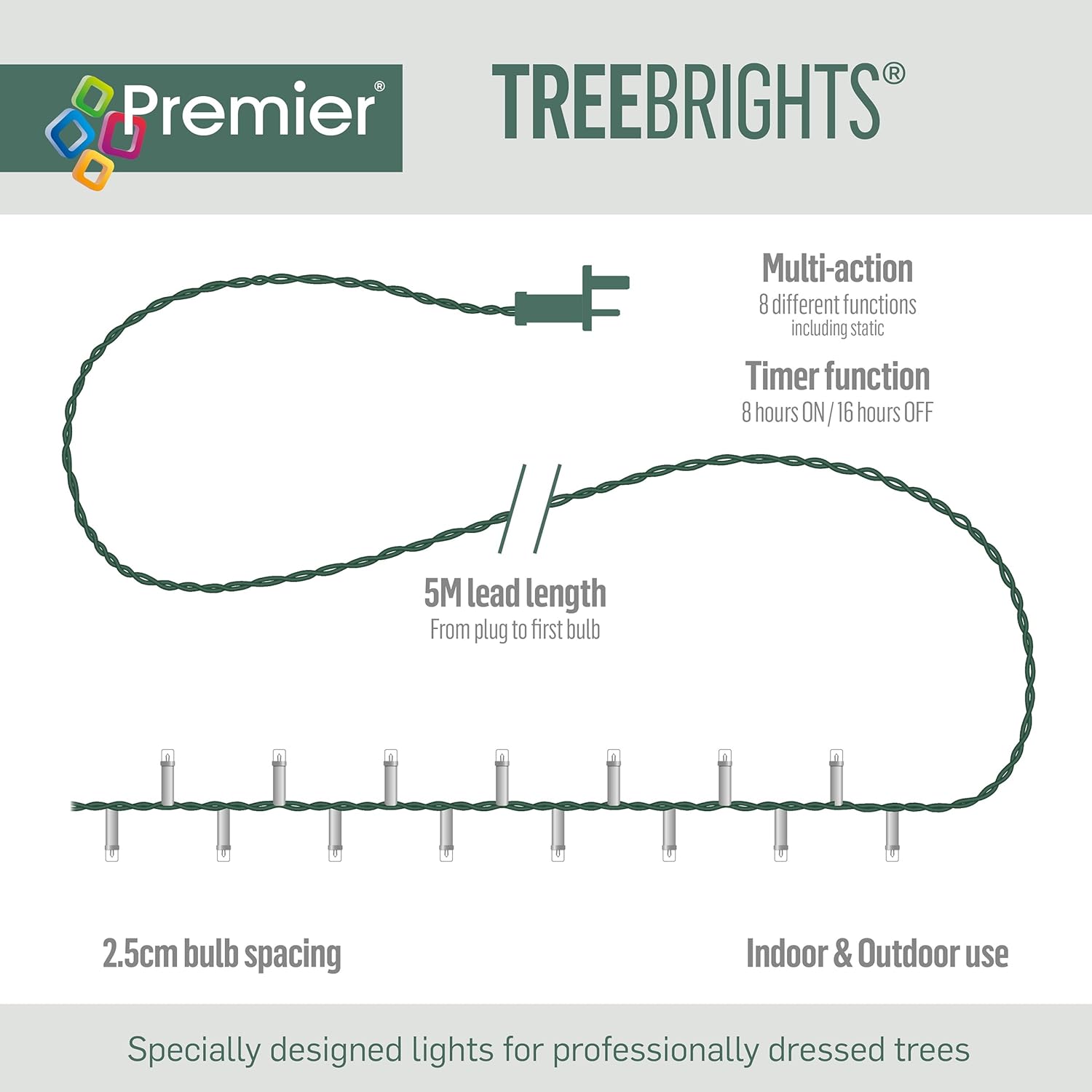
Image: A diagram highlighting the 5-meter lead length from the plug to the first bulb and the 2.5cm spacing between individual LED bulbs.
4. Connecting to Power
Once the lights are positioned, plug the power adapter into a standard 230V mains electrical outlet. For outdoor use, ensure the outlet is weatherproof or use a suitable outdoor-rated extension cord and weatherproof housing for the plug and controller.
Operating Instructions
1. Powering On/Off
Plug the unit into a power outlet to turn the lights on. Unplug to turn them off. The integrated controller manages the lighting functions and timer.
2. Changing Light Functions
The light set features 8 multi-action functions. Press the button on the integrated controller to cycle through the different lighting modes. These modes typically include:
- Static
- Sequential
- Twinkle/Flash
- Slow Fade
- Chasing/Flash
- Wave
- Slow Glo

Image: A circular diagram illustrating the 8 distinct multi-action lighting functions available on the controller.
3. Timer Function
The integrated timer function allows the lights to operate automatically. Once activated, the lights will stay ON for 8 hours and then turn OFF for 16 hours, repeating this cycle daily. To activate the timer, select your desired lighting function, then press and hold the button on the controller until the lights flash or indicate timer activation (refer to controller for specific indicator). The timer will then begin its cycle from that moment.
Maintenance
1. Cleaning
Ensure the lights are unplugged before cleaning. Gently wipe the LED bulbs and cable with a soft, dry cloth. Do not use harsh chemicals or abrasive cleaners.
2. Storage
When not in use, carefully coil the light set to prevent tangling and damage to the wires. Store in a cool, dry place, away from direct sunlight and extreme temperatures. Keep the original packaging for convenient storage.
3. Bulb Replacement
The LED bulbs in this set are non-replaceable. If a bulb fails, it will not affect the operation of other bulbs in the set.
Troubleshooting
Lights Not Working
- Check if the power plug is securely inserted into a working electrical outlet.
- Ensure there is power to the outlet by testing with another appliance.
- Inspect the entire length of the cable for any visible damage or breaks.
- If using an extension cord, ensure it is fully functional and rated for the product's power requirements.
Timer Not Functioning Correctly
- Ensure the timer function was activated correctly (lights should indicate activation, e.g., a flash).
- If the timer is out of sync, unplug the lights for a few minutes, then plug them back in and reactivate the timer at your desired start time.
Specifications
| Feature | Specification |
|---|---|
| Model Number | JNS_447210 |
| Brand | Premier Decorations |
| Number of LEDs | 1000 |
| Light Colour | Multicolour |
| Cable Colour | Green |
| Total Length | 25 meters |
| Lead Length (Plug to first bulb) | 5 meters |
| Bulb Spacing | 2.5 cm |
| Voltage | 230 Volts |
| Power Consumption | 6 Watts |
| Functions | 8 Multi-Action (including Static) |
| Timer | 8 hours ON / 16 hours OFF |
| Usage | Indoor & Outdoor |
| Weight | 880 g |
| Package Dimensions (L x W x H) | 11 x 18 x 28 cm |
Warranty Information
Premier Decorations products are manufactured to high-quality standards. This product comes with a standard manufacturer's warranty against defects in materials and workmanship. Please retain your proof of purchase for any warranty claims. Specific warranty terms and duration may vary by region and retailer. For detailed warranty information, please refer to the packaging or contact your retailer.
Support
If you encounter any issues or have questions regarding your Premier Decorations 1000 LED Multi-Action Christmas Tree Lights that are not covered in this manual, please contact the retailer where you purchased the product. They will be able to provide assistance or direct you to the appropriate support channels.

