
1. Introduction
Thank you for purchasing the Fenton LIVE102 Party Station. This high-quality professional speaker features a built-in media player, Bluetooth receiver, and dynamic RGB LED illumination. This manual provides essential information for safe operation, setup, and maintenance of your device. Please read it thoroughly before use and retain it for future reference.
2. Safety Instructions
To ensure safe operation, please observe the following safety precautions:
- Electrical Safety: Always connect the unit to a grounded mains outlet. Ensure the voltage matches the rating on the unit. Disconnect from the mains before cleaning or servicing.
- Moisture: Do not expose the unit to rain, moisture, or liquids. Do not place objects filled with liquids, such as vases, on the unit.
- Ventilation: Ensure adequate ventilation. Do not block ventilation openings.
- Heat: Keep the unit away from heat sources such as radiators, heat registers, stoves, or other apparatus that produce heat.
- Servicing: Do not attempt to repair the unit yourself. Refer all servicing to qualified service personnel.
- Placement: Place the unit on a stable, flat surface. Avoid placing it in direct sunlight or extreme temperatures.
- Children: Keep the unit and its accessories out of reach of children.
Warning: Risk of electric shock. Do not open the casing. No user-serviceable parts inside.

Close-up of the rear product label on the Fenton LIVE102 Party Station, showing model number (178.423), serial number, manufacturer details, and safety warnings regarding electrical shock and moisture exposure.
3. Package Contents
Please check that all items are present and in good condition upon unpacking:
- Fenton LIVE102 Party Station
- Power Cable
- Infrared Remote Control
- User Manual (this document)
4. Product Overview
4.1 Front View

Front-side view of the Fenton LIVE102 Party Station, showcasing its main speaker, two tweeters, and the included remote control. The main woofer is illuminated with a green LED light.

Close-up front view of the Fenton LIVE102 Party Station, highlighting the main woofer with its dynamic RGB LED illumination, currently displaying a yellow-green hue.
4.2 Rear Panel

Rear panel of the Fenton LIVE102 Party Station, displaying the main power switch, AC input, RCA line input, and antenna connection for FM radio.
4.3 Top Control Panel
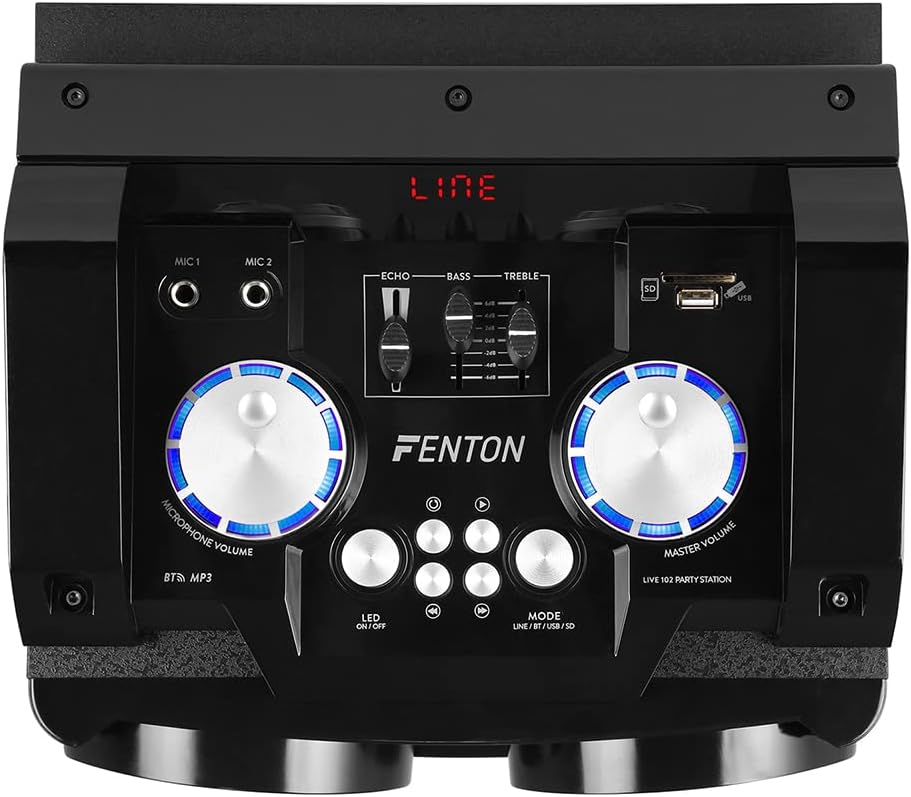
Top control panel of the Fenton LIVE102 Party Station, featuring microphone inputs (MIC 1, MIC 2), Echo, Bass, and Treble controls, USB/SD card slots, and main volume and microphone volume knobs with blue LED backlighting.

Detailed view of the top control panel, showing a USB flash drive inserted into the USB port, the SD card slot, and the media playback control buttons (Play/Pause, Stop, Previous, Next).
4.4 Remote Control

The infrared remote control for the Fenton LIVE102 Party Station, featuring buttons for mode selection (MODO), Bluetooth (BT), scan (SCAN), power (red button), USB/SD, FM, AUX, volume adjustment (VOL+/VOL-), track control (CH+/CH-), and a numeric keypad for direct track selection.
5. Setup
- Unpacking: Carefully remove the Party Station from its packaging. Retain the packaging for future transport or storage.
- Placement: Place the unit on a stable, flat surface. Ensure there is enough space around the unit for proper ventilation.
- Power Connection: Connect the supplied power cable to the AC input on the rear panel of the Party Station and then to a suitable mains power outlet (220-240VAC/50Hz).
- Power On: Flip the ON/OFF switch on the rear panel to the 'ON' position. The unit will power on, and the display will light up.
6. Operating Instructions
6.1 Mode Selection
Press the 'MODE' button on the top panel or the remote control to cycle through available input modes: Line (AUX), Bluetooth (BT), USB, SD, and FM Radio.
6.2 Bluetooth Operation
- Switch the Party Station to 'BT' mode. The display will show 'BT', and a pairing indicator will flash.
- Enable Bluetooth on your smartphone, tablet, or other compatible device.
- Search for 'Fenton LIVE102' in your device's Bluetooth list and select it to pair.
- Once paired, the unit will emit a confirmation sound, and the 'BT' indicator will stop flashing. You can now play audio from your device through the Party Station.
- Control playback (play/pause, next/previous track) using your connected device or the controls on the Party Station/remote.
6.3 USB/SD Media Playback
- Insert a USB flash drive or SD card into the respective slot on the top panel. The unit will automatically switch to USB or SD mode and begin playing compatible audio files.
- If it does not switch automatically, press the 'MODE' button to select 'USB' or 'SD' mode.
- Use the playback control buttons (Play/Pause, Previous, Next) on the top panel or remote control to manage your music.
6.4 AUX/Line-in Connection
- Connect an external audio source (e.g., CD player, laptop) to the 'LINE IN' RCA ports on the rear panel using an RCA cable.
- Switch the Party Station to 'LINE' or 'AUX' mode using the 'MODE' button.
- Adjust the volume on both the Party Station and your external audio source.
6.5 Microphone Usage
- Connect up to two microphones to the 6.3mm Jack inputs (MIC 1, MIC 2) on the top panel.
- Adjust the 'MICROPHONE VOLUME' knob to control the microphone input level.
- Use the 'ECHO' slider to add an echo effect to the microphone sound.
6.6 Tone Control
Use the 'BASS' and 'TREBLE' sliders on the top panel to adjust the low and high frequencies of the audio output to your preference.
6.7 RGB LED Illumination
The Party Station features integrated RGB LEDs in the woofer grill. Press the 'LED ON/OFF' button on the top panel to toggle the LED lights on or off. The lights will cycle through various colors automatically.

Front view of the Fenton LIVE102 Party Station, with the main woofer illuminated in a vibrant purple LED light.

Front-side view of the Fenton LIVE102 Party Station, showing the main woofer illuminated in red, with overlaid dimensions indicating its height (62.51cm), width (35cm), and depth (33.5cm).
6.8 FM Radio
- Switch the Party Station to 'FM' mode.
- Press the 'SCAN' button on the remote control to automatically scan and save available FM radio stations.
- Use the 'CH+' and 'CH-' buttons on the remote or top panel to navigate through the saved stations.
7. Maintenance
- Cleaning: Use a soft, dry cloth to clean the exterior of the unit. Do not use abrasive cleaners or solvents.
- Storage: If storing the unit for an extended period, disconnect it from power and store it in a cool, dry place, preferably in its original packaging.
- Ventilation: Regularly check that the ventilation openings are free from dust and debris.
8. Troubleshooting
| Problem | Possible Cause | Solution |
|---|---|---|
| No power | Power cable not connected; Power switch off; No power from outlet. | Check power cable connection; Ensure power switch is ON; Test outlet with another device. |
| No sound | Volume too low; Incorrect input mode; External device not playing. | Increase Master Volume; Select correct input mode (BT, USB, AUX); Ensure external device is playing and its volume is up. |
| Bluetooth not connecting | Unit not in BT mode; Device too far; Already connected to another device. | Switch to BT mode; Move device closer; Disconnect from other devices and try pairing again. |
| USB/SD not playing | Incorrect file format; USB/SD card corrupted; Unit not in USB/SD mode. | Ensure files are MP3 or compatible; Try another USB/SD card; Select USB/SD mode. |
| Remote control not working | Batteries depleted; Obstruction between remote and unit; Remote not pointed at sensor. | Replace batteries; Remove obstructions; Point remote directly at the unit's IR sensor. |
9. Specifications
| Feature | Specification |
|---|---|
| Brand | Fenton |
| Model Number | LIVE102 (Sky-178.423) |
| Maximum Power Output | 300W |
| Woofer Size | 10 inch |
| Tweeter Size | 3.5 inch |
| Power Supply | 220-240VAC / 50Hz |
| Dimensions (W x D x H) | 28.5 x 30 x 56.5 cm |
| Weight | 8.4 kg |
| Connectivity Technology | Bluetooth, USB |
| Control Method | Remote Control |
| Special Features | Bluetooth, LED-light, Media Player (USB/SD), FM Radio, Microphone Inputs, Echo Function |
| Compatible Devices | Smartphone, Tablet, MP3 Players |
| Audio Output Mode | Stereo |
| Mounting Type | Floor Standing |
10. Warranty and Support
This product comes with a standard manufacturer's warranty. For specific warranty terms and conditions, please refer to the documentation provided at the time of purchase or contact your retailer. For technical support or service inquiries, please contact the Fenton customer service department or your authorized dealer.
Manufacturer: Tronios BV, Bedrijvenpark Twente 245, 7602KM Almelo, The Netherlands.


