1. Introduction
Thank you for purchasing the Reality Leuchten Ackbar LED Floor Lamp, Model R42752107. This manual provides important information regarding the safe installation, operation, and maintenance of your new floor lamp. Please read this manual thoroughly before use and retain it for future reference.
2. Product Overview
The Ackbar LED Floor Lamp is a modern lighting solution featuring a main uplighter and an adjustable reading arm, both equipped with integrated LED technology. Its sleek design in matt nickel finish complements various interior styles.

Figure 2.1: The Reality Leuchten Ackbar LED Floor Lamp, showcasing its overall design with the main uplighter and the flexible reading arm.

Figure 2.2: The Ackbar LED Floor Lamp with both the main uplighter and the reading arm illuminated, demonstrating its functional lighting capabilities.

Figure 2.3: A detailed view of the main uplighter, which provides ambient light upwards.

Figure 2.4: The sturdy, round base of the floor lamp, ensuring stability.
Key Features:
- Integrated 18-watt LED spotlight (uplighter) with 1,700 lumens and 3,000 Kelvin (warm white light), offering an average lifespan of 25,000 hours.
- Integrated 4-watt LED reading arm with 350 lumens and 3,000 Kelvin (warm white light), offering an average lifespan of 30,000 hours.
- Stepless dimming for the main spotlight via a sensor dimmer.
- On/off touch sensor for the reading arm.
- Matt nickel finish.
3. Safety Instructions
Please observe the following safety precautions to prevent injury or damage to the product:
- Ensure the power supply voltage matches the lamp's requirements before plugging in.
- Do not attempt to modify or repair the lamp yourself. Refer all servicing to qualified personnel.
- Keep the lamp away from water and high humidity.
- Do not cover the lamp with any materials while it is in operation, as this may cause overheating.
- Place the lamp on a stable, level surface to prevent it from tipping over.
- The LEDs are integrated and cannot be replaced. Do not attempt to remove them.
- Unplug the lamp from the power outlet before cleaning or moving it.
4. Setup
Follow these steps to set up your Ackbar LED Floor Lamp:
- Unpack: Carefully remove all components from the packaging. Check for any damage during transit.
- Assemble the Pole: The lamp pole may come in multiple sections. Screw the sections together clockwise until they are securely fastened.
- Attach to Base: Securely attach the assembled pole to the lamp base. Ensure it is tightened firmly to prevent wobbling.
- Position the Reading Arm: The reading arm is flexible. Adjust it to your desired position.
- Placement: Place the assembled lamp on a flat, stable surface in your desired location, ensuring it is not a tripping hazard and has adequate ventilation.
- Connect to Power: Insert the power plug into a suitable wall outlet.
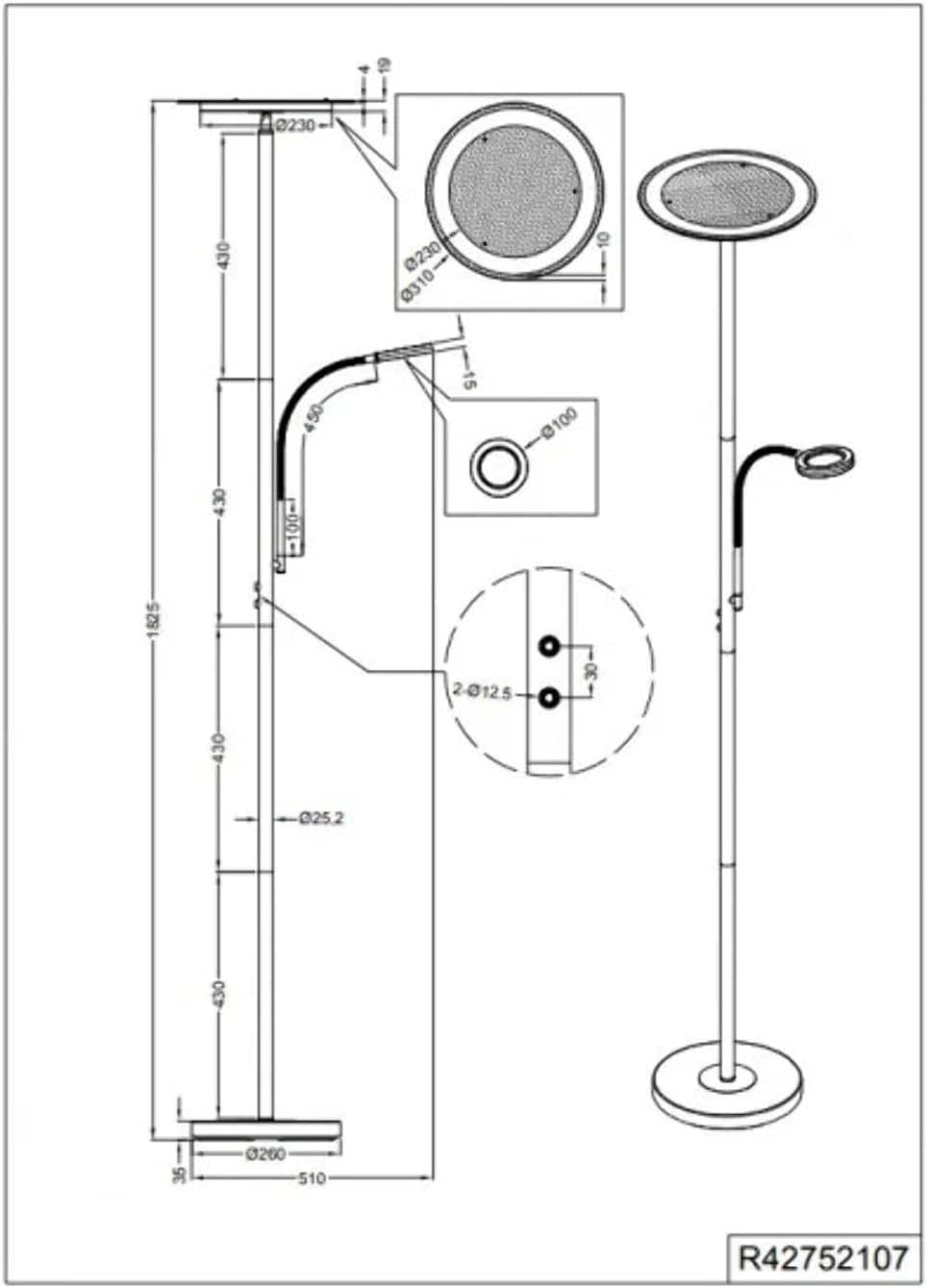
Figure 4.1: Technical drawing illustrating the dimensions and assembly points of the lamp. This diagram can be helpful during assembly.
5. Operating Instructions
Your Ackbar LED Floor Lamp features intuitive controls for both the main uplighter and the reading arm.
5.1 Main Uplighter (Spotlight)
- Power On/Off: The main uplighter is controlled by a sensor dimmer located on the lamp pole. Touch the sensor briefly to turn the light on or off.
- Dimming: To adjust the brightness, touch and hold the sensor dimmer. The light will gradually dim or brighten. Release your finger when the desired brightness level is reached.
5.2 Reading Arm
- Power On/Off: The reading arm is controlled by a separate on/off touch sensor, typically located on the reading arm itself or near its base on the main pole. Touch the sensor briefly to turn the reading light on or off.
- Adjusting Position: The reading arm is flexible. Gently bend and position it to direct light where needed for reading or task lighting.
6. Maintenance
Proper care will ensure the longevity and optimal performance of your lamp.
- Cleaning: Before cleaning, always unplug the lamp from the power outlet. Use a soft, dry cloth to wipe down the lamp's surfaces. Do not use abrasive cleaners, solvents, or polishes, as these may damage the finish.
- LEDs: The LEDs in this lamp are integrated and designed for a long lifespan. They are not user-replaceable. If the LEDs fail, the entire fixture may need to be serviced by a qualified technician or replaced.
- General Care: Avoid placing the lamp in direct sunlight or near heat sources, which can affect its lifespan.
7. Troubleshooting
If you encounter issues with your lamp, refer to the following common problems and solutions:
| Problem | Possible Cause | Solution |
|---|---|---|
| Lamp does not turn on. | No power supply. Loose connection. Faulty outlet. | Check if the lamp is properly plugged into a working outlet. Ensure all lamp sections are securely assembled. Test the outlet with another device. |
| Main uplighter does not dim. | Incorrect operation of sensor dimmer. | Ensure you are touching and holding the sensor dimmer for continuous adjustment, not just tapping it. |
| Reading arm does not turn on/off. | Incorrect operation of touch sensor. | Ensure you are tapping the touch sensor on the reading arm. |
| Lamp is unstable. | Loose assembly. Uneven surface. | Tighten all pole connections and ensure the base is firmly attached. Place the lamp on a flat, stable surface. |
If the problem persists after trying these solutions, please contact customer support.
8. Specifications
| Attribute | Value |
|---|---|
| Model Number | R42752107 |
| Brand | RL LIVE YOUR LIGHT |
| Product Dimensions | 31 x 31 x 182 cm (D x W x H) |
| Item Weight | 5.5 Kilograms |
| Finish Type | Matt |
| Color | Nickel Matt |
| Main Lamp Type | Integrated LED (18W, 1700lm, 3000K) |
| Reading Arm Lamp Type | Integrated LED (4W, 350lm, 3000K) |
| Switch Type | Sensor Dimmer (main), Touch (reading arm) |
| Shade Material | Metal |
| Batteries Required | No |
9. Warranty and Support
This product comes with a standard manufacturer's warranty. Please refer to the warranty card included in your product packaging for specific terms and conditions. For technical support, replacement parts, or any inquiries not covered in this manual, please contact the retailer or the manufacturer directly. Keep your purchase receipt as proof of purchase for warranty claims.
Manufacturer: RL LIVE YOUR LIGHT


