
Caraudio-Systems TF-NTG5
CarAudio Systems TF-NTG5 Video-in-Motion Interface User Manual
Model: TF-NTG5
Brand: Caraudio-Systems
Introduction
This manual provides detailed instructions for the installation, operation, and maintenance of the CarAudio Systems TF-NTG5 Video-in-Motion Interface. This device is designed to enable video playback and display of auxiliary media menus (e.g., from retrofitted DVD players or rear cameras) on Mercedes Benz vehicles equipped with Comand Online NTG5, NTG5.1, and NTG5.5 navigation systems while the vehicle is in motion.
The TF-NTG5 interface is a Plug & Play solution, manufactured in Germany, and supports updates via USB.
Safety Information
Please read all safety instructions carefully before installation and use. Failure to follow these instructions may result in damage to the device, vehicle, or personal injury.
- Installation should only be performed by qualified personnel to avoid damage to the vehicle's electrical system.
- Ensure the vehicle's ignition is off and the battery is disconnected before beginning installation.
- Do not attempt to modify or disassemble the interface.
- This device is intended for passenger use only. The driver must always maintain full attention to the road and traffic conditions. Viewing dynamic images while driving can be distracting and may lead to accidents.
- Adhere to all local laws and regulations regarding in-car entertainment systems.
Package Contents
Verify that all items are present in the package:
- 1x CarAudio Systems TF-NTG5 Video-in-Motion Interface Module
- 1x Plug & Play Wiring Harness
- 1x USB Cable (for updates)
- 1x User Manual (this document)
Setup and Installation
The TF-NTG5 interface is designed for Plug & Play installation. No coding is required.
Pre-Installation Steps
- Park the vehicle on a level surface and engage the parking brake.
- Turn off the ignition and remove the key.
- Disconnect the vehicle's battery to prevent electrical shorts.
- Access the rear of the Comand Online head unit in your Mercedes Benz vehicle. This typically involves removing trim panels and the head unit itself. Refer to your vehicle's service manual for specific instructions on head unit removal.
Connecting the Interface
- Locate the main wiring harness connected to the back of your Comand Online unit.
- Disconnect the original harness from the Comand Online unit.
- Connect the supplied Plug & Play wiring harness from the TF-NTG5 interface in-line with the original harness. The interface harness will have connectors that match the original vehicle connectors and the Comand Online unit.
- Connect the main module of the TF-NTG5 interface to the new wiring harness. Ensure all connections are secure.
DIP Switch Configuration
The TF-NTG5 module features DIP switches for specific configurations. Refer to the image below for the location of the DIP switches.
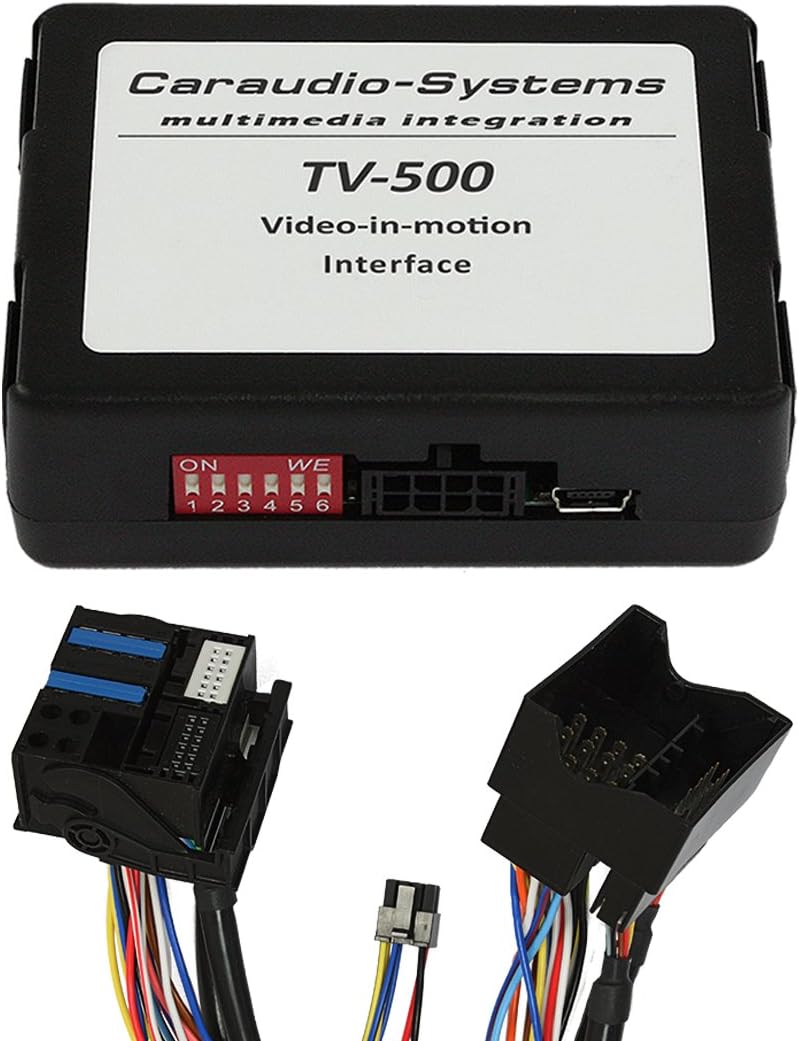
Figure 1: CarAudio Systems TF-NTG5 Interface Module and Wiring. The module features a label indicating "TV-500 Video-in-motion Interface" and a set of red DIP switches (1-6) for configuration. The accompanying wiring harness includes various connectors for integration with the vehicle's Comand Online system.
The default configuration for video-in-motion activation is usually pre-set. Consult the specific instructions provided with your unit or the manufacturer's website for detailed DIP switch settings if custom functionality is desired. For standard video-in-motion, typically all switches are in the 'OFF' position or as specified by the manufacturer for your specific vehicle model.
Post-Installation
- Secure the TF-NTG5 module and wiring harness in a safe location behind the head unit, ensuring no wires are pinched or interfere with moving parts.
- Reconnect the vehicle's battery.
- Reinstall the head unit and trim panels.
Operating Instructions
Once installed, the TF-NTG5 interface automatically activates the video-in-motion function for your Mercedes Benz Comand Online system.
- Turn on the vehicle's ignition and the Comand Online system.
- Navigate to the desired video source (e.g., DVD player, auxiliary input, or rear camera feed) on your Comand Online display.
- The video or auxiliary menu should now be viewable even when the vehicle is in motion.
USB Update Functionality
The interface supports firmware updates via its USB port.
- Download the latest firmware from the official Caraudio-Systems website.
- Copy the firmware file to a USB flash drive.
- Connect the USB flash drive to the USB port on the TF-NTG5 module (if accessible without disassembly, otherwise temporary removal of the head unit may be required).
- Follow the specific update procedure outlined in the firmware download instructions.
Maintenance
The CarAudio Systems TF-NTG5 interface requires minimal maintenance.
- Keep the module and connections free from dust and moisture.
- Do not use harsh chemicals or abrasive cleaners on the unit.
- Periodically check connections to ensure they remain secure.
- Ensure the vehicle's electrical system is in good working order to prevent damage to the interface.
Troubleshooting
If you experience issues with your TF-NTG5 interface, refer to the following common problems and solutions:
| Problem | Possible Cause | Solution |
|---|---|---|
| Video does not play while driving. | Incorrect installation; DIP switch settings incorrect; Firmware issue. | Check all wiring connections. Verify DIP switch settings according to manufacturer's guidelines. Attempt a firmware update. |
| No power to the module. | Loose connection; Blown fuse in vehicle. | Ensure all power connections are secure. Check relevant vehicle fuses. |
| Intermittent video display. | Loose connections; Electrical interference. | Re-check all harness connections. Ensure proper grounding. |
If the problem persists after attempting these solutions, please contact Caraudio-Systems customer support.
Specifications
| Feature | Detail |
|---|---|
| Model | TF-NTG5 |
| Brand | Caraudio-Systems |
| Compatible Vehicles | Mercedes Benz with Comand Online NTG5, NTG5.1, NTG5.5 |
| Function | Video-in-Motion Interface |
| Connectivity | Plug & Play Harness, USB (for updates) |
| Dimensions (Module) | Approx. 25 x 18 x 6 cm (9.8 x 7.1 x 2.4 inches) |
| Weight | Approx. 235 g (0.52 lbs) |
| Manufacturing Origin | Germany |
| UPC | 733991314534 |
Warranty and Support
For warranty information and technical support, please refer to the official Caraudio-Systems website or contact your authorized dealer. Keep your proof of purchase for warranty claims.
Related documentsTF-NTG5


Ask a question about this manual
Ask about setup, troubleshooting, compatibility, parts, safety, or missing instructions. Manuals+ will review the question and use this page’s manual context to help answer it.