
1. Introduction
The BENETECH GM1020 Digital Lux Meter is a precision instrument designed for measuring illuminance and temperature. It is widely used in various fields including electro-optical sources, research and teaching, metallurgy and building industries, industrial inspection, agriculture research, and illumination control. This manual provides essential information for the proper setup, operation, and maintenance of your GM1020 Lux Meter.
2. Key Features
- Powerful Measurement Functions: Measures current, maximum, minimum, and difference of illuminance and temperature. Also calculates integrating illuminance and average integrating illuminance.
- Data Storage: Supports automatic storage of up to 1900 groups of illuminance data and manual storage of up to 60 groups.
- Wide Measuring Range: Covers 0 to 200,000 Lux with automatic range shifting.
- PC Analysis Software: Delivered with PC-based analysis software for easy operation and data management.
- Portability and Responsiveness: Quick response time, highly portable, and designed for single-hand operation.
- Backlight Display: Features a backlight to facilitate operation in dimly lit environments.
- Power Supply: Operates on two AAA batteries (not included).
3. Setup
3.1. Component Identification

Figure 3.1: Front view of the GM1020 Digital Lux Meter. The device features a large LCD display, a light sensor at the top, and three control buttons (SET, SELECT, ENTER) below the display. A lanyard is attached to the side.

Figure 3.2: Side view of the GM1020 Digital Lux Meter. This view shows the textured orange grip on the side, and a small rectangular port (likely USB) on the top side, along with the battery compartment cover.
3.2. Battery Installation
- Locate the battery compartment cover on the back of the device.
- Slide or unclip the cover to open the compartment.
- Insert two AAA batteries, ensuring correct polarity (+/-) as indicated inside the compartment.
- Replace the battery compartment cover securely.
Note: Batteries are not included with the product. Use fresh alkaline AAA batteries for optimal performance.
3.3. Initial Power On
Press and hold the SELECT button (power symbol) to turn on the device. The LCD display will illuminate, showing the current illuminance and temperature readings.
3.4. Sensor Protection
The GM1020 comes with a protective cap for the light sensor located at the top of the device. Always keep the cap on when the meter is not in use to protect the sensor from dust and damage.
4. Operation
4.1. Basic Measurement
Once powered on, the meter will immediately begin displaying real-time illuminance (Lux) and temperature readings. Ensure the light sensor is exposed to the light source you wish to measure.
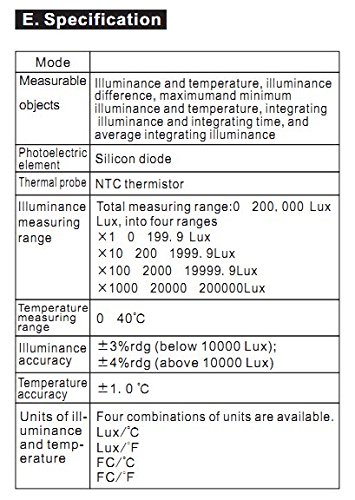
Figure 4.1: Example of the GM1020 display during operation. The top large digits show the illuminance in Lux, and the smaller digits below show the temperature in degrees Celsius.
4.2. Unit Selection
Press the SET button to cycle through different measurement units or modes. Refer to the display icons for the currently selected unit (e.g., Lux, FC, °C, °F).
4.3. Data Storage
- Manual Storage: Press the ENTER button to manually save the current reading. The device can store up to 60 groups of data manually.
- Automatic Storage: The device supports automatic data logging for up to 1900 groups. Consult the full user manual or PC software for configuration of automatic storage intervals.
4.4. Backlight Function
To activate or deactivate the display backlight, press and hold the SELECT button briefly. This feature is useful for reading measurements in low-light conditions.
4.5. Advanced Measurement Functions
The GM1020 offers advanced functions such as measuring maximum, minimum, and difference values of illuminance and temperature, as well as integrating illuminance and average integrating illuminance. These functions are typically accessed via specific button combinations or through the PC software. Refer to the comprehensive user manual for detailed instructions on utilizing these advanced features.
5. Maintenance
5.1. Cleaning
Wipe the device with a soft, dry cloth. Do not use abrasive cleaners or solvents, as they may damage the casing or display. Ensure the light sensor is kept clean and free of dust for accurate readings.
5.2. Storage
When not in use for extended periods, remove the batteries to prevent leakage and store the meter in a cool, dry place, away from direct sunlight and extreme temperatures. Always keep the sensor cap on during storage.
5.3. Battery Replacement
When the low battery indicator appears on the display, replace both AAA batteries promptly following the instructions in Section 3.2. Dispose of used batteries responsibly.
6. Troubleshooting
- Device does not power on:
- Check if batteries are installed correctly with the right polarity.
- Replace with new AAA batteries.
- Ensure the power button is pressed and held sufficiently.
- Inaccurate readings:
- Ensure the light sensor is clean and unobstructed.
- Verify that the sensor cap is removed during measurement.
- Avoid measuring in rapidly changing light conditions if stable readings are required.
- Check if the correct measurement unit (Lux/FC) is selected.
- Display is dim or blank:
- Batteries may be low; replace them.
- Backlight might be off; press and hold the SELECT button to toggle.
- Data storage issues:
- Ensure there is sufficient memory available for manual storage.
- For automatic storage, verify settings via PC software.
7. Specifications

Figure 7.1: Detailed specifications of the GM1020 Digital Lux Meter.
| Mode | Description |
|---|---|
| Measurable objects | Illuminance and temperature, illuminance difference, maximum and minimum illuminance and temperature, integrating illuminance and integrating time, and average integrating illuminance. |
| Photoelectric element | Silicon diode |
| Thermal probe | NTC thermistor |
| Illuminance measuring range | Total measuring range: 0 - 200,000 Lux, into four ranges: ×1: 0 - 199.9 Lux ×10: 200 - 1999.9 Lux ×100: 2000 - 19999.9 Lux ×1000: 20000 - 200000 Lux |
| Temperature measuring range | 0 - 40 °C |
| Illuminance accuracy | ±3%rdg (below 10000 Lux); ±4%rdg (above 10000 Lux) |
| Temperature accuracy | ±1.0 °C |
| Units of illuminance and temperature | Four combinations of units are available: Lux/°C Lux/°F FC/°C FC/°F |
8. Warranty and Support
Information regarding the specific warranty terms and conditions for the BENETECH GM1020 Digital Lux Meter is not provided in this document. For warranty claims, technical support, or service inquiries, please refer to the original product packaging, purchase documentation, or contact your retailer or the manufacturer directly.


